
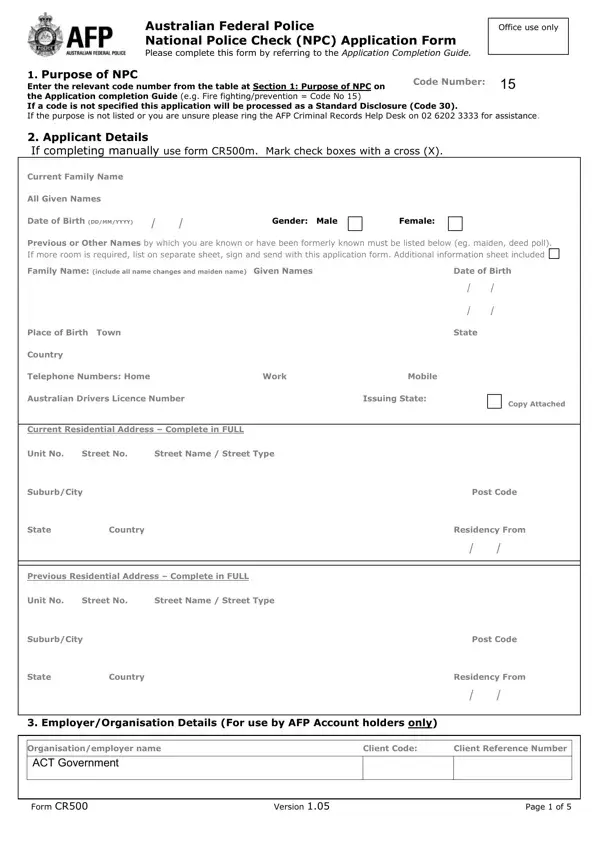
Form Cr500 PDF Details

The Australian Federal Police National Police Check, encapsulated within the CR500 form, serves as a critical document for individuals requiring official verification of their legal background in specific contexts. The form guides applicants through a detailed submission procedure, starting from selecting the purpose of the police check with a specific code number, which determines the type of disclosure needed—ranging from standard to more sensitive roles, like fire fighting. Applicants are required to provide comprehensive personal and professional details, highlighting the meticulous nature of the process. Additionally, the form outlines the necessity for fingerprints under certain conditions, a requirement that amplifies the thoroughness of the background check. It underscores the importance of consent, where the applicant acknowledges and allows the AFP to disclose pertinent information to potential employers or other relevant organisations, with a stern reminder of the implications of providing false information. Moreover, the CR500 form calls attention to spent convictions legislation, which aims to protect individuals from discrimination due to past offences under specific criteria, further emphasizing the balance between thorough background checks and the rights to privacy and rehabilitation. Instructions for disputing record accuracy ensure applicants have a recourse should they find discrepancies, cementing the form's role not only as a tool for background verification but also as a safeguard for applicant rights.

QuestionAnswer
Form NameForm Cr500
Form Length5 pages
Fillable?No
Fillable fields0
Avg. time to fill out1 min 15 sec
Other namesAFP_Police_Chec k_15 australian federal police check online application form

How to Edit Form Cr500 Online for Free

Using PDF documents online is always very easy with our PDF editor. Anyone can fill out Form Cr500 here effortlessly. The editor is constantly updated by our team, getting handy features and becoming greater. To begin your journey, consider these basic steps:

Step 1: First of all, open the tool by clicking the "Get Form Button" above on this site.

Step 2: The tool lets you customize PDF forms in a range of ways. Improve it by including customized text, correct existing content, and put in a signature - all when you need it!

This document will need particular data to be entered, therefore you need to take the time to type in what is expected:

1. To start off, once filling in the Form Cr500, start out with the page that has the subsequent fields:

Ways to fill out Form Cr500 step 1

2. Once this segment is complete, it is time to include the necessary details in Unit No, Street No, Street Name Street Type, SuburbCity, State, Country, Previous Residential Address, Unit No, Street No, Street Name Street Type, SuburbCity, State, Country, Post Code, and Residency From allowing you to proceed further.

Step no. 2 for completing Form Cr500

Always be very attentive while filling out Street Name Street Type and State, because this is the part in which many people make mistakes.

3. This next step focuses on Organisationemployer name, ACT Government, Client Code, Client Reference Number, Form CR, Version, and Page of - fill out each of these blank fields.

Client Reference Number, Organisationemployer name, and ACT Government of Form Cr500

4. This next section requires some additional information. Ensure you complete all the necessary fields - Mailing Address for Police, Is a fingerprint check required, If yes fingerprints must be, a fingerprints taken by another, b fingerprints taken by the AFP, c fingerprints taken by the AFP, receipt of payment must be, Consent, ii iii, and I acknowledge I have read the - to proceed further in your process!

Tips to complete Form Cr500 part 4

5. This pdf must be finished by filling in this area. Here you will find a detailed set of fields that require accurate information for your form submission to be complete: I acknowledge I have read the, Applicants Signature, Date, If you are under years of age, ParentGuardian Signature, Date, and ParentGuardian name printed in full.

Best ways to fill out Form Cr500 portion 5

Step 3: Glance through the details you have entered into the blanks and then click the "Done" button. After starting a7-day free trial account with us, it will be possible to download Form Cr500 or email it promptly. The form will also be accessible from your personal account page with your every modification. FormsPal ensures your data confidentiality with a protected system that never records or shares any personal information involved in the process. Be assured knowing your paperwork are kept protected any time you use our editor!