
Form Ct 706 Nt PDF Details

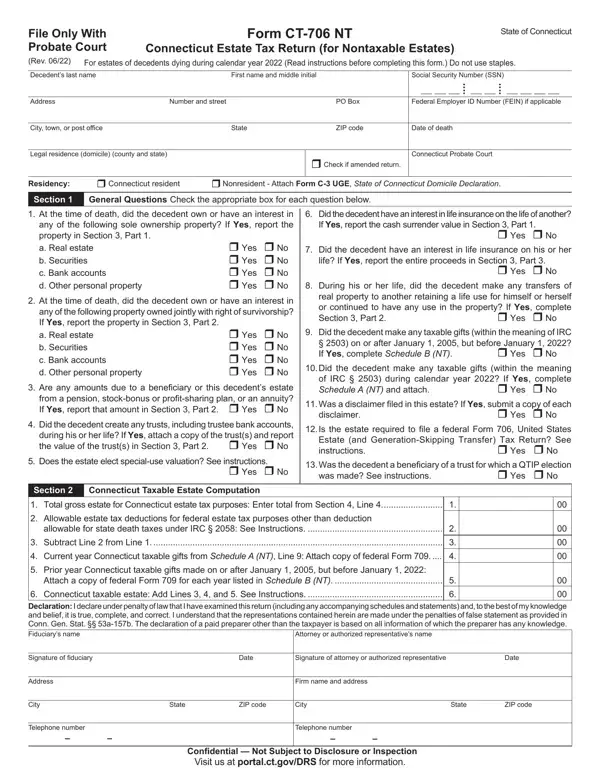
Understanding the CT-706 NT form is essential for executors and beneficiaries dealing with estates in Connecticut, particularly when navigating the complexities of estate taxes for nontaxable estates. This form, specifically designed for the estates of decedents who passed away during the calendar year 2021, serves as the Connecticut Estate Tax Return for Nontaxable Estates. It requires detailed information, including the decedent's personal details, such as their Social Security Number and legal residence, and an itemized list of the estate's assets - ranging from real estate and securities to life insurance proceeds and gifts made prior to death. The form also inquires about the decedent's interests in jointly owned property, any trusts they might have established, and any taxable gifts made within the specified years before their passing. Moreover, it includes sections for calculating the Connecticut taxable estate, which involves understanding deductions allowable for federal estate tax purposes and adding the value of current and prior year taxable gifts. Executors and authorized representatives must approach the CT-706 NT form with a comprehensive understanding of the decedent’s assets and the tax implications to ensure accurate and lawful handling of the estate, emphasizing the importance of reading the instructions carefully and attaching required schedules and declarations, all while keeping in mind the legal implications and the necessity for thorough documentation.

QuestionAnswer
Form NameForm Ct 706 Nt
Form Length5 pages
Fillable?No
Fillable fields0
Avg. time to fill out1 min 15 sec
Other names portal.ct.gov-media2021 Form CT-706 NT Instructions Connecticut Estate Tax ...

How to Edit Form Ct 706 Nt Online for Free

Form Ct 706 Nt can be filled in online with ease. Simply use FormsPal PDF editor to get the job done quickly. We are devoted to giving you the ideal experience with our editor by constantly adding new functions and upgrades. With these updates, working with our editor becomes better than ever! With just a few simple steps, you are able to begin your PDF editing:

Step 1: Click the "Get Form" button above. It's going to open up our tool so that you could begin filling out your form.

Step 2: With the help of our advanced PDF editor, you can do more than merely complete forms. Edit away and make your forms appear perfect with custom text put in, or fine-tune the file's original content to perfection - all comes along with an ability to incorporate any type of photos and sign the file off.

Be mindful when filling in this form. Ensure all necessary fields are done accurately.

1. It is critical to fill out the Form Ct 706 Nt correctly, hence pay close attention when filling in the areas including these blanks:

Step # 1 of submitting Form Ct 706 Nt

2. Given that this array of fields is completed, you should put in the required particulars in d Other personal property Are any, Was a disclaimer filed in this, Yes No, disclaimer, Did the decedent create any, Is the estate required to file a, Yes No, Does the estate elect specialuse, Yes No, Was the decedent a beneficiary of, was made See instructions, Yes No, Section Connecticut Taxable, Allowable estate tax deductions, and allowable for state death taxes so you can go further.

disclaimer, Yes  No, and Yes  No in Form Ct 706 Nt

People generally make mistakes when filling in disclaimer in this part. You should go over what you type in right here.

3. Completing Telephone number, Telephone number, Confidential Not Subject to, and Visit us at portalctgovDRS for is essential for the next step, make sure to fill them out in their entirety. Don't miss any details!

How to complete Form Ct 706 Nt step 3

4. The next part will require your attention in the following areas: If real property list the complete, Ownership, Fair Market Value at Date of Death, Amount of Column D, Passing to Spouse, Subtotal from continuation sheets, Total Add all amounts for Column, Part JointlyOwned Property and, Item, Description of All Property and, If real property list the complete, Fair Market Value at Date of Death, Percentage Includible, Includible Value Attributed to This, and Estate. Be sure to enter all of the needed information to move onward.

Filling out part 4 in Form Ct 706 Nt

5. And finally, the following final section is what you will have to wrap up prior to submitting the document. The blanks here are the following: A B C D E Subtotal from, Total Add all amounts for Column, Part Life Insurance Proceeds on, Item, Attach copy of federal Form for, Description of Life Insurance, A B C D E Subtotal from, Total Add all amounts for Column, Life Insurance Value Report the, proceeds from, each policy, Amount of Column C, and Passing to Spouse.

Item, proceeds from, and Amount of Column C of Form Ct 706 Nt

Step 3: When you have glanced through the details in the document, press "Done" to conclude your form. Find your Form Ct 706 Nt when you sign up for a 7-day free trial. Instantly get access to the pdf file from your personal account, with any edits and adjustments automatically kept! With FormsPal, it is simple to complete forms without having to be concerned about personal data incidents or data entries being distributed. Our secure system ensures that your private information is maintained safely.