
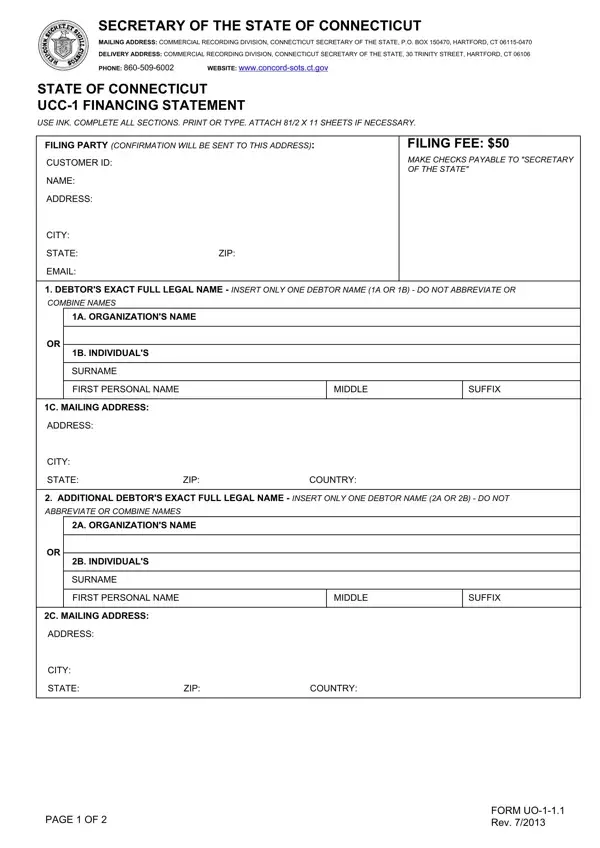
When using the online tool for PDF editing by FormsPal, you are able to fill in or modify how to ct ucc state right here. Our tool is consistently developing to give the very best user experience achievable, and that's because of our commitment to continual improvement and listening closely to comments from users. With just a couple of simple steps, you may start your PDF journey:
Step 1: Open the PDF file in our editor by hitting the "Get Form Button" in the top part of this page.
Step 2: This editor will give you the capability to work with the majority of PDF forms in a range of ways. Enhance it with customized text, correct what's already in the document, and place in a signature - all within a few clicks!
This PDF doc will involve specific details; to guarantee consistency, make sure you consider the subsequent guidelines:
1. Start completing the how to ct ucc state with a group of necessary blanks. Collect all the necessary information and be sure there's nothing forgotten!
2. Once your current task is complete, take the next step – fill out all of these fields - C MAILING ADDRESS, ADDRESS, CITY, STATE, ZIP, COUNTRY, ADDITIONAL DEBTORS EXACT FULL, ABBREVIATE OR COMBINE NAMES, A ORGANIZATIONS NAME, B INDIVIDUALS, SURNAME, FIRST PERSONAL NAME, MIDDLE, SUFFIX, and C MAILING ADDRESS with their corresponding information. Make sure to double check that everything has been entered correctly before continuing!
3. Within this part, examine A ORGANIZATIONS NAME, B INDIVIDUALS, SURNAME, FIRST PERSONAL NAME, MIDDLE, SUFFIX, C MAILING ADDRESS, ADDRESS, CITY, STATE, ZIP, COUNTRY, and THIS FINANCING STATEMENT COVERS. Each of these have to be completed with greatest awareness of detail.
4. To go onward, the next step requires filling out a couple of fields. Examples include CHECK ONLY IF APPLICABLE AND, ITEM AND INSTRUCTIONS BEING, CHECK ONLY IF APPLICABLE AND, PublicFinance Transaction, A Debtor is a Transmitting Utility, ALTERNATIVE DESIGNATION if, Lessee Lessor, Consignee Consignor, Seller Buyer, Bailee Bailor, Licensee Licensor, and OPTIONAL FILER REFERENCE DATA, which you'll find vital to going forward with this particular document.
5. This document has to be concluded by dealing with this part. Here there is a full listing of form fields that require correct information to allow your form submission to be accomplished: OFFICE OF THE SECRETARY OF THE.
Always be extremely mindful when filling in OFFICE OF THE SECRETARY OF THE and OFFICE OF THE SECRETARY OF THE, as this is the part where many people make some mistakes.
Step 3: After you have looked once more at the information you given, click "Done" to conclude your form at FormsPal. Join us right now and immediately access how to ct ucc state, ready for download. Every last edit made is conveniently kept , which enables you to edit the form later as required. Here at FormsPal.com, we do everything we can to make sure that your information is stored secure.
