
Form Disc 004 PDF Details

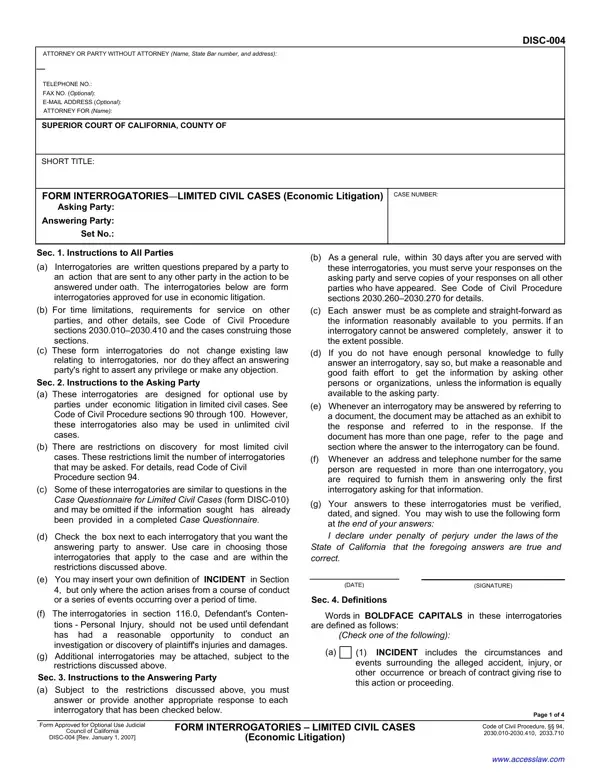
The Disc 004 form serves a crucial role in the facilitation of economic litigation within the bounds of limited civil cases, adhering strictly to the prescribed standards set forth by the Code of Civil Procedure sections 2030.010–2030.410, among others. Crafted as a set of form interrogatories approved for use within this specific legal context, the document outlines a series of standardized queries designed to simplify the discovery process, making it more accessible and streamlined for both the asking and answering parties involved in a lawsuit. It mandates timely and comprehensive responses to all selected questions, underpinned by the strict adherence to truthfulness under penalty of perjury, as mandated by California law. Diligently structured, it encompasses a range of topics from personal background information, such as general or business-related inquiries, to more case-specific sections addressing insurance, physical or other forms of injuries, and damaged property details—each tailored to extract relevant facts pertinent to economic disputes. This form also navigates through complex issues of claims and defenses, statutory or regulatory violations, and even touches on contractual disputes, effectively embodying the multifaceted nature of economic litigation while offering a streamlined approach to interrogatory exchanges.

QuestionAnswer
Form NameForm Disc 004
Form Length4 pages
Fillable?No
Fillable fields0
Avg. time to fill out1 min
Other namesform interrogatories limited, E-MAIL, typewriting, DISC-004

How to Edit Form Disc 004 Online for Free

Any time you intend to fill out typewriting, it's not necessary to install any sort of software - simply make use of our PDF editor. Our tool is consistently developing to present the best user experience achievable, and that's due to our commitment to continual development and listening closely to testimonials. All it requires is a few basic steps:

Step 1: Press the "Get Form" button in the top part of this page to get into our editor.

Step 2: With this state-of-the-art PDF file editor, you can do more than just fill in forms. Try all the functions and make your documents appear faultless with customized text put in, or adjust the original input to excellence - all that accompanied by an ability to add stunning graphics and sign the PDF off.

To be able to complete this PDF document, be certain to enter the information you need in each and every area:

1. The typewriting involves particular details to be inserted. Ensure that the subsequent blanks are completed:

Find out how to fill in photostating step 1

2. Just after finishing the last step, go on to the next stage and fill out the necessary details in these blanks - d Check the box next to each, e You may insert your own, f The interrogatories in section, I declare under penalty of perjury, DATE, SIGNATURE, Sec Definitions, Words in BOLDFACE CAPITALS in, are defined as follows, Check one of the following, INCIDENT includes the, Form Approved for Optional Use, Council of California, DISC Rev January, and FORM INTERROGATORIES LIMITED.

Writing segment 2 of photostating

3. The next step is hassle-free - fill in every one of the blanks in INCIDENT means insert your, b YOU OR ANYONE ACTING ON YOUR, General Background Information, State your name any other names, DISC, State the date and place of your, State as of the time of the, State each residence ADDRESS for, c PERSON includes a natural person, State the name ADDRESS and, d DOCUMENT means a writing as, e HEALTH CARE PROVIDER includes, f ADDRESS means the street address, Sec Interrogatories, and Describe your work for each to conclude this segment.

photostating conclusion process described (stage 3)

It's easy to make errors while completing the State the date and place of your, so make sure to go through it again before you'll finalize the form.

4. Your next subsection requires your information in the subsequent places: Judicial Council under Code of, CONTENTS, Identity of Persons Answering, Describe any physical emotional, Describe the nature and quantity, General Background Information, State your current business name, Insurance, State the name and ADDRESS of, Reserved Physical Mental or, Describe each injury or illness, and Describe your present complaints. Make certain to provide all required info to go onward.

Tips to fill in photostating step 4

5. This form should be wrapped up by filling in this part. Here you will notice a comprehensive list of blank fields that need to be filled out with accurate information for your form usage to be complete: Identity of Persons Answering, State the name ADDRESS telephone, Describe your present complaints, State the name ADDRESS and, DISC Rev January, FORM INTERROGATORIESLIMITED CIVIL, Page of, and Economic Litigation.

Stage number 5 of filling out photostating

Step 3: After double-checking the entries, press "Done" and you're all set! Find the typewriting as soon as you register online for a 7-day free trial. Quickly access the document within your FormsPal account page, together with any edits and changes being conveniently saved! At FormsPal, we strive to make sure that all of your information is maintained secure.