
Form Dte 105C PDF Details

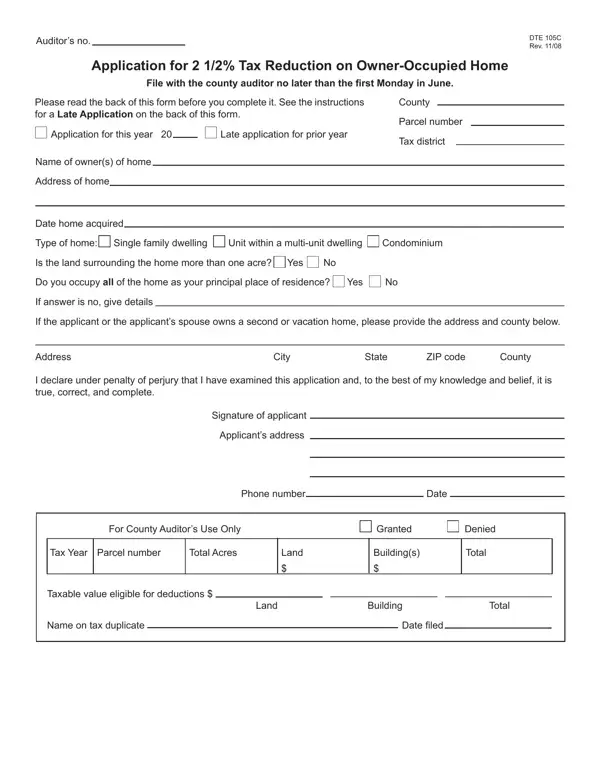
Understanding the DTE 105C form is essential for homeowners who wish to benefit from the 2 1/2% Tax Reduction on an owner-occupied home. This tax reduction initiative is aimed at providing financial relief by reducing the property tax burden on eligible residents. To benefit from this reduction, the homeowner must file the application with the county auditor by the specified deadline, which is no later than the first Monday in June. The form requires various pieces of information including the homeowner's name, address, the date the home was acquired, and the type of home, among others. Importantly, the eligibility criteria stipulate that the applicant must own and occupy the property as their principal place of residence as of January 1 of the year they file for the reduction. For those who may have qualified in the previous year but did not apply, there is an option to submit a late application. Additionally, specific instructions caution against filling out sections reserved for the auditor and provide guidance on how to correctly identify the parcel number and tax district. This form also includes sections concerning additional properties owned, underlining the requirement that the tax reduction applies to only one property per homeowner, thereby necessitating transparency about any second or vacation homes. In essence, the DTE 105C form is a pathway for homeowners to potentially reduce their financial load, provided they meet the criteria and adhere to the filing guidelines carefully laid out in the document.

QuestionAnswer
Form NameForm Dte 105C
Form Length2 pages
Fillable?No
Fillable fields0
Avg. time to fill out30 sec
Other namesDTE_DTE105C 2 12% homestead exemption application form dte 105c

How to Edit Form Dte 105C Online for Free

Working with PDF forms online can be very easy using our PDF tool. You can fill in Form Dte 105C here painlessly. To make our tool better and more convenient to utilize, we constantly work on new features, taking into account suggestions from our users. Starting is effortless! Everything you should do is follow the next basic steps directly below:

Step 1: Access the PDF doc in our tool by hitting the "Get Form Button" at the top of this page.

Step 2: After you open the editor, you will notice the document made ready to be filled out. In addition to filling in various fields, you may as well perform several other things with the PDF, namely putting on any words, changing the initial textual content, adding illustrations or photos, putting your signature on the form, and much more.

This form will need specific data to be filled in, therefore be sure to take your time to fill in exactly what is expected:

1. While filling in the Form Dte 105C, be certain to incorporate all of the necessary blanks in their associated form section. It will help expedite the process, allowing your details to be processed promptly and properly.

Form Dte 105C conclusion process explained (step 1)

2. Once the previous array of fields is completed, you're ready to insert the required specifics in Signature of applicant, Applicants address, Phone number, Date, For County Auditors Use Only, Granted, Denied, Tax Year Parcel number, Total Acres, Land, Buildings, Total, Taxable value eligible for, Name on tax duplicate, and Land so that you can move forward further.

Completing segment 2 of Form Dte 105C

It's simple to get it wrong while completing the Phone number, for that reason make sure that you look again prior to when you finalize the form.

Step 3: Proofread the information you have inserted in the blanks and then hit the "Done" button. Sign up with us today and instantly gain access to Form Dte 105C, available for downloading. Each and every change you make is conveniently kept , allowing you to customize the file at a later stage when required. We do not sell or share the details that you enter when filling out documents at our site.