
Form F242 173 444 PDF Details

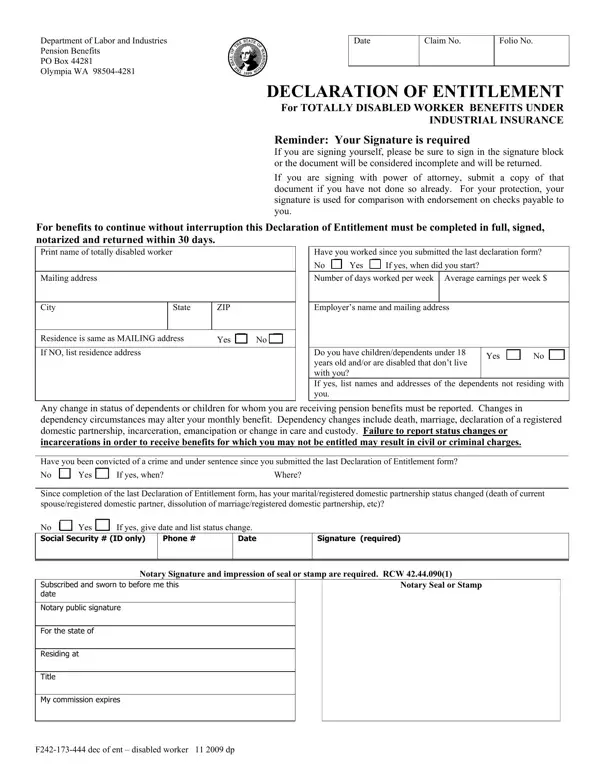
The F242 173 444 form is a vital document for totally disabled workers seeking benefits under industrial insurance from the Department of Labor and Industries. It serves as a declaration of entitlement, requiring meticulous completion and prompt submission within 30 days to prevent any interruption in the receipt of benefits. The form necessitates the worker's signature, a crucial step not only for authentication but also for ensuring the worker's protection, as this signature is compared against endorsements on checks made payable to them. It gathers comprehensive information, including the worker's mailing and residence addresses, employment details since the last declaration, and any dependency information which may affect the monthly benefits—highlighting changes in the dependency status such as death, marriage, or declaration of a registered domestic partnership, which could alter the benefits received. Additionally, the document asks for details regarding any criminal convictions since the last declaration, as well as any changes in marital or registered domestic partnership status. These details are critical, especially considering that failure to report could lead to severe legal repercussions, including civil or criminal charges. A notary's signature and seal impression are mandatory, emphasizing the legal seriousness and formal verification process of the declaration. Thus, the F242 173 444 form acts as a fundamental link between totally disabled workers and their rightful benefits, stressing the importance of accurate and timely information.

QuestionAnswer
Form NameForm F242 173 444
Form Length1 pages
Fillable?No
Fillable fields0
Avg. time to fill out15 sec
Other namesdependents, ent, dissolution, 2009

How to Edit Form F242 173 444 Online for Free

If you want to fill out form 444, it's not necessary to download and install any kind of programs - simply try using our online tool. To have our editor on the cutting edge of convenience, we strive to implement user-driven features and improvements regularly. We are routinely happy to get feedback - join us in remolding how we work with PDF docs. Starting is effortless! All you should do is take these simple steps below:

Step 1: Click the orange "Get Form" button above. It will open up our pdf tool so you can begin filling in your form.

Step 2: As you launch the online editor, you'll notice the form made ready to be completed. Aside from filling in different fields, it's also possible to perform several other things with the form, including adding custom words, modifying the original text, inserting images, putting your signature on the form, and more.

It will be simple to fill out the pdf with this helpful guide! This is what you have to do:

1. For starters, while filling out the form 444, beging with the form section containing subsequent blank fields:

Filling out segment 1 in 2009

2. Given that the last array of fields is complete, you have to include the essential details in Residence is same as MAILING, If NO list residence address, Yes No, Do you have childrendependents, Yes No, Any change in status of dependents, Have you been convicted of a crime, Since completion of the last, Signature required, Phone, Notary Signature and impression of, Subscribed and sworn to before me, Notary public signature, Notary Seal or Stamp, and For the state of in order to move on to the third stage.

The way to fill out 2009 stage 2

Always be very mindful while filling out Have you been convicted of a crime and Yes No, as this is the section in which most users make errors.

Step 3: Immediately after double-checking the entries, press "Done" and you're done and dusted! Right after creating afree trial account with us, you'll be able to download form 444 or email it promptly. The PDF file will also be easily accessible in your personal account with all of your changes. FormsPal is focused on the privacy of all our users; we make sure that all information going through our editor stays secure.