
Form Fda 3602A PDF Details

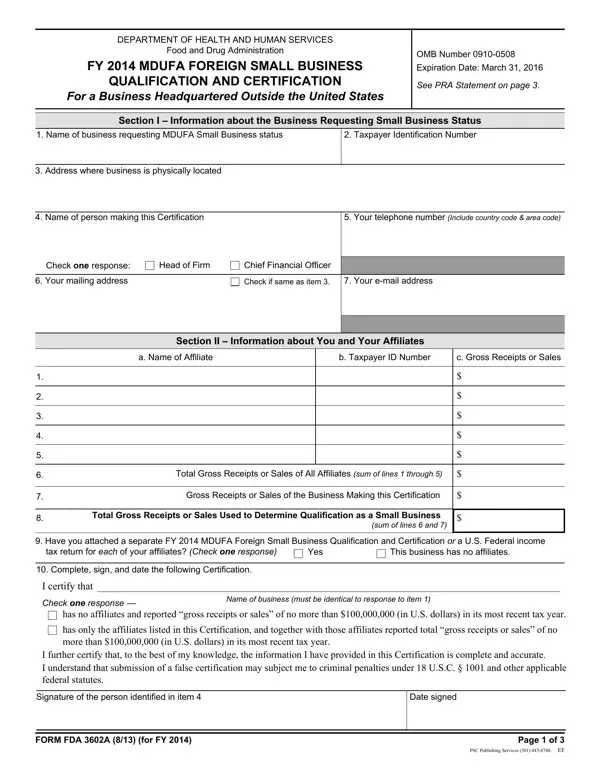
At the heart of supporting innovation and fairness in the medical device industry, particularly for businesses outside the United States aiming to navigate the regulatory environment, lies the FDA 3602A form. Titled "FY 2014 MDUFA Foreign Small Business Qualification and Certification," this document serves as a vital tool for international enterprises seeking to benefit from reduced or waived fees associated with medical device submissions under the Medical Device User Fee Amendments (MDUFA). To qualify, businesses headquartered abroad must meticulously provide information about their operations, including the name of the business, taxpayer identification number, and detailed financial data, to the U.S. Food and Drug Administration (FDA). A critical segment of the form requires companies to list and detail their affiliates' financials to ensure accuracy in determining small business status. Additionally, the national taxing authority of the business's country must complete a part of the form, verifying reported gross receipts or sales and affirming the accuracy of the provided information. The process not only underscores the importance of transparency and accuracy in reporting but also illustrates the global reach and influence of U.S. regulatory policies on international commerce in the health sector. Failure to comply or provide accurate information can result in severe penalties, emphasizing the form's role in upholding integrity within the industry. As companies complete and submit their FDA 3602A, they navigate a pathway defined by rigorous checks that underscore the value of honesty, accuracy, and cooperation between international businesses and U.S. regulatory bodies.

QuestionAnswer
Form NameForm Fda 3602A
Form Length7 pages
Fillable?No
Fillable fields0
Avg. time to fill out1 min 45 sec
Other namesyyyy, OMB, NONBINDING, FDA

How to Edit Form Fda 3602A Online for Free

With the help of the online tool for PDF editing by FormsPal, you can fill in or edit proprietorship right here and now. To keep our editor on the forefront of convenience, we aim to put into practice user-driven features and enhancements on a regular basis. We're routinely happy to get feedback - join us in revampimg PDF editing. With some basic steps, it is possible to begin your PDF journey:

Step 1: Click the "Get Form" button in the top part of this webpage to access our tool.

Step 2: As you start the file editor, you'll see the document prepared to be filled out. In addition to filling in different blank fields, you may as well perform many other things with the form, including adding your own words, modifying the initial textual content, adding illustrations or photos, putting your signature on the form, and more.

As for the fields of this precise document, this is what you should know:

1. It is crucial to fill out the proprietorship accurately, hence take care when working with the areas that contain all of these blank fields:

Part no. 1 in submitting yyyy

2. Given that this segment is finished, it's time to insert the needed specifics in Total Gross Receipts or Sales of, Gross Receipts or Sales of the, Total Gross Receipts or Sales Used, sum of lines and, Have you attached a separate FY, tax return for each of your, Yes, This business has no affiliates, Complete sign and date the, I certify that, Check one response, Name of business must be identical, has no affiliates and reported, has only the affiliates listed in, and I further certify that to the best so you're able to proceed further.

Filling in segment 2 in yyyy

3. This next step will be about Name of business, What is this business Check one, The business requesting small, An affiliate of a business, Gross receipts or sales reported, Does the National Taxing, most recent tax year, a Local currency, Currency Unit, Amount Reported, b US currency, US Dollars, c Exchange rate per US Dollar, Period during which reported, and affiliates of the business - type in each one of these fields.

Completing part 3 of yyyy

4. It's time to fill out this fourth form section! Here you'll have all of these Telephone number of National, Email address of National, Name of this National Taxing, Sign and date the following, Affix Official Seal of National, I certify that to the best of my, Signature of official making this, Date of this Certification mmddyyyy, The business seeking small, US FDA Use Only, Review, Certification is complete, and Information is not complete fields to fill out.

Sign and date the following, Name of this National Taxing, and Review inside yyyy

Be extremely mindful when filling in Sign and date the following and Name of this National Taxing, since this is where most users make mistakes.

5. When you reach the completion of your document, there are just a few extra things to do. In particular, The business seeking small, FY MDUFA Small Business, and Consumer Assistance, New Hampshire Avenue Building, Information is not complete, Decision, Qualifies for Small Business fee, Qualifies for Small Business fee, SBD, Does not qualify, FORM FDA A for FY, and Page of must be filled out.

Part no. 5 in filling out yyyy

Step 3: When you have reviewed the information you filled in, click "Done" to complete your FormsPal process. Join FormsPal right now and easily use proprietorship, set for downloading. All changes you make are kept , which enables you to edit the file at a later time if necessary. FormsPal is dedicated to the confidentiality of all our users; we make sure that all personal data going through our tool stays confidential.