
Form G5B PDF Details

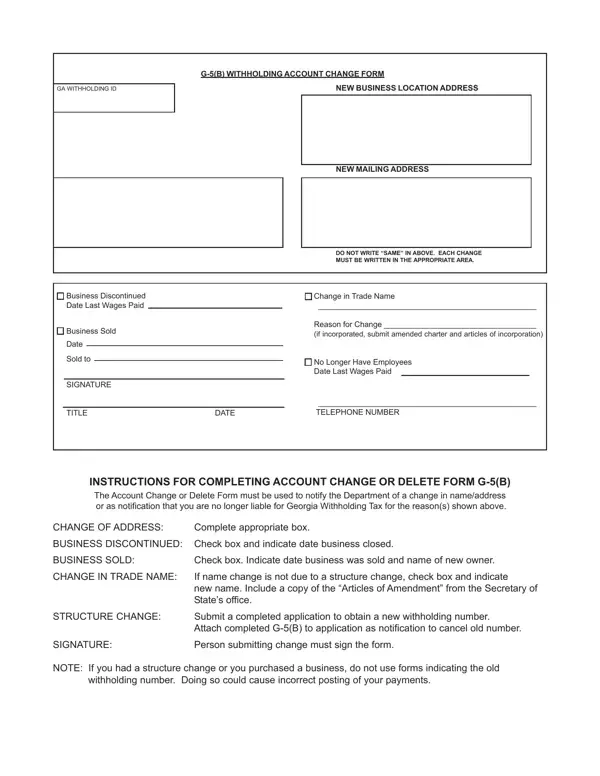
Understanding the G-5(B) Withholding Account Change Form is essential for businesses undergoing certain types of changes, such as moving to a new location, changing their trade name, or transferring ownership. This form serves as an official notification to the Department, alerting them to modifications that affect a business's Georgia Withholding Tax obligations. It's crucial not only for keeping records up to date but also for ensuring tax compliance. The form requires detailed information about the business's new address or the reason for discontinuation. If a business is sold, the date of sale and new ownership details must be provided. A change in trade name without altering the business structure also necessitates the submission of this form, accompanied by official amendment documents. In situations where there's a significant structural change, businesses are instructed to submit a new application for a withholding number, attaching the completed G-5(B) form to signal the cancellation of the old number. Completeness and accuracy when filling out this form ensure smooth transitions and prevent issues related to tax filings. Importantly, the form must be signed by an authorized individual to validate the submission, underlining the importance of the information provided. Through these provisions, the G-5(B) form facilitates essential updates that keep the state informed and businesses compliant.

QuestionAnswer
Form NameForm G5B
Form Length1 pages
Fillable?No
Fillable fields0
Avg. time to fill out15 sec
Other nameswhere do i mail form g5 b, mail g 5 b withholding account, ga form g 5b, form g5 b georgia department of revenue

How to Edit Form G5B Online for Free

In case you intend to fill out form g5 b georgia department of revenue, you won't have to install any kind of programs - just use our online tool. We at FormsPal are focused on making sure you have the absolute best experience with our tool by regularly presenting new features and enhancements. Our editor has become even more user-friendly thanks to the latest updates! Now, editing PDF files is a lot easier and faster than ever. It merely requires a couple of basic steps:

Step 1: Click the "Get Form" button above on this page to get into our tool.

Step 2: This editor enables you to change PDF files in many different ways. Modify it by writing customized text, adjust what's originally in the document, and put in a signature - all within the reach of several mouse clicks!

This form will need specific details; in order to guarantee accuracy and reliability, be sure to consider the next suggestions:

1. Begin filling out your form g5 b georgia department of revenue with a group of major blank fields. Note all of the information you need and be sure absolutely nothing is missed!

Stage number 1 for submitting where do i fax the form g5 for the state of georgia

2. Soon after the first section is filled out, proceed to type in the suitable information in these - SIGNATURE, TITLE DATE, TELEPHONE NUMBER, INSTRUCTIONS FOR COMPLETING, CHANGE OF ADDRESS, Complete appropriate box, BUSINESS DISCONTINUED Check box, BUSINESS SOLD, Check box Indicate date business, CHANGE IN TRADE NAME, If name change is not due to a, STRUCTURE CHANGE, Submit a completed application to, SIGNATURE, and Person submitting change must sign.

Guidelines on how to prepare where do i fax the form g5 for the state of georgia portion 2

You can potentially get it wrong when filling in the CHANGE IN TRADE NAME, and so you'll want to go through it again before you decide to finalize the form.

Step 3: When you have reviewed the information in the blanks, click "Done" to complete your document creation. Right after registering afree trial account with us, it will be possible to download form g5 b georgia department of revenue or send it through email promptly. The form will also be at your disposal in your personal account menu with all of your changes. At FormsPal.com, we endeavor to make sure your details are kept protected.