
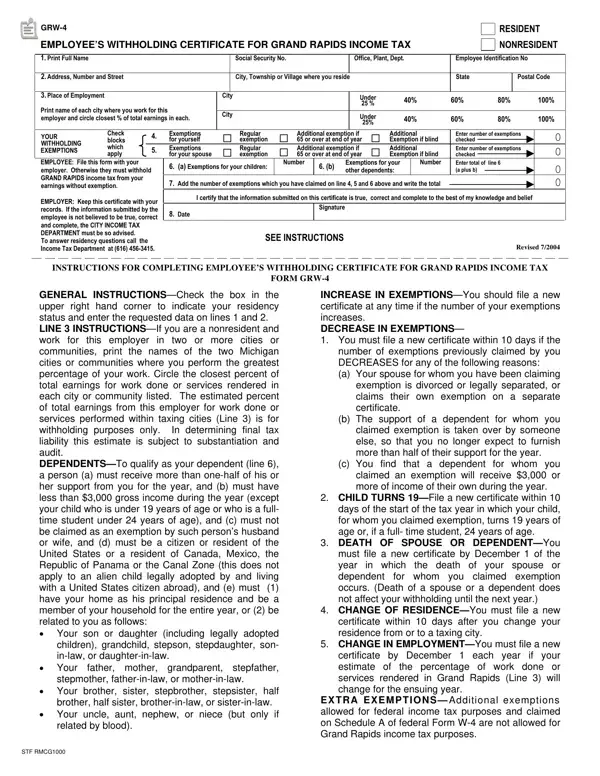
In an era where understanding tax obligations is crucial for both employees and employers, the Employee’s Withholding Certificate for Grand Rapids Income Tax, known as the GRW-4 form, emerges as an essential document for those living or working within the jurisdiction of Grand Rapids, Michigan. This form plays a pivotal role in determining the amount of city income tax withheld from an employee's paycheck by requiring detailed information such as full name, social security number, address, and employment details, alongside the critical decision of declaring residency status as either a resident or nonresident. Additionally, it encompasses provisions for declaring exemptions based on personal circumstances, including age, blindness, or dependents, which can significantly affect the withholding amount. Employees are tasked with accurately reporting places of employment and estimating the percentage of income earned within Grand Rapids or other specified working cities to ensure correct tax withholding. This proactive declaration on the GRW-4 form not only facilitates accurate tax deductions from earnings but also aids in avoiding potential conflicts with the Grand Rapids City Income Tax Department by ensuring compliance with local tax regulations. The instructions included with the form guide individuals through each section, emphasizing its completion's significance and the conditions that necessitate the filing of a new certificate due to changes in personal or financial status.
| Question | Answer |
|---|---|
| Form Name | Grand Rapids Form CF-W-4 Withholding Certificate |
| Form Length | 1 page |
| Fillable? | No |
| Fillable fields | 0 |
| Avg. time to fill out | 15 sec |
| Other names | grw4 pdf, EXEMPTIONSYou, city of grand rapids w4, GRW-4 |
Form Grw 4 isn’t the one you’re looking for?