
Form H1801 at a glance
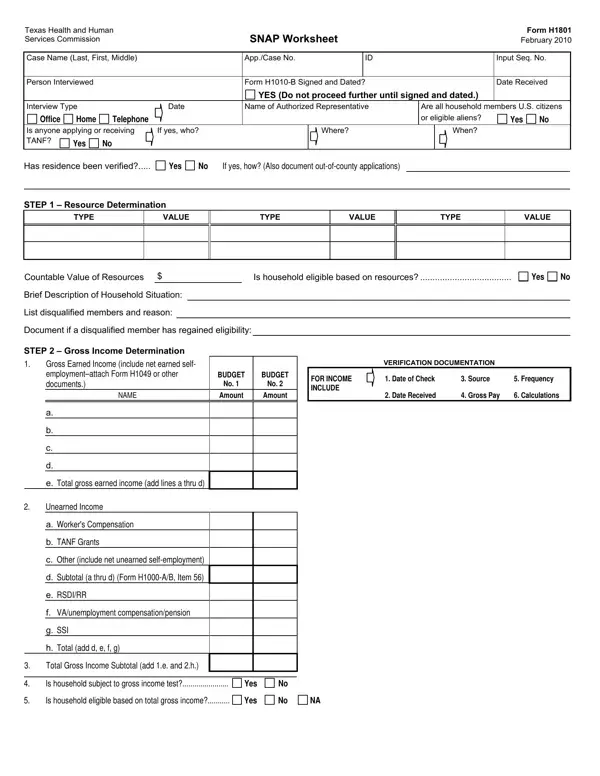
What it is: Form H1801 November 2017-E is the SNAP Worksheet.
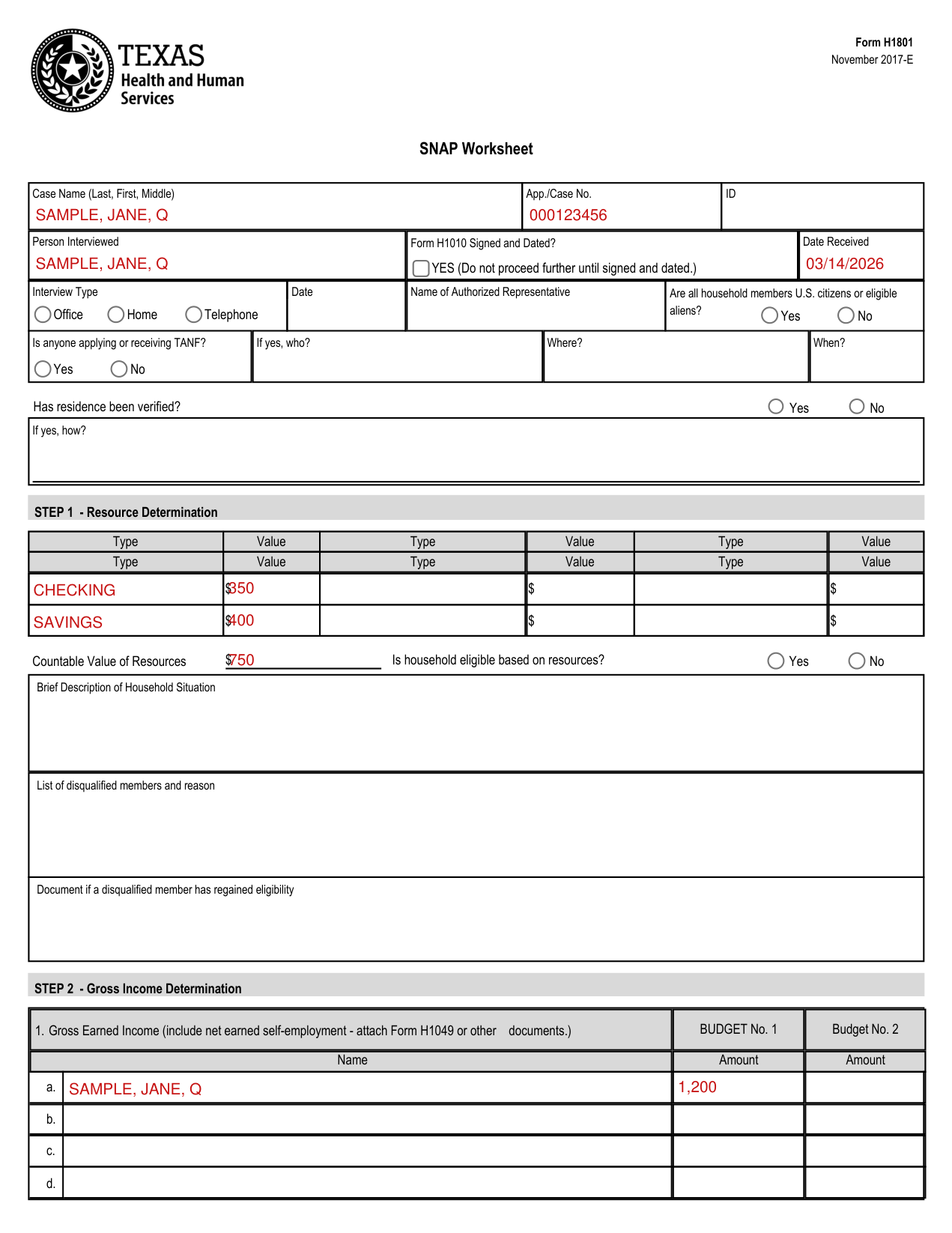
A filled-in Form H1801 example: a caseworker enters resources and one job
How to fill out Form H1801, box by box
Interview Type

Enter the Person Interviewed and the Date Received. Under Form H1010 Signed and Dated?, mark YES: do not proceed further until signed and dated.
Mark the Interview Type: Office, Home or Telephone.
Enter the Date and the Name of Authorized Representative. Mark No or Yes for Are all household members U.S. citizens or eligible aliens?
STEP 1 - Resource Determination

Under STEP 1 - Resource Determination, enter the Type and the Value for each resource, then the Countable Value of Resources. Mark Yes or No for Is household eligible based on resources?
STEP 2 - Gross Income Determination
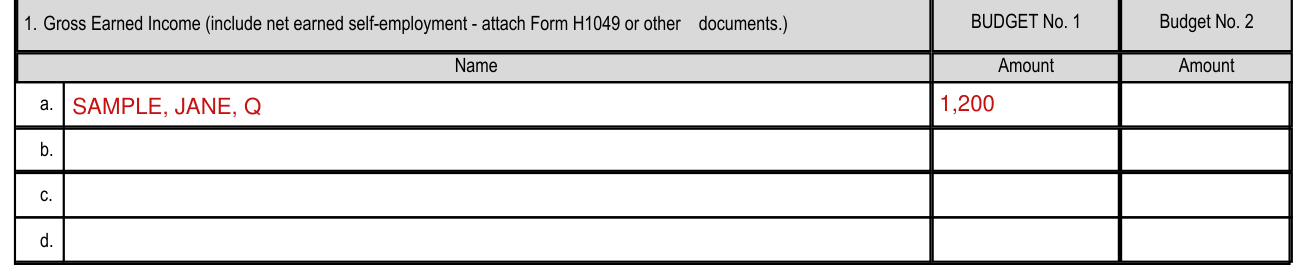
Under STEP 2 - Gross Income Determination, enter each Name and Amount for Budget No. 1 and Budget No. 2 as 1. Gross Earned Income (include net earned self-employment - attach Form H1049 or other documents.).
STEP 7 - SNAP Forms and Referrals
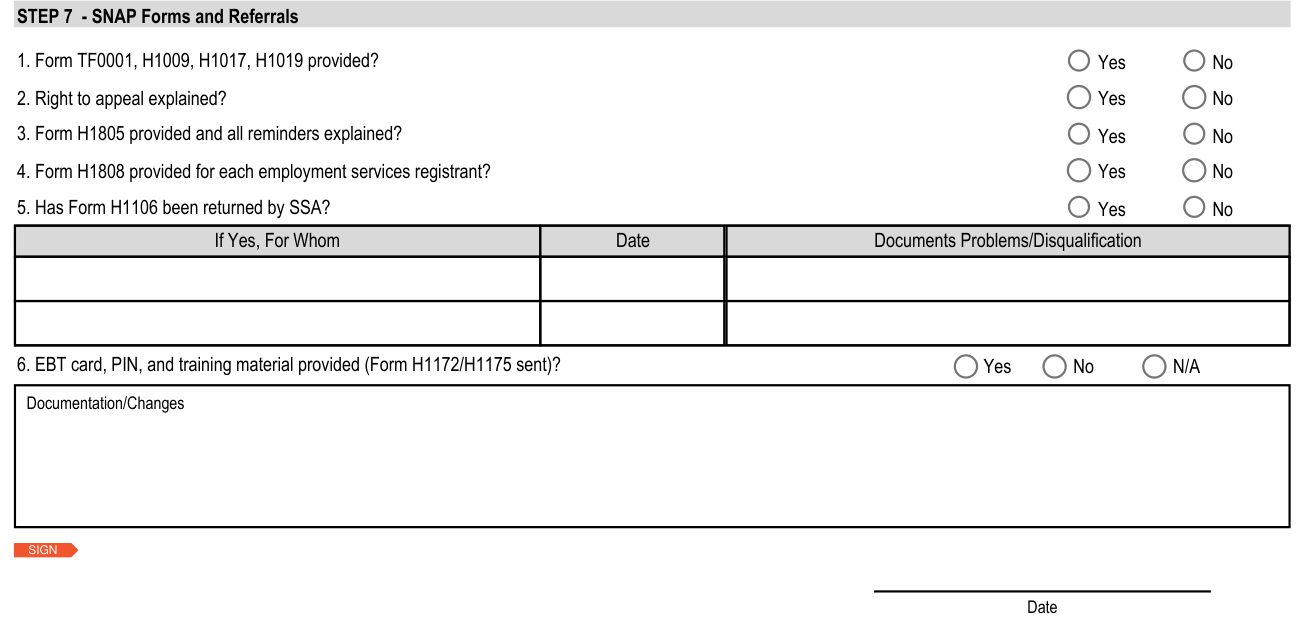
Under STEP 7 - SNAP Forms and Referrals, mark Yes or No: 1. Form TF0001, H1009, H1017, H1019 provided? 2. Right to appeal explained? 3. Form H1805 provided and all reminders explained? 4. Form H1808 provided for each employment services registrant?
Mark Yes or No for 5. Has Form H1106 been returned by SSA? If Yes, enter For Whom, Date and Documents Problems/Disqualification. Mark Yes, No or N/A for 6. EBT card, PIN, and training material provided (Form H1172/H1175 sent)?, then enter Documentation/Changes.
SIGN and enter the Date.
More rules for Form H1801
Enter the Case Name (Last, First, Middle), the App./Case No. and the ID.
Mark Yes or No for Is anyone applying or receiving TANF? If yes, enter who, where and when.
Mark Yes or No for Has residence been verified? If yes, enter how.
Enter a Brief Description of Household Situation and a List of disqualified members and reason. Document if a disqualified member has regained eligibility.
Enter e. Total gross earned income (add lines a through d).
Under 2. Unearned Income, enter a. Worker's Compensation, b. TANF Grants and c. Other (include net unearned self-employment).
Enter d. Subtotal (a through c), e. RSDI/RR, f. VA/unemployment compensation/pension and g. SSI, then h. Total (add d, e, f, g).
Enter 3. Total Gross Income Subtotal (add 1.e. and 2.h.).
Mark Yes or No for 4. Is household subject to gross income test? Mark Yes, No or N/A for 5. Is household eligible based on total gross income?
Under STEP 3 - Net Income Determination, enter the Name and Amount for Budget No. 1 and Budget No. 2: 1. Total Gross Income (from STEP 2, Item 3), 2. Earned Income Deduction (20% of STEP 2, 1.e.) and 3. Remaining Farm Loss (if NA, enter 0).
Enter 4. Standard Deduction, 5. Allowable Medical Costs (Actual or Standard), 6. Homeless Shelter Standard, 7. Monthly Dependent Care Costs and 8. Child Support Paid to/for Non-Household Members.
Enter 9. Total Deductions (add 2,3,4,5,6,7 and 8), then 10. Adjusted Gross Income (Item 1 minus 9).
Under 11. Shelter Expenses, enter a. Housing and b. Utility or Telephone Standard. Expedited Only - Actual Utilities: enter (1) Gas, (2) Electric, (3) Water/Sewage and (4) Other (explain):.
Enter d. Total Shelter Costs, then e. Subtract 50% Adjusted Gross Income and f. Total Excess Shelter Costs. Enter 12. Maximum Excess Shelter (if applicable).
Enter 13. Net Income (Item 10 minus 11.f. or 12) and 14. Rounded Net Income. Mark Yes, No or N/A for 15. Is household eligible based on total net income?
Enter the Amount for each budget for 16. Number of Certified Members, 17. Monthly Allotment (TW Handbook C-1431), 18. Prorated Allotment (if applicable) TW Handbook C-1432), 19. Months Covered by First Budget and 20. Months Covered by Second Budget.
VERIFICATION DOCUMENTATION FOR INCOME INCLUDE: 1. Date of Check 2. Date Received 3. Source 4. Gross Pay 5. Frequency 6. Calculations.
Under STEP 4 - Management, document any management problems and explain.
Under STEP 5 - Employment Services, list household members and their exemption or registration/education codes: enter each Member and Code. Justify codes for household members coded E or H.
Mark Yes or No for Does the household qualify to select the PWE? If yes, give the name of the PWE. If yes, mark Yes or No for do all adult household members agree on the selection?
Under STEP 6 - Basis of Certification or Denial, enter Certified From: and To:, the Special Review Date and the Reason Code. Under 1. Special Review and Certification Period, enter the Explanation.
Under 2. Denial Explanations, enter the explanation.
Enter the Case Name (Last, First, Middle) and App./Case No. Document Changes: Include change, date of change and date reported.
Under Adjustments, enter 1. Gross Earned Income, 2. Gross Unearned Income and 3. Total Gross Income Subtotal (add Items 1 and 2) for Budget No.1 and Budget No. 2. Mark Yes, No or N/A for Is household eligible based on gross income?
Enter 4. Earned Income Deduction (20% of Item 1), 5. Remaining Farm Loss (if NA, enter 0), 6. Standard Deduction, 7. Allowable Medical Costs (Actual or Standard), 8. Homeless Shelter Standard, 9. Dependent Care Expense and 10. Child Support Paid to/for Non-Household Member.
Enter 11. Total Deductions (add items 4 through 10) and 12. Adjusted Gross Income (Item 3 minus 11). Enter 13. Total Shelter Cost, a. Subtract 50% of Item 12, b. Total Excess Shelter Costs and 14. Maximum Excess Shelter (if applicable).
Enter 15. Net Income (Item 12 minus Item 13b or 14) and 16. Rounded Net Income. Mark Yes, No or N/A for Is household eligible based on net income?
Enter Denied, Effective and the Effective date of change. Mark Yes or No for Employment services registration changed? Enter the Special review (mm/yy), Reason Code, Household Size and Allotment. Mark Form H1019, Form H1172/H1175 or Form. SIGN and enter the Date.
Sources
[1] Form H1801 (November 2017-E), SNAP Worksheet, Texas Health and Human Services (the Official source link on this page).