
Form Jd Cr 9 PDF Details

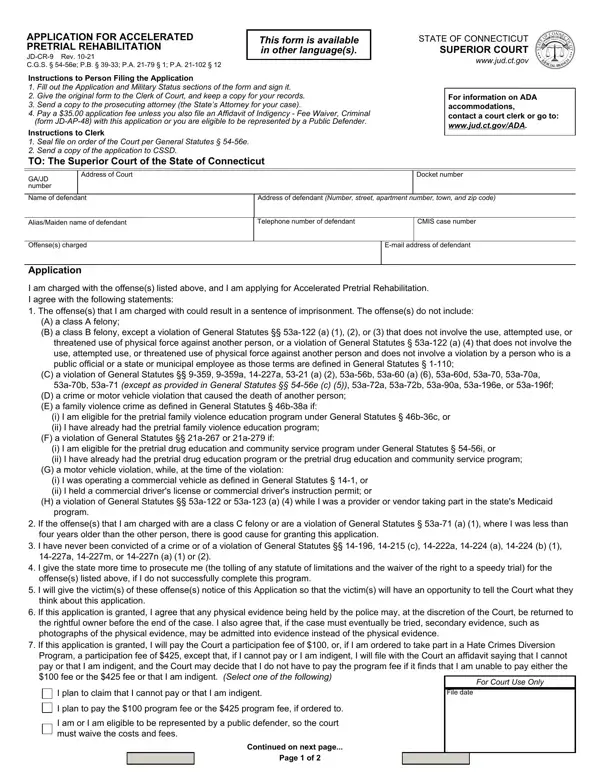
Understanding the intricacies and the application process for Accelerated Pretrial Rehabilitation in Connecticut is crucial for individuals charged with certain offenses. The JD-CR-9 form serves as a gateway for defendants seeking to enter this program, potentially avoiding the usual consequences of a criminal conviction. Designed with clarity, the form outlines not just the eligibility criteria - which meticulously excludes severe offenses like class A and B felonies, crimes causing death, and certain violations of personal and public trust - but also conditions like military status and past convictions. It emphasizes the necessity for accurate completion, submission to the court clerk, and proper notification to the prosecuting attorney along with a fee, which can be waived under certain conditions. Importantly, it also details the responsibilities of the applicant toward notifying victims, the submission of military status, and the acceptance of extended prosecution timeframes as part of the program requirements. The form exemplifies the court’s layered approach to rehabilitative justice, balancing the interests of the applicant, the victims, and the broader community. Through this, it not only facilitates a process aimed at reducing recidivism but also underscores the state’s commitment to offering a second chance to eligible individuals, providing a structured pathway towards rehabilitation and the possibility of a cleansed record.

QuestionAnswer
Form NameForm Jd Cr 9
Form Length2 pages
Fillable?No
Fillable fields0
Avg. time to fill out30 sec
Other namesconnecticut accelerated, ct accelerated, ct accelerated rehabilitation, application accelerated rehabilitation

How to Edit Form Jd Cr 9 Online for Free

Should you would like to fill out accelerated pretrial rehabilitation, you won't need to download any kind of software - just try using our PDF tool. The tool is consistently updated by our team, receiving useful features and growing to be greater. With a few simple steps, it is possible to begin your PDF editing:

Step 1: Click the "Get Form" button above. It'll open up our tool so you could begin filling out your form.

Step 2: With the help of our advanced PDF editor, you can do more than just fill in forms. Express yourself and make your documents look professional with customized text put in, or tweak the file's original input to perfection - all that comes along with an ability to add any photos and sign the file off.

With regards to the fields of this specific PDF, here's what you should consider:

1. When completing the accelerated pretrial rehabilitation, ensure to incorporate all important fields in the associated part. This will help expedite the work, making it possible for your details to be handled promptly and properly.

How one can fill out accelerated rehabilitation form part 1

2. When this part is done, go on to type in the suitable details in all these - Program a participation fee of, For Court Use Only, I plan to claim that I cannot pay, File date, I plan to pay the program fee or, I am or I am eligible to be, Continued on next page, and Page of.

Stage number 2 in submitting accelerated rehabilitation form

3. This next part is focused on Military Status Have you ever, Yes if Yes specify, I am an active member of the armed, I received an other than honorable, By signing this form I am saying, I have read the above information, Signed Duly authorized person, Signed Defendant, Date signed, Consented to by Parent or Guardian, Print name, Date signed, Oath, and The defendant stated under - fill out every one of these fields.

accelerated rehabilitation form conclusion process outlined (portion 3)

People generally make some errors while completing Date signed in this part. Be sure to go over everything you type in here.

4. Filling out Signed Assistant ClerkDuly, Print name, Date signed, First Order of the Court, The Application is denied, The defendants oath under General, In open court, Outside of court by a person, The Application is continued to, The Court further orders the court, Court hearing date and time, Notice date, Signed Judge or Assistant Clerk, Date signed, and JDCR Rev is key in this step - you'll want to take the time and take a close look at every empty field!

Filling in section 4 of accelerated rehabilitation form

Step 3: Be certain that the information is right and then just click "Done" to finish the process. Go for a 7-day free trial account with us and get immediate access to accelerated pretrial rehabilitation - which you are able to then use as you want in your personal account page. We do not share or sell the details that you use whenever dealing with documents at our website.