
Form LIC 508 D PDF Details

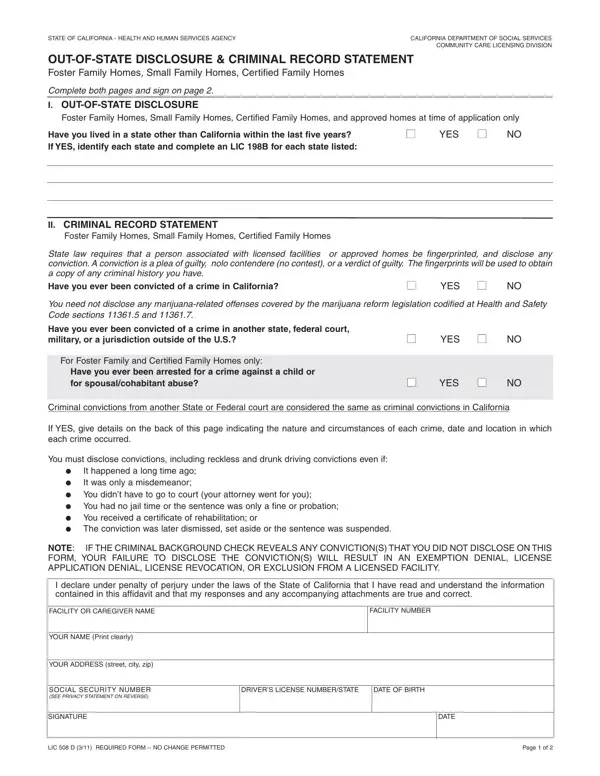
The State of California takes special measures to ensure the safety and well-being of individuals in foster and family care environments through comprehensive background checks and disclosures required from caregivers. Central to this procedure is the LIC 508 D form, mandated by the California Department of Social Services' Community Care Licensing Division. This crucial document functions as both an Out-of-State Disclosure and Criminal Record Statement for individuals associated with Foster Family Homes, Small Family Homes, Certified Family Homes, and certain approved homes at the time of application. It obligates applicants to disclose prior residences in other states within the last five years, necessitating further documentation for each state listed. Furthermore, it mandates a revealing of any criminal convictions, with a clear stipulation that convictions in any state, federal court, or military jurisdiction are treated with the same gravity as those in California. Uniquely, the form shows leniency towards certain marijuana-related offenses, reflecting changes in legislation. Its stringent requirement for truthfulness under the threat of severe consequences for nondisclosure underscores the state's commitment to safeguarding vulnerable populations. Spanning two pages, the LIC 508 D form embodies a critical step in the meticulous process of background verification, serving as a testament to California's rigorous standards for caregivers and facility personnel. By providing specific instructions for respondents, licensees, and regional offices, along with a privacy statement regarding the handling of Social Security Numbers, the form balances comprehensive scrutiny with considerations for privacy and fairness.

QuestionAnswer
Form Name Form Lic 508 D
Form Length 2 pages
Fillable? No
Fillable fields 0
Avg. time to fill out 30 sec
Other names lic 508 out, lic out form, lic 508 7 20, california lic 508 state

How to Edit Form LIC 508 D Online for Free

If you would like to fill out lic 508 2021, you don't need to download any kind of programs - simply give a try to our online tool. Our tool is constantly evolving to present the best user experience attainable, and that is due to our commitment to continual improvement and listening closely to customer opinions. Getting underway is easy! Everything you need to do is take the following basic steps below:

Step 1: Open the PDF doc in our tool by clicking the "Get Form Button" in the top section of this page.

Step 2: After you open the PDF editor, there'll be the form made ready to be completed. Other than filling out various fields, you could also perform other sorts of things with the PDF, namely writing your own text, modifying the original text, inserting illustrations or photos, affixing your signature to the form, and more.

It is actually easy to finish the pdf with our helpful guide! This is what you should do:

1. You need to complete the lic 508 2021 properly, thus be attentive when filling in the areas that contain these specific fields:

Part # 1 for submitting 508 d forms ccld

2. Immediately after this section is done, go on to type in the relevant information in these - FACILITY OR CAREGIVER NAME, FACILITY NUMBER, YOUR NAME Print clearly, YOUR ADDRESS street city zip, SOCIAL SECURITY NUMBER SEE PRIVACY, SIGNATURE, DRIVERS LICENSE NUMBERSTATE, DATE OF BIRTH, DATE, LIC D REQUIRED FORM NO CHANGE, and Page of.

DRIVERS LICENSE NUMBERSTATE, YOUR ADDRESS street city zip, and SIGNATURE of 508 d forms ccld

It is possible to make an error while completing your DRIVERS LICENSE NUMBERSTATE, and so ensure that you go through it again prior to when you submit it.

3. This step is going to be hassle-free - complete all of the form fields in You need not disclose any, When did this happen, Tell us what happened Use, I certify under penalty of perjury, Signature Date, and If you have any questions about to conclude this part.

Simple tips to prepare 508 d forms ccld stage 3

Step 3: Check that your details are right and simply click "Done" to progress further. Sign up with FormsPal today and immediately get access to lic 508 2021, set for download. Every last edit made is handily kept , allowing you to customize the document further when necessary. FormsPal guarantees your information privacy with a protected method that in no way records or distributes any personal data used in the form. Feel safe knowing your documents are kept protected any time you use our services!