
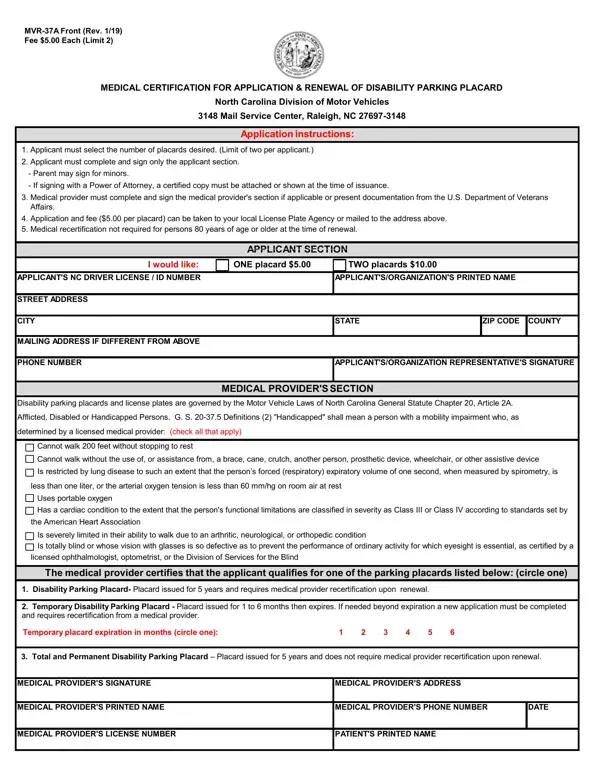
Form Mvr 37A PDF Details

Navigating through the requirements for obtaining or renewing a Disability Parking Placard in North Carolina can be straightforward with a clear understanding of the MVR-37A form. This document serves as an essential tool in the application process, whether individuals are applying for the first time, renewing, or requesting additional placards. Designed by the North Carolina Division of Motor Vehicles, the form facilitates the certification and recertification processes for those in need of parking privileges due to various disabilities. With a nominal fee, applicants can request up to two placards, which are invaluable for ensuring closer and more accessible parking. The form is divided into sections that require personal information from the applicant and medical certification from a licensed provider. These sections confirm the type and severity of the disability, dictating the kind of placard an applicant is eligible for—be it temporary, permanent, or renewable after five years. Moreover, for those over the age of 80, medical recertification is waived during renewal, simplifying the process for elderly citizens. Documentation or certification from the U.S. Department of Veterans Affairs also plays a crucial role for veterans in proving eligibility. Understanding the intricacies of the MVR-37A form and its related processes, including fees, medical provider requirements, and the distinctions between different kinds of placards, is fundamental for applicants aiming to secure their right to accessible parking spaces.

QuestionAnswer
Form NameForm Mvr 37A
Form Length2 pages
Fillable?No
Fillable fields0
Avg. time to fill out30 sec
Other namesnorth carolina disability placard, nc mvr 37a form, mvr 37a form, mvr 37a

How to Edit Form Mvr 37A Online for Free

You may work with nc application for disability parking placard without difficulty with the help of our online editor for PDFs. FormsPal team is constantly working to improve the tool and insure that it is much better for clients with its handy functions. Unlock an endlessly revolutionary experience today - take a look at and uncover new opportunities as you go! Here's what you'll want to do to begin:

Step 1: Access the PDF file inside our editor by pressing the "Get Form Button" in the top area of this webpage.

Step 2: The tool allows you to customize your PDF document in a range of ways. Modify it with your own text, adjust original content, and place in a signature - all readily available!

So as to fill out this PDF document, ensure that you type in the required details in each blank field:

1. Complete the nc application for disability parking placard with a group of major fields. Gather all the necessary information and make certain nothing is neglected!

Stage number 1 for submitting nc application renewal

2. The subsequent step is usually to submit the following blank fields: Temporary Disability Parking, Temporary placard expiration in, Total and Permanent Disability, MEDICAL PROVIDERS SIGNATURE, MEDICAL PROVIDERS ADDRESS, MEDICAL PROVIDERS PRINTED NAME, MEDICAL PROVIDERS PHONE NUMBER, DATE, MEDICAL PROVIDERS LICENSE NUMBER, and PATIENTS PRINTED NAME.

Stage # 2 of submitting nc application renewal

It is easy to make a mistake while filling out the PATIENTS PRINTED NAME, and so be sure to reread it prior to deciding to submit it.

Step 3: Check everything you've typed into the form fields and then click on the "Done" button. Obtain the nc application for disability parking placard when you register at FormsPal for a free trial. Easily view the pdf document from your personal cabinet, with any modifications and changes automatically saved! FormsPal guarantees your information privacy via a protected method that never saves or shares any sort of personal information involved. Be confident knowing your documents are kept confidential each time you use our tools!