
Form Pc 652 PDF Details

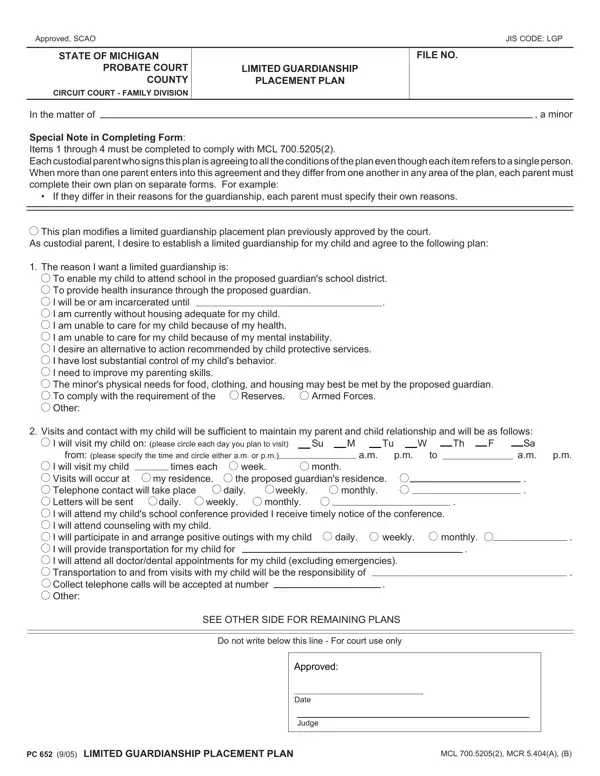
In navigating the complexities of legal guardianship in Michigan, the PC 652 form serves as a vital tool for parents and guardians aiming to establish a limited guardianship placement plan. This form, formally recognized and utilized by the State of Michigan's Probate and Family Division Courts, outlines the specifics of an agreement between a child’s custodial parent(s) and a proposed guardian. Notably, the form encompasses comprehensive sections that demand thoughtful completion to adhere to Michigan Compiled Laws 700.5205(2), including reasons for seeking limited guardianship, arrangements for maintaining parent-child relationships, financial support commitments, and the envisioned duration of the guardianship. By signing this document, custodial parents express their consent to the outlined conditions, even if these require separate documentation due to diverging perspectives or needs. The form further extends to capture agreements on visitation schedules, communication plans, educational and medical provisions, among others, ensuring a structured approach to the minor's welfare under limited guardianship. The completion and approval of this document signify a legal agreement, shaped by the shared responsibility towards the minor's needs, making it a cornerstone in safeguarding the child's well-being while under the care of a guardian other than the custodial parent(s).

QuestionAnswer
Form NameForm Pc 652
Form Length2 pages
Fillable?No
Fillable fields0
Avg. time to fill out30 sec
Other namespc652 limited guardianship michigan form

How to Edit Form Pc 652 Online for Free

It is possible to complete Form Pc 652 effortlessly with the help of our PDF editor online. Our professional team is relentlessly working to expand the tool and insure that it is even faster for users with its many functions. Enjoy an ever-improving experience now! With some simple steps, you'll be able to begin your PDF editing:

Step 1: Simply click on the "Get Form Button" above on this webpage to launch our form editing tool. This way, you will find all that is necessary to work with your document.

Step 2: As you launch the file editor, you'll see the document made ready to be completed. In addition to filling out different blank fields, you might also perform many other actions with the form, including adding custom textual content, editing the original text, inserting illustrations or photos, affixing your signature to the form, and more.

With regards to the fields of this precise document, here is what you should do:

1. Firstly, once filling out the Form Pc 652, begin with the page that contains the following blank fields:

The way to complete Form Pc 652 stage 1

2. The third stage would be to fill in the following blank fields: To enable my child to attend, Armed Forces, Reserves, Visits and contact with my child, I will visit my child on please, from please specify the time and, daily, daily, week, month, weekly, weekly, times each my residence, the proposed guardians residence, and I will visit my child Visits will.

Writing part 2 of Form Pc 652

Concerning the proposed guardians residence and week, ensure you review things in this section. Those two are certainly the most important fields in this file.

3. Completing Financial support will be made by, Health insurance coverage through, Policy numbers are, each month for room board, School lunch money clothing, My plan is for the limited, The end of the current school year, I graduate, my child graduates, from high school, end, beginning, incarcerated, on paroleprobation, and I am able to provide a drugfree is essential for the next step, make sure to fill them out in their entirety. Don't miss any details!

Guidelines on how to prepare Form Pc 652 portion 3

4. The following section needs your information in the subsequent parts: I am able to provide a drugfree, I also agree as follows, As a custodial parent of the minor, Date, Signature, Date, Signature, Name of custodial parent type or, Name of custodial parent type or, Address, City state zip, Address, Telephone no, City state zip, and Telephone no. Remember to give all needed info to move forward.

Filling in section 4 of Form Pc 652

5. As a final point, the following final portion is precisely what you have to complete before submitting the PDF. The blank fields under consideration are the next: I will serve as limited guardian, Date, Signature, Date, Signature, Name of proposed guardian type or, Name of proposed guardian type or, Address, City state zip, Address, Telephone no, City state zip, Telephone no, Date of birth, and Driver license no or other.

Filling in section 5 of Form Pc 652

Step 3: Check the details you've typed into the blanks and then hit the "Done" button. Grab your Form Pc 652 once you subscribe to a free trial. Conveniently access the pdf within your FormsPal account page, along with any edits and changes being conveniently kept! FormsPal offers protected document tools with no personal information recording or distributing. Feel comfortable knowing that your information is in good hands here!