
Form R 3 PDF Details

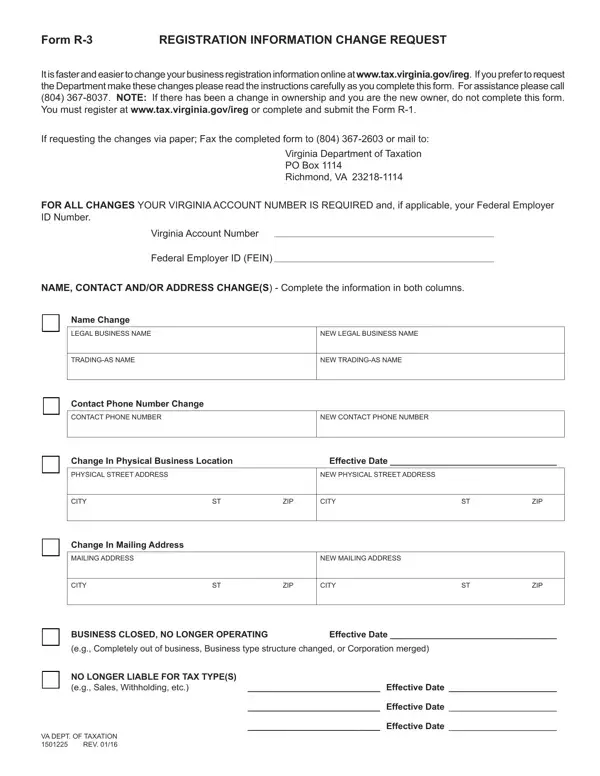
When running a business, staying on top of registration information is crucial for ensuring compliance with state tax laws, and this is where the Form R-3 comes into play. Specifically designed for businesses in Virginia, the Form R-3 Registration Information Change Request offers a structured way to communicate updates regarding business registration details to the Virginia Department of Taxation. This form is a vital tool for businesses looking to update their legal business name, trading name, contact information, or address changes efficiently. It's particularly important to note that in circumstances of ownership changes, the new owner must not use this form but rather re-register through the Department's recommended channels. The form emphasizes the necessity of including a Virginia Account Number and, if applicable, a Federal Employer Identification Number (FEIN) to process any changes. Instructions indicate that updates can be submitted either online, which is faster, or via traditional mail or fax, catering to a broad range of preferences. Additionally, the form provides a means for businesses to report closure or cessation of operations—a critical step for entities no longer conducting business. By streamlining the process of communicating significant business information changes to tax authorities, Form R-3 plays an indispensable role in maintaining the accuracy of business records and ensuring compliance with state tax regulations.

QuestionAnswer
Form NameForm R 3
Form Length1 pages
Fillable?No
Fillable fields0
Avg. time to fill out15 sec
Other namesform r 3, r 3 virginia form, form 3 va pdf, r form 3

How to Edit Form R 3 Online for Free

form r 3 can be filled in with ease. Simply open FormsPal PDF editing tool to get the job done quickly. Our expert team is continuously working to develop the editor and enable it to be much better for people with its handy features. Enjoy an ever-improving experience now! Should you be looking to start, here's what it will take:

Step 1: Hit the "Get Form" button at the top of this page to get into our editor.

Step 2: This editor lets you change PDF forms in various ways. Change it by including your own text, correct what is originally in the PDF, and include a signature - all close at hand!

Be mindful when filling out this pdf. Ensure that all mandatory fields are filled out properly.

1. When completing the form r 3, ensure to incorporate all necessary fields in their corresponding form section. It will help to hasten the work, allowing for your details to be processed swiftly and correctly.

How one can prepare r 3 stage 1

2. Your next stage would be to fill out these fields: Change In Mailing Address, MAILING ADDRESS, NEW MAILING ADDRESS, CITY, ZIP, CITY, ZIP, BUSINESS CLOSED NO LONGER OPERATING, Effective Date, eg Completely out of business, NO LONGER LIABLE FOR TAX TYPES eg, Effective Date, VA DEPT OF TAXATION REV, Effective Date, and Effective Date.

Simple tips to complete r 3 portion 2

Always be extremely mindful when filling out NO LONGER LIABLE FOR TAX TYPES eg and CITY, as this is the part where most people make errors.

Step 3: Just after taking one more look at the fields you have filled out, press "Done" and you are all set! Acquire your form r 3 the instant you register at FormsPal for a 7-day free trial. Quickly get access to the pdf file from your personal account, along with any edits and adjustments conveniently saved! FormsPal guarantees your information confidentiality via a protected system that in no way records or shares any type of private information used. Feel safe knowing your paperwork are kept confidential when you use our tools!