
Form T 121 PDF Details

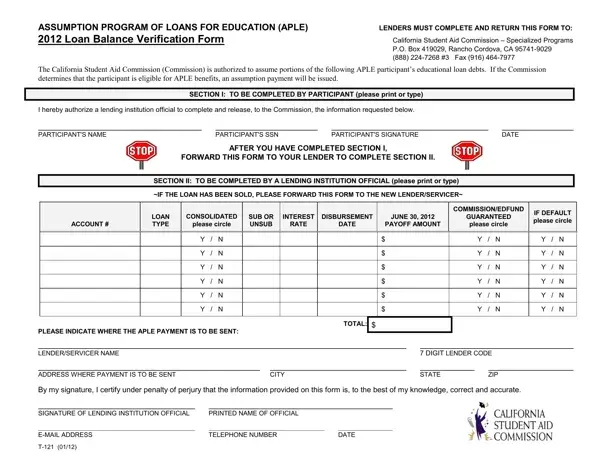
The Assumption Program of Loans for Education (APLE) plays a pivotal role in the support system for educators within California, easing the financial burden of educational loans. Central to this program is the T-121 form, a document that bridges communication between the California Student Aid Commission, lending institutions, and participants seeking debt assumption benefits. Essentially, this form serves as a verification tool, ensuring that the Commission receives accurate loan balance information from lenders. Through a carefully structured process, the form prompts participants to authorize the release of their loan details to the Commission, followed by a section for lenders to complete, specifying loan amounts, interest rates, and other critical financial data. Completing this form is a crucial step for participants, as it triggers the Commission's review of their eligibility for the APLE program. If approved, the assumption payment—an eagerly awaited financial relief—will be dispatched to the designated lending institution. Understanding the T-121 form reveals not just the practical steps of engaging with the APLE program, but also highlights the collaborative effort between educational borrowers, lending entities, and state bodies committed to the advancement of California's educators.

QuestionAnswer
Form NameForm T 121
Form Length1 pages
Fillable?No
Fillable fields0
Avg. time to fill out15 sec
Other namesE-MAIL, SSN, balance verification letter, California

How to Edit Form T 121 Online for Free

You can complete balance verification letter instantly with the help of our PDFinity® online PDF tool. Our tool is consistently developing to deliver the best user experience achievable, and that is due to our resolve for continuous improvement and listening closely to user opinions. It merely requires several easy steps:

Step 1: First, open the pdf editor by pressing the "Get Form Button" at the top of this webpage.

Step 2: After you start the file editor, you will notice the form prepared to be filled out. In addition to filling in various blanks, you could also perform some other things with the form, particularly adding custom textual content, modifying the initial text, adding images, placing your signature to the form, and much more.

It really is easy to complete the form using this practical guide! Here is what you must do:

1. While filling in the balance verification letter, ensure to incorporate all needed blanks in the associated section. It will help to facilitate the work, which allows your information to be processed swiftly and correctly.

Completing part 1 in UNSUB

2. The third stage is usually to submit these particular blank fields: PLEASE INDICATE WHERE THE APLE, PRINTED NAME OF OFFICIAL, DIGIT LENDER CODE, TELEPHONE NUMBER, STATE, DATE, CITY, and ZIP.

Filling out segment 2 of UNSUB

As to ZIP and PRINTED NAME OF OFFICIAL, ensure you do everything correctly here. These are viewed as the most important ones in this form.

Step 3: Revise the details you have inserted in the blank fields and then click the "Done" button. After setting up a7-day free trial account at FormsPal, it will be possible to download balance verification letter or email it immediately. The document will also be readily accessible from your personal cabinet with your modifications. When you work with FormsPal, you can certainly fill out forms without the need to get worried about personal information breaches or data entries being distributed. Our secure system makes sure that your private information is stored safe.