
Form Tr2 PDF Details

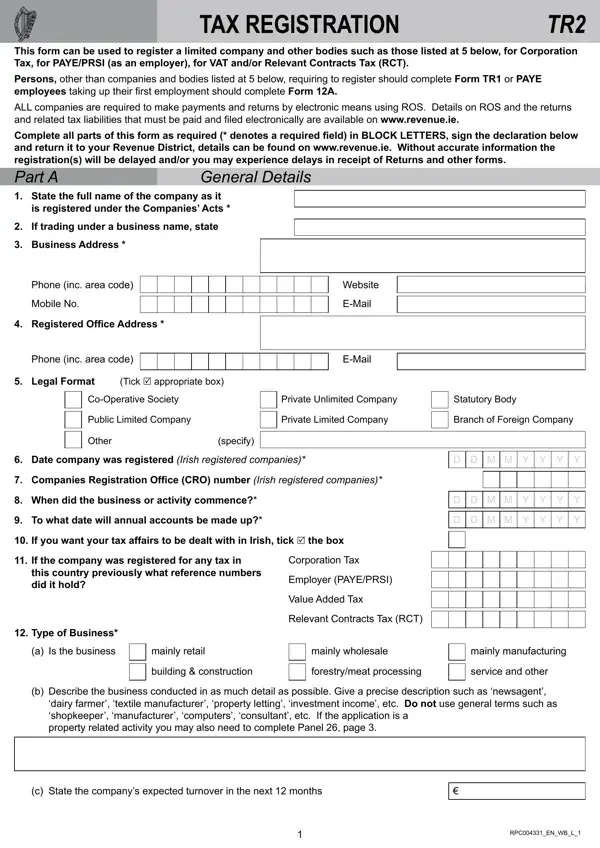
For businesses navigating the complexities of tax registration, the TAX REGISTRATION TR2 form serves as a crucial starting point. Designed to streamline the process for limited companies and various other entities as outlined, this form facilitates registration for Corporation Tax, PAYE/PRSI (as an employer), VAT, and Relevant Contracts Tax (RCT). Distinguishing itself, it mandates all companies adhere to electronic payments and returns via the Revenue Online Service (ROS), pinpointing the need for digital compliance in modern taxation practices. With a meticulous requirement for complete and accurate information—highlighted by the emphasis on BLOCK LETTERS and detailed field designations—the form underscores the importance of precision in tax matters. Entities not falling under its purview are directed to alternative forms, such as the TR1 or Form 12A, ensuring a tailored approach to tax registration across different business structures. Additionally, its comprehensive layout, requesting detailed business information from company names to the expected turnover, caters to a broad spectrum of tax registration needs, thereby serving as a fundamental resource for entities embarking on their tax obligations journey.

QuestionAnswer
Form NameForm Tr2
Form Length4 pages
Fillable?No
Fillable fields0
Avg. time to fill out1 min
Other namesrevenue form tr2, tr2 fillable, tr2 form, ireland form registration

How to Edit Form Tr2 Online for Free

Using PDF documents online is super easy with our PDF editor. Anyone can fill in tax registration form tr2 here painlessly. Our professional team is relentlessly endeavoring to expand the tool and help it become even better for people with its extensive functions. Discover an endlessly revolutionary experience now - explore and find new possibilities as you go! By taking several easy steps, you may begin your PDF journey:

Step 1: First, open the pdf editor by clicking the "Get Form Button" at the top of this page.

Step 2: With our handy PDF file editor, it is easy to do more than simply fill in blanks. Express yourself and make your forms appear high-quality with custom textual content incorporated, or adjust the file's original content to perfection - all comes along with the capability to add your own graphics and sign the document off.

It will be an easy task to fill out the pdf with this practical guide! Here is what you want to do:

1. The tax registration form tr2 necessitates particular information to be entered. Ensure the subsequent fields are complete:

Part number 1 of completing tr2 form fillable

2. Once your current task is complete, take the next step – fill out all of these fields - Legal Format, Tick R appropriate box, CoOperative Society, Private Unlimited Company, Statutory Body, Public Limited Company, Private Limited Company, Branch of Foreign Company, Other, specify, Date company was registered Irish, D D M M Y Y Y Y, Companies Registration Ofice CRO, When did the business or activity, and To what date will annual accounts with their corresponding information. Make sure to double check that everything has been entered correctly before continuing!

tr2 form fillable completion process shown (portion 2)

3. This subsequent section is considered fairly simple, dairy farmer textile manufacturer, c State the companys expected, and RPCENWBL - each one of these fields will need to be completed here.

Ways to prepare tr2 form fillable portion 3

It's easy to get it wrong while completing your c State the companys expected, thus make sure that you look again prior to when you submit it.

4. Filling in Part A continued, General Details, If the business will supply, Directors give the following, of two directors are required, Name, Private Address, Shareholding, PPSN, Company Secretary if this is one, acting precedent partner partner, Name, Private Address, PPSN, and Shareholders give the details of is paramount in the next part - be sure to devote some time and fill in each and every blank area!

How you can complete tr2 form fillable step 4

5. Lastly, this last section is precisely what you'll want to complete before closing the document. The blanks here are the following: Name, Private Address, Shareholding, PPSN, Adviser Details give the, accounts and tax returns of the, Address, Phone inc area code, Contact name for Advisor, Tax Adviser Identiication Number, Clients Reference, EMail, Mobile No, If correspondence relating to the, and VAT ie VATs.

Step # 5 in filling in tr2 form fillable

Step 3: Ensure that your details are accurate and click on "Done" to progress further. After creating a7-day free trial account at FormsPal, you'll be able to download tax registration form tr2 or email it immediately. The PDF form will also be accessible in your personal account page with your each and every change. We don't sell or share any details you enter whenever dealing with forms at our site.