
Fpf400 Form PDF Details

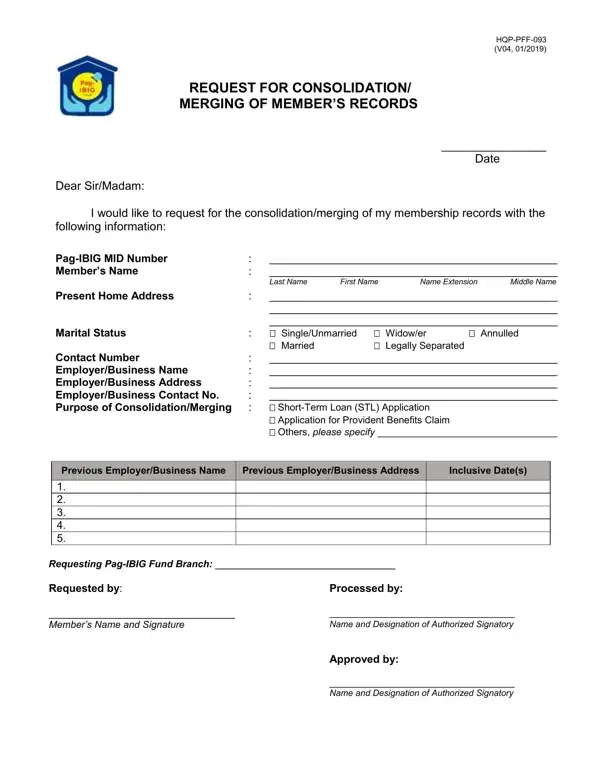
Understanding the intricacies of managing and consolidating membership records is a critical task for members of the Pag-IBIG Fund, particularly when aiming to simplify their financial engagements and ensure the accuracy of their records. The FPF400 form, officially known as the Request for Consolidation/Merging of Member’s Records, stands at the forefront of facilitating such important processes. Filed with Pag-IBIG, this document assists members in unifying their membership details, which may have been fragmented across different periods or types of employment, into a single, coherent record. It requires detailed personal and employment information, ranging from the Pag-IBIG MID Number and member’s full name to current home address, marital status, and contact details. Moreover, it explicitly asks for the specific purpose behind the request, whether for short-term loan applications, claims for provident benefits, or other reasons. Additionally, the document requires information about previous employers or businesses, which further assists in the comprehensive consolidation of a member’s records. This form embodies a pivotal step for members seeking to streamline their interactions with Pag-IBIG, particularly when applying for loans or claiming benefits, emphasizing the significance of keeping members’ records organized and updated.

QuestionAnswer
Form NameFpf400 Form
Form Length1 pages
Fillable?No
Fillable fields0
Avg. time to fill out15 sec
Other namesrequest for consolidation merging of member's records form 2021, request for consolidation merging of member's records, pag ibig consolidation form 2021, pagibig merging form

How to Edit Fpf400 Form Online for Free

pagibig consolidation form 2021 can be completed in no time. Simply open FormsPal PDF editing tool to complete the task right away. To make our editor better and more convenient to utilize, we continuously work on new features, with our users' feedback in mind. With a few basic steps, you can begin your PDF editing:

Step 1: Click the "Get Form" button above. It will open our pdf editor so that you could start filling in your form.

Step 2: This editor will allow you to customize your PDF file in various ways. Change it by adding customized text, correct original content, and add a signature - all at your convenience!

This PDF form will require specific information to be filled in, therefore you need to take the time to type in what is expected:

1. It's vital to complete the pagibig consolidation form 2021 accurately, thus be mindful while filling in the areas including these fields:

Step no. 1 of submitting pag ibig merging form

2. Your next stage is usually to fill in these particular blanks: Previous EmployerBusiness Name, Previous EmployerBusiness Address, Inclusive Dates, Requesting PagIBIG Fund Branch, Requested by Members Name and, Processed by Name and Designation, and Approved by Name and Designation.

Find out how to complete pag ibig merging form step 2

People often make mistakes when filling out Approved by Name and Designation in this part. Be sure to revise whatever you type in here.

Step 3: Right after you've reviewed the information in the blanks, click on "Done" to conclude your FormsPal process. Sign up with us now and instantly gain access to pagibig consolidation form 2021, prepared for downloading. All changes made by you are saved , allowing you to modify the file at a later time if needed. FormsPal guarantees your information privacy by having a secure system that never records or shares any kind of sensitive information involved in the process. Be confident knowing your documents are kept safe every time you use our tools!