
IMM 5645 at a glance
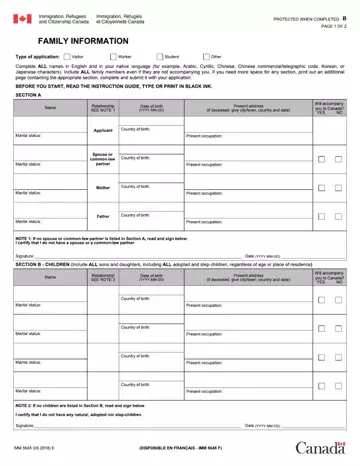
What it is: IMM 5645 (01-2021) is FAMILY INFORMATION: Section A, Section B - Children and Section C - Brothers and Sisters.
Who signs: Sign and date SECTION D - CERTIFICATION (Date in YYYY-MM-DD). If no spouse or common-law partner is listed in Section A, read and sign under NOTE 1 ("I certify that I do not have a spouse or a common-law partner"); if no children are listed in Section B, read and sign under NOTE 2 ("I certify that I do not have any natural, adopted nor step-children").
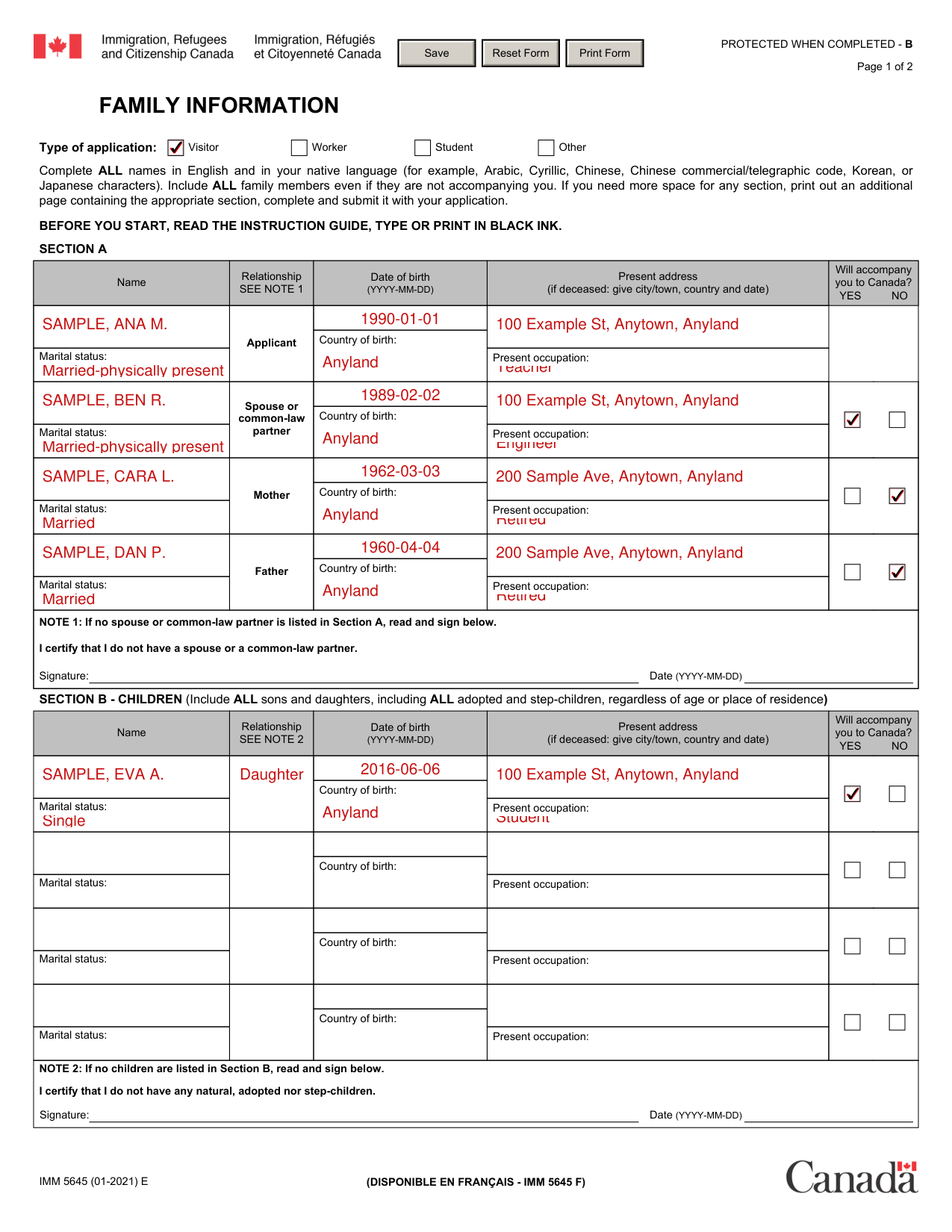
A filled-in IMM 5645 example: an applicant lists their family
How to fill out IMM 5645, box by box
Type of application
Complete ALL names in English and in your native language (for example, Arabic, Cyrillic, Chinese, Chinese commercial/telegraphic code, Korean, or Japanese characters). Include ALL family members even if they are not accompanying you. If you need more space for any section, print out an additional page containing the appropriate section, complete and submit it with your application. Before you start, read the instruction guide, and type or print in black ink.
Under Type of application, mark Visitor, Worker, Student or Other.
Section A
Section A has boxes for the Applicant, the Spouse or common-law partner, the Mother and the Father.
For each of them, enter the Name, the Date of birth (YYYY-MM-DD), the Country of birth, the Present address (if deceased: give city/town, country and date), the Present occupation and the Marital status.
Under Will accompany you to Canada?, mark YES or NO for the Spouse or common-law partner, the Mother and the Father.
NOTE 1: If no spouse or common-law partner is listed in Section A, read and sign in Section A: I certify that I do not have a spouse or a common-law partner. Sign in Signature and enter the Date (YYYY-MM-DD).
Section B - Children
Include ALL sons and daughters, including ALL adopted and step-children, regardless of age or place of residence.
Under Will accompany you to Canada?, mark YES or NO.
For ALL sons and daughters, enter the Name, the Relationship, the Date of birth (YYYY-MM-DD), the Country of birth, the Present address (if deceased: give city/town, country and date), the Marital status and the Present occupation.
NOTE 2: If no children are listed in Section B, read and sign in Section B: I certify that I do not have any natural, adopted nor step-children. Enter the Date (YYYY-MM-DD) with the Signature.
Section C - Brothers and Sisters
Include ALL brothers and sisters, ALL half-brother and sister and stepbrother and sister.
Will accompany you to Canada? Mark YES or NO.
For ALL brothers and sisters, enter the Name, the Relationship, the Date of birth (YYYY-MM-DD), the Country of birth, the Present address (if deceased: give city/town, country and date), the Marital status and the Present occupation.
Section D - Certification
SECTION D - CERTIFICATION: By signing you certify that the information contained in this document is complete, accurate and factual.
I also realize that once this document has been completed and signed that it will form part of my Immigration Record and will be used to verify my family details on future applications.
In this section, sign in Signature and enter the Date (YYYY-MM-DD).
More rules for IMM 5645
Personal information provided on this form is collected by Immigration, Refugees, and Citizenship Canada (IRCC) under the authority of the Immigration and Refugee Protection Act (IRPA).
The personal information provided will be used for the purpose of processing an application.
The personal information provided may be disclosed to other federal government institutions, law enforcement bodies, provincial/territorial governments, foreign governments for the purpose of validating identity, eligibility and admissibility.
The personal information may also be disclosed to medical practitioners for the purpose of validating identity and eligibility.
Personal information may also be used for other purposes including research, statistics, program and policy evaluation, internal audit, compliance, risk management, subsequent program eligibility, and strategy development and reporting.
The Privacy Act gives individuals the right of access to, protection, and correction of their personal information.
If you are not satisfied with the manner in which IRCC handles your personal information, you may exercise your right to file a complaint to the Office of the Privacy Commissioner of Canada.
Before you go
Failure to complete the form in full may result in a delay or the application not being processed.
Sources
[1] IMM 5645 (01-2021) E, Family Information, Immigration, Refugees and Citizenship Canada (the Official source link on this page).
