
Lic 401 Form PDF Details

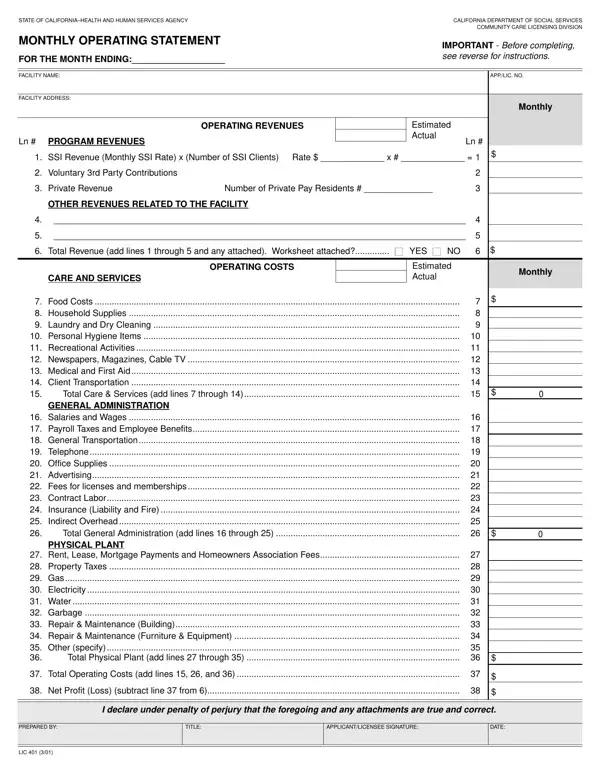
The LIC 401 form is a vital document for care facilities operating within the California Department of Social Services, particularly under the Community Care Licensing Division. This comprehensive form, requiring diligent completion on a monthly basis, serves as an operating statement for the reporting period specified. It encompasses various essential aspects such as estimated and actual revenues, ranging from SSI revenue, voluntary third-party contributions, private revenue to other facility-related revenues. Additionally, it meticulously outlines operating costs, segregated into subcategories like care and services, general administration, and physical plant costs. These encapsulate expenses from food costs, household supplies, personal hygiene items, to more extensive costs like rent, utilities, and maintenance. Facilities must report both estimated and actual figures, offering a holistic view of their financial health. The necessity for accuracy is underscored by the requirement for the preparer's printed name and the applicant or licensee's signature, affirming the veracity of the information. This form not only fulfills regulatory compliance but also aids in the strategic management of the facility's resources, ensuring operational sustainability and the provision of quality care.

QuestionAnswer
Form NameLic 401 Form
Form Length2 pages
Fillable?No
Fillable fields0
Avg. time to fill out30 sec
Other nameslic 401a form, lic 401 monthly operating statement, 401 statement, lic 401 example

How to Edit Lic 401 Form Online for Free

If you want to fill out 401 statement, you won't need to install any kind of software - just try using our PDF editor. To retain our tool on the cutting edge of convenience, we strive to implement user-oriented capabilities and enhancements on a regular basis. We are always grateful for any feedback - join us in remolding the way you work with PDF files. Here's what you'd want to do to start:

Step 1: First, access the tool by pressing the "Get Form Button" at the top of this page.

Step 2: The editor will let you change the majority of PDF files in many different ways. Improve it by including personalized text, correct existing content, and put in a signature - all at your fingertips!

This PDF form will need some specific information; in order to ensure correctness, please make sure to take into account the suggestions directly below:

1. The 401 statement will require specific details to be inserted. Be sure the following fields are completed:

Writing part 1 of 401 monthly

2. Given that the last array of fields is completed, it's time to insert the essential details in Food Costs Household Supplies, GENERAL ADMINISTRATION, Salaries and Wages Payroll, PHYSICAL PLANT, and Rent Lease Mortgage Payments and in order to proceed further.

Food Costs   Household Supplies, Rent Lease Mortgage Payments and, and Salaries and Wages   Payroll in 401 monthly

3. The following segment is typically pretty easy, Rent Lease Mortgage Payments and, Total Operating Costs add lines, Net Profit Loss subtract line, I declare under penalty of perjury, PREPARED BY, TITLE, APPLICANTLICENSEE SIGNATURE, DATE, and LIC - all these fields needs to be filled in here.

Step number 3 in filling out 401 monthly

When it comes to DATE and Total Operating Costs add lines, be sure you don't make any mistakes in this current part. These are certainly the most important ones in this document.

Step 3: Immediately after going through the entries, click "Done" and you are all set! Join us today and easily get access to 401 statement, available for download. Each change made is handily saved , meaning you can change the form later when required. FormsPal is devoted to the personal privacy of our users; we make sure all information processed by our tool continues to be secure.