
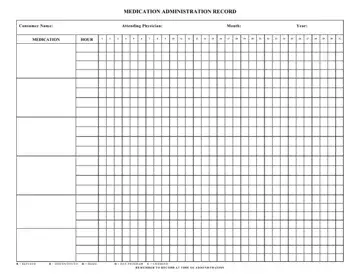
A medication administration record sheet is a straightforward form used in healthcare and caregiving settings. In medical terms, a MAR is a record of the medication, the dosage, and the time caregivers give it. Healthcare staff rely on it to follow medication instructions accurately and avoid missed or duplicate doses.
The MAR medication sheet gives everyone involved in care a view of the patient’s medication schedule. Staff can quickly check the sheet to confirm whether a dose has already been given or still needs to be administered.
In this sheet, you can list each medication with its dosage, route of administration, and scheduled time. Caregivers then mark the appropriate time slot to show whether they gave, refused, changed, or discontinued the medication. A structured format like this makes it easy to review all activity at a glance and identify any issues quickly.
Most medication administration record sheets cover these details:
✔️ Patient or resident information section.
✔️ Medication name, dosage, route, and time.
✔️ Administration tracking grid.
✔️ Daily dates and hourly or scheduled time slots.
✔️ Status indicators and notes.
✔️ Refused, discontinued, changed, home, or day program.
Using this form also makes shared care much easier. When shifts change or there's more than one caregiver, everyone can quickly track all medications. It’s also helpful during reviews, audits, or doctor visits, as it gives a complete record of the patient’s medication history.
| Question | Answer |
|---|---|
| Form Name | Medication Administration Record PDF |
| Form Length | 1 page |
| Fillable? | Yes |
| Fillable fields | 65 |
| Avg. time to fill out | 15 min |
| Other names | MAR sheet template, printable MAR sheet, MAR template, blank MAR sheets |
