
Oha 7210 PDF Details

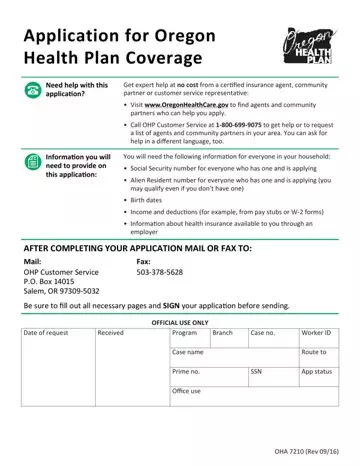
Navigating the healthcare landscape can be a daunting task, particularly when it comes to understanding and completing the necessary paperwork to ensure access to coverage. The OHA 7210 form serves as a critical document for individuals and families in Oregon seeking health plan coverage under the Oregon Health Plan. This form is designed to streamline the application process, offering a detailed but straightforward path for applicants to provide essential information about themselves and their household members. Required information includes Social Security numbers for all applying members who possess one, Alien Resident numbers for applicable individuals, birth dates, income and deduction details, and information regarding any employer-provided health insurance. Importantly, the form also offers insights into the kind of assistance available to applicants, emphasizing that expert help is accessible at no cost, thereby ensuring that individuals do not have to navigate the process alone. Agents, community partners, and customer service representatives are ready to assist, with support available for those needing help in languages other than English. Additionally, the form meticulously describes how the provided information will be used to assess eligibility and keep applicants informed throughout the process. By delineating the steps involved in the application and outlining the support mechanisms in place, the OHA 7210 form acts as a crucial tool in the effort to secure health coverage, making a significant difference in the lives of Oregonians by ensuring they have the guidance and resources necessary to access important health benefits.

QuestionAnswer
Form NameOha 7210
Form Length25 pages
Fillable?No
Fillable fields0
Avg. time to fill out6 min 15 sec
Other namesoregon application health form, 7210 or application, medicaid renewal application 7210, oregon application health plan form

How to Edit Oha 7210 Online for Free

This PDF editor was made to be so simple as possible. While you keep up with these steps, the procedure for filling out the 7210 or application file will undoubtedly be effortless.

Step 1: Hit the button "Get form here" to open it.

Step 2: Now you will be on your document edit page. You'll be able to add, transform, highlight, check, cross, add or erase areas or phrases.

For you to get the form, provide the data the program will require you to for each of the following areas:

step 1 to filling in oha plan

Type in the demanded details in the STEP, Legal name first middle last and, Maiden or other names used first, Social Security number SSN An, SSN, No Applied for SSN Newborn Dont, Birthdate MMDDYYYY, Sex, Phone number Home Work Cell, Male Female, Do you live in Oregon Answer yes, Only answer if you are applying, Email address, Home address skip to if you dont, and ApartmentUnit segment.

step 2 to entering details in oha plan

The program will require details to instantly fill in the box Mailing address only required if, ApartmentUnit, City, State, and ZIP code.

Completing oha plan part 3

In the field STEP, Primary Contact continued, In what language do you want us, In what language do you want us, Do you need written materials in, If yes which Braille Oral, Are you pregnant Yes No Is, Do you the primary contact plan, plan to file even if you will not, YES If yes complete ab below NO, What will your filing status be on, Single Head of household, If married spouses name, Do you have any tax dependents, and Firstlast name and birthdate of, list the rights and obligations of the parties.

stage 4 to filling out oha plan

Check the areas Note for each person listed as a, Are you claimed as a dependent on, If yes list firstlast name and, How are you related to the tax, If HispanicLatino ethnicity, Mexican Mexican American, Race check all that apply, American Indian or Alaska Native, Filipino Guamanian or Chamorro, Other Pacific Islander Samoan, Is your tax filing information, YES NO If no complete Appendix D, Are you applying for health, coverage, and YES If yes go to NO If no skip and thereafter fill them in.

Filling out oha plan stage 5

Step 3: Once you've clicked the Done button, your document is going to be available for upload to every gadget or email address you identify.

Step 4: It may be simpler to keep duplicates of your document. You can be sure that we will not share or see your data.

Please rate Oha 7210

1 Votes
If you believe this page is infringing on your copyright, please familiarize yourself with and follow our DMCA notice and takedown process - click here to proceed .
