
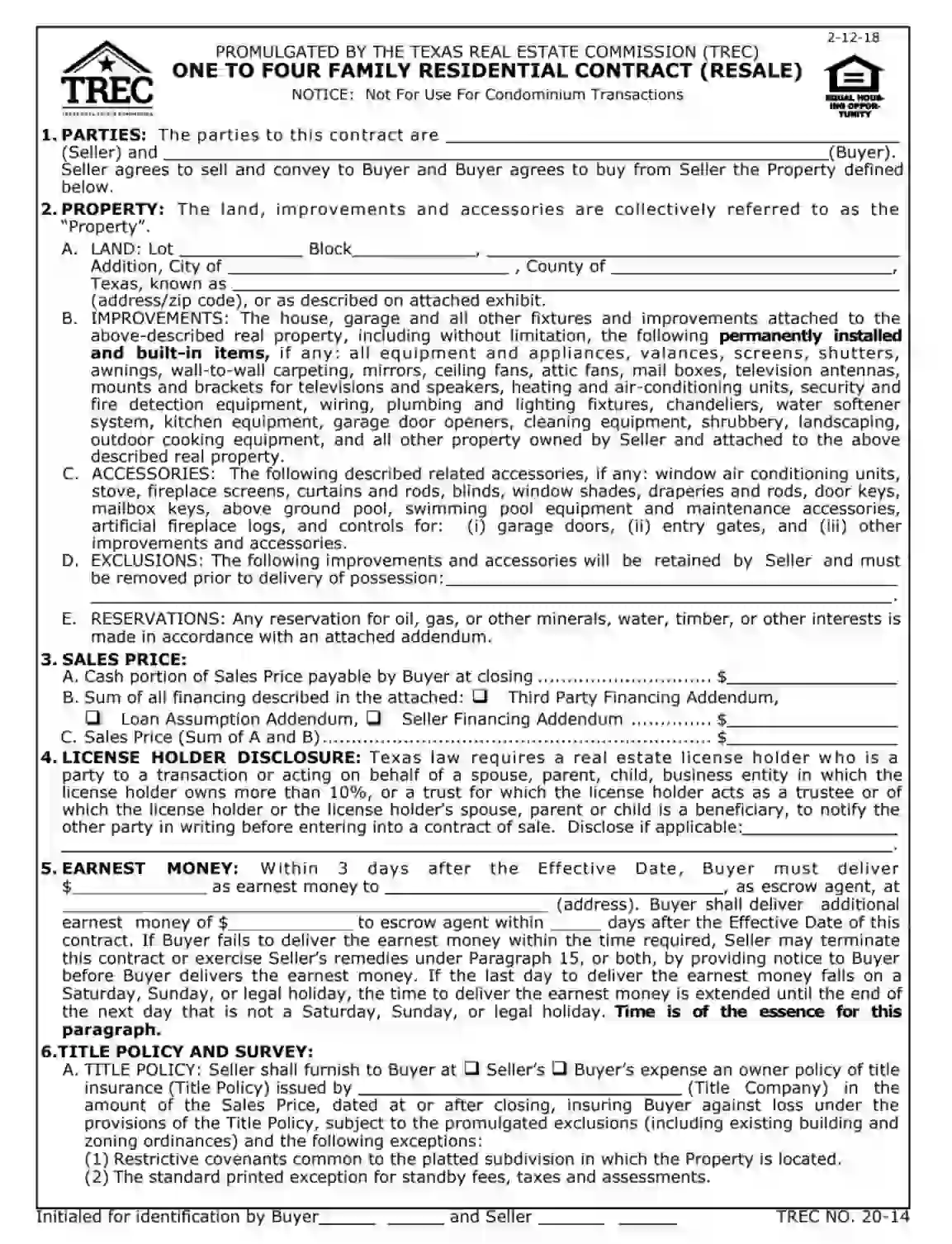
The TREC One to Four Family Residential Contract is a legally binding document used in Texas to govern the sale and purchase of residential properties containing one to four family units. This contract outlines the terms and conditions the buyer and seller agreed upon, including the property’s sales price, each party’s obligations, property descriptions, financing details, and other necessary provisions such as title policies, surveys, and inspections.
The TREC One to Four Family Residential Contract standardizes residential real estate transactions within the state, ensuring that all critical aspects are addressed to protect the interests of both parties involved. The form facilitates a clear understanding and agreement on how the sale will proceed, each party’s responsibilities, and the timelines for completing various stages of the sale process.
Other Texas Forms
You will find more fillable Texas forms accessible here. Following next, we listed a number of the more popular forms available in this category. Also, keep in mind that it is easy to upload, fill out, and edit any PDF form at FormsPal.
1. Download the free TREC One to four-family residential contract 02-12-2018 template.
2. Write down the full names of both parties of the residential contract (trader and consumer). By doing this, a consumer consent to purchase the trader’s estate, and a trader agrees to transfer his estate to the consumer’s right of ownership.

3. Give detailed information on the estate, including country, city, zip code, block, and lot. Add all accessories coming with the estate. They can be curtains, door keys, kitchen equipment, swimming pool, entry gates, fireplace, stove, fireplace logs, and others. Also, state what accessories a trader wants to keep to himself before signing the residential contract. Give a list of those.

4. Establish the final price for the estate in American dollars. If there’s a third-party financing addendum, seller financing addendum, or loan assumption addendum, fill in the contract.

5. Give the information about the license holder, as the Texas state law requires for completing the estate transferring process.

6. Write down the date on which a consumer must deposit earnest money to a trader. Fill in the address where that money has to be transferred. If a consumer won’t do it on the established date, a trader has the right to cancel the whole deal.

7. Give information about an owner’s policy of title insurance. A trader is the one who needs to provide this document to a consumer, but they can decide whether they’re doing it at their or the consumer’s expense. Exceptions and exclusions of the agreed provisions of the Title Policy must be stated in the residential contract as well.

8. Both a consumer and a trader have to leave signatures at the bottom of each page approving their identification of the established residential contract’s amendments. Estate’s address must be written down after signatures every time.

9. Thoroughly read the commitment of the deal before signing the residential contract.
10. Complete the survey, choose the one option only. Only a registered professional land surveyor has the right to perform this procedure.

11. Write down the objections to the contract’s statements if you have any. You won’t have this opportunity anymore.

12. Choose if the estate will be a member of the property owner’s associations.

13. Both a consumer and a trader have to leave signatures at the bottom of each page approving their identification of the established residential contract’s amendments. Estate’s address must be written down after signatures every time.
14. Attentively read all details of the future residential contract, involving information on the statutory tax districts, tidewaters, annexation of the estate, whether the estate is in an approved service area of a utility service provider, belonging of the estate to the public improvement districts, belonging it to the propane gas system service area, and check if there’re water level fluctuations in the area.
15. Both a consumer and a trader have to leave signatures at the bottom of each page approving their identification of the established residential contract’s amendments. Estate’s address must be written down after signatures every time.
16. Give information on the estate’s condition, covering if a consumer got a trader’s disclosure notice or not. Also, highlight if a consumer takes the estate as it is or not. If a consumer wants a trader to complete some repairs, he needs to write it down. Try not to use general phrases. Environmental matters must be considered while establishing demands for the estate’s repairs and treatments.

17. If a consumer wants to obtain the residential service contract from a TREC’s approved residential service company, he has the right to do it. A trader has to compensate for the money spent by a consumer. The sum of the compensation must be stated in the contract in American dollars.

18. Both a consumer and a trader have to leave signatures at the bottom of each page approving their identification of the established residential contract’s amendments. Estate’s address must be written down after signatures every time.
19. Give details of the sale’s closing. Fill in the date of the closing. Both parties of the estate’s sale need to agree with this date.

20. State the details of a consumer’s possession of the property. Choose the option that suits your interests the most. Also, check the lease details.

21. Write down the special provisions, if there are any. Include only business details and factual statements.

22. Establish the expenses incurred during the residential process. Both a trader and a consumer must write down their expenses in American dollars.

23. Both a consumer and a trader have to leave signatures at the bottom of each page approving their identification of the established residential contract’s amendments. Estate’s address must be written down after signatures every time.
24. Carefully read the information on the prorations, casualty loss, default, mediation, fees of an attorney, escrow agent, the conditions of depositing the earnest money, possible estate’s damages.
25. Both a consumer and a trader have to leave signatures at the bottom of each page approving their identification of the established residential contract’s amendments. Estate’s address must be written down after signatures every time.
26. Approve that all representations, covenants, and warranties survive closing. Check the federal tax requirements.
27. Add addresses of both parties of the residential process so they can send each other their written notices. Write down their emails, faxes, and mobile phones.

28. Choose the additions to the parties’ agreement. If you decide to do it after signing the contract, you can do it only in a written way. If there’s no needed additional document in the list, you can add it yourself.

29. Both a consumer and a trader have to leave signatures at the bottom of each page approving their identification of the established residential contract’s amendments. Estate’s address must be written down after signatures every time.
30. State the details of the residential contract termination. Choose how much is the fee a consumer has to pay to a trader. Write it in American dollars.

31. Show the residential contract to your attorney before signing it. Real estate license holders can’t give you any advice due to the TREC rules. Attorneys of both parties have to sign the contract and write down their faxes, emails, and mobile phones.

32. Write down the effective date of the residential contract.

33. Both a trader and a consumer need to sign the approved legal document. Estate’s address must be written down after signatures.

34. Give detailed information on the brokers. Include both brokers’ firms and their license numbers. Establish who from brokers represent a consumer and who represents a trader. Include brokers’ emails, associate’s and listing associate’s names, certified supervisors of associate and listing associate, selling associate’s name, email, certified supervisor, and office address. The address must include state, city, and zip code. Write down how much money a listing broker pays to another broker.

35. Add the estate’s address after this.

36. Complete the Option Fee Receipt. Write down the amount of the option fee in American dollars. A listing broker or a seller has to sign the receipt and fill in the effective date.

37. Fill out the Earnest Money Receipt. Write down the amount of earnest money in American dollars. An escrow agent has to sign the receipt, write down the effective date, email, city, state, zip code, fax, address, and mobile phone.

38. Complete the Contract Receipt. This receipt approves the contract’s receipt. An escrow agent has to sign the receipt, write down the effective date, email, city, state, zip code, fax, address, and mobile phone.

39. Fill out the Additional Earnest Money Receipt. Write down the amount of additional earnest money in American dollars. An escrow agent has to sign the receipt, write down the effective date, email, city, state, zip code, fax, address, and mobile phone.
