
Pbgc Form 10 PDF Details

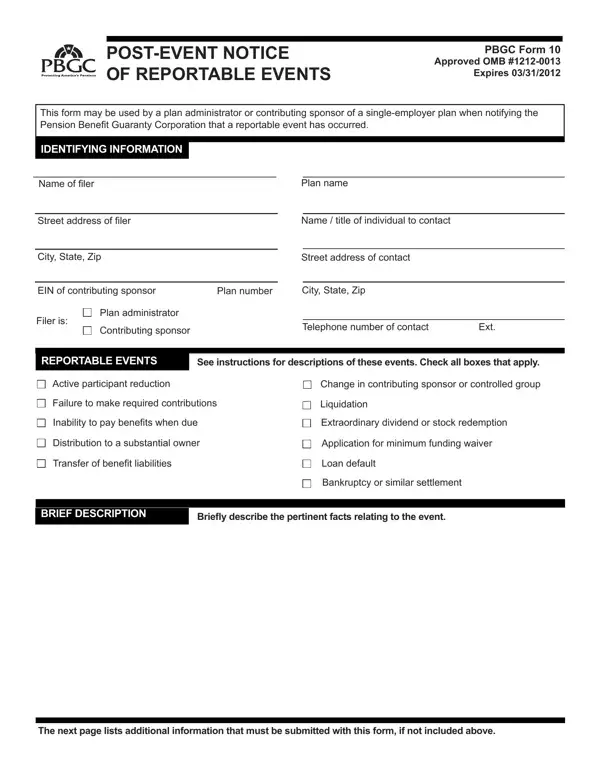
At the intersection of employer obligations and pension safety nets stands the Pension Benefit Guaranty Corporation (PBGC) Form 10. This critical document serves as a linchpin for the notification of reportable events regarding single-employer pension plans, a mechanism designed to safeguard the financial integrity of the pension insurance system in the United States. Employers or plan administrators reach for this form when certain events, potentially threatening the solvency or operational structure of a pension plan, occur. These events range from significant changes in the employer’s financial health, like bankruptcy or a failure to make required contributions, to shifts in plan demographics, including active participant reductions. The form demands detailed information, including but not limited to, the narrative of the event, involved parties' contact details, and quantitative data such as participant numbers or missed payments. Additionally, further documentation may be required, encompassing loan defaults, liquidation details, or changes in the contributing sponsor or controlled group, underscoring the form's role in providing a comprehensive view of the event's implications for the pension plan. By compiling and submitting this form, plan administrators or contributing sponsors engage in a crucial dialogue with the PBGC, ensuring transparency and initiating possible interventions to protect pension beneficiaries.

QuestionAnswer
Form NamePbgc Form 10
Form Length2 pages
Fillable?No
Fillable fields0
Avg. time to fill out30 sec
Other namesform notice events, form event reportable, event reportable events, form event notice

How to Edit Pbgc Form 10 Online for Free

pbgc form event online can be filled in online easily. Simply try FormsPal PDF editing tool to complete the job in a timely fashion. We are dedicated to making sure you have the absolute best experience with our tool by constantly introducing new functions and enhancements. Our editor is now even more intuitive with the latest updates! Currently, editing PDF files is simpler and faster than ever before. It just takes a couple of basic steps:

Step 1: Just click the "Get Form Button" above on this site to launch our pdf file editing tool. Here you'll find everything that is required to work with your document.

Step 2: This editor gives you the capability to change the majority of PDF documents in a range of ways. Enhance it by writing your own text, correct original content, and place in a signature - all at your disposal!

It really is easy to complete the document using this detailed tutorial! Here's what you want to do:

1. It is recommended to fill out the pbgc form event online properly, thus be attentive when working with the areas that contain these specific fields:

How to prepare form event reportable part 1

2. Once your current task is complete, take the next step – fill out all of these fields - Distribution to a substantial owner, Transfer of beneit liabilities, Application for minimum funding, Loan default, Bankruptcy or similar settlement, BRIEF DESCRIPTION, and Briely describe the pertinent with their corresponding information. Make sure to double check that everything has been entered correctly before continuing!

Briely describe the pertinent, Loan default, and Distribution to a substantial owner inside form event reportable

3. The third part is usually straightforward - fill out all of the fields in Active Participant Reduction, Statement explaining the cause of, Failure to Make Required, Due date and amount of both the, Name of each plan maintained by, Inability to Pay Beneits When Due, Date of any missed beneit payment, Next date on which the plan is, Description of the plans old and, Name of each plan maintained by, Liquidation, Description of the plans, Name of each plan maintained by, Extraordinary Dividend or Stock, and Name and EIN of person making the in order to complete this segment.

Completing segment 3 of form event reportable

4. It is time to complete this next segment! Here you'll have all these Next date on which the plan is, Distribution to a Substantial Owner, Name address and phone number of, Transfer of Beneit Liabilities, Name contributing sponsor and, Explanation of the actuarial, Copy of waiver application with, Loan Default, Copy of the relevant loan, Due date and amount of any missed, Bankruptcy or Similar Settlement, Copy of bankruptcy petition or, Note To the extent this, and Name of each plan maintained by blank fields to do.

Explanation of the actuarial, Copy of bankruptcy petition or, and Bankruptcy or Similar Settlement in form event reportable

Always be extremely attentive while completing Explanation of the actuarial and Copy of bankruptcy petition or, as this is the section in which many people make some mistakes.

Step 3: Check everything you have entered into the blanks and then click on the "Done" button. Try a free trial subscription at FormsPal and acquire immediate access to pbgc form event online - downloadable, emailable, and editable in your FormsPal account. At FormsPal.com, we do everything we can to be sure that your details are maintained private.