
Pdhra Dd Form 2900 PDF Details

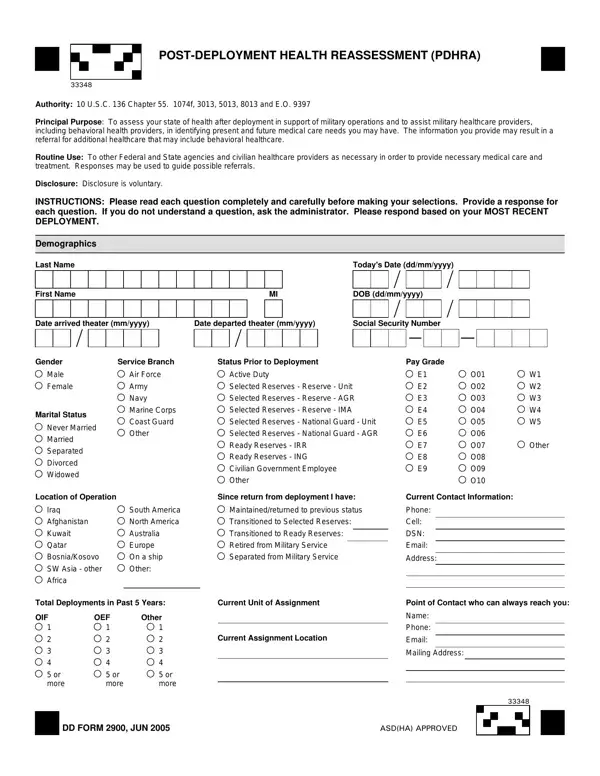
The Post-Deployment Health Reassessment (PDHRA) DD Form 2900 is a crucial document designed to evaluate the health status of military personnel after they return from deployment. Authorized under 10 U.S.C. 136, Chapter 55, 1074f, 3013, 5013, 8013, and Executive Order (E.O.) 9397, its primary mission is to facilitate a comprehensive assessment of a service member's physical and mental health. This form plays a pivotal role in identifying any immediate and future medical care needs, potentially leading to referrals for additional healthcare services, including behavioral health support. By collecting detailed information about the individual’s deployment experience, current health concerns, and interactions with healthcare providers post-deployment, the PDHRA aims to address a broad spectrum of health issues ranging from physical injuries to mental health symptoms. Disclosure of personal health information through the form is voluntary but critical for ensuring that service members receive the appropriate care and support. Additionally, the information may be shared with other Federal and State agencies as well as civilian healthcare providers as necessary, to facilitate proper medical care and treatment, highlighting the form’s importance in the seamless transition of care from military to civilian health services.

QuestionAnswer
Form NamePdhra Dd Form 2900
Form Length4 pages
Fillable?No
Fillable fields0
Avg. time to fill out1 min
Other namesdd2900 post deployment health reassessment, O08, OEF, yyyy

How to Edit Pdhra Dd Form 2900 Online for Free

When working in the online PDF tool by FormsPal, you are able to fill out or edit W3 here and now. FormsPal professional team is relentlessly endeavoring to develop the tool and enable it to be even better for people with its cutting-edge functions. Bring your experience one step further with continually improving and exciting possibilities we offer! It merely requires a couple of basic steps:

Step 1: Just hit the "Get Form Button" above on this webpage to start up our pdf file editing tool. This way, you will find all that is needed to fill out your file.

Step 2: When you launch the tool, you will get the form prepared to be completed. Apart from filling in various blanks, you might also do several other actions with the file, specifically adding any words, editing the original textual content, adding illustrations or photos, putting your signature on the form, and much more.

It is straightforward to fill out the document following our helpful guide! Here is what you want to do:

1. To start off, once completing the W3, start with the part that has the next blanks:

Writing section 1 of yyyy

2. Your next part is usually to complete these fields: Iraq Afghanistan Kuwait Qatar, Total Deployments in Past Years, Current Unit of Assignment, OIF or more, OEF or more, Other or more, Current Assignment Location, Point of Contact who can always, DD FORM JUN, and ASDHA APPROVED.

Total Deployments in Past  Years, Current Assignment Location, and Current Unit of Assignment of yyyy

Regarding Total Deployments in Past Years and Current Assignment Location, ensure you don't make any mistakes in this section. The two of these could be the key fields in the PDF.

3. Through this step, examine Overall how would you rate your, Excellent, Very Good, Good, Fair, Poor, Compared to before your most, Much better now than before I, Since you returned from, visits, Over visits, No visits, visit, Since you returned from, and During your deployment were you. All of these need to be filled out with highest attention to detail.

Writing part 3 of yyyy

4. Completing a IF YES please mark the items, Chronic cough Runny nose Fever, Redness of eyes with tearing, Do you have any persistent major, Yes, a IF YES please mark the items, DEET insect repellent applied to, and Paints Radiation Radarmicrowaves is essential in the fourth section - always spend some time and fill out each field!

Part # 4 in completing yyyy

5. Finally, the following final portion is what you will need to complete prior to submitting the document. The blank fields in question are the next: DEET insect repellent applied to, DD FORM JUN, Paints Radiation Radarmicrowaves, and Other.

yyyy conclusion process outlined (step 5)

Step 3: Right after you've looked over the details entered, click "Done" to conclude your form. Join FormsPal today and easily gain access to W3, all set for download. All adjustments made by you are kept , letting you change the file at a later time anytime. FormsPal guarantees safe form completion devoid of data recording or sharing. Feel comfortable knowing that your details are safe here!