Peco Service And Meter Application PDF Details

Getting electricity set up for a new construction, upgrade, or remodel requires several steps, one of which is filling out the PECO Service and Meter Application form. This form is crucial for anyone seeking to initiate or change electric service within the PECO service region. It includes sections for all necessary details ranging from the customer's personal information, their current electrical setup or needs, to technical specifications about the load and service characteristics expected. The application requires specifics such as customer name, service and billing addresses, tax identification number or social security number, and detailed information about the service requested—be it new, an upgrade, or a temporary setup. Moreover, the form asks for the electrician or contractor details, construction status, the type of electrical service required, and specifications for metering among other details. It also outlines the necessity for a site plan, single-line diagram, and substation arrangement if applicable, ensuring a comprehensive approach towards preparing for electric service and meter installation. Detailed motor and load characteristics sections ensure that the service provided matches the demand and construction requirements. Completion and accurate submission of this form to the designated PECO regional office are essential steps in ensuring timely processing and avoiding potential delays in service initiation or modifications. Additionally, the form mentions the requirement for compliance with PECO Electric Service Requirements manual and the need for inspection by an approved agency, highlighting the importance of meeting regulatory and safety standards.

QuestionAnswer
Form NamePeco Service And Meter Application
Form Length5 pages
Fillable?No
Fillable fields0
Avg. time to fill out1 min 15 sec
Other namespeco service and meter application, peco application service, peco electric service, peco application electric

Form Preview Example

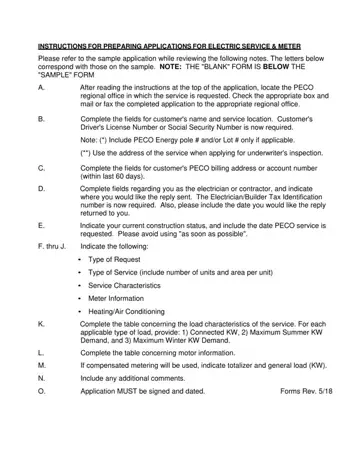
INSTRUCTIONS FOR PREPARING APPLICATIONS FOR ELECTRIC SERVICE & METER

Please refer to the sample application while reviewing the following notes. The letters below correspond with those on the sample. NOTE: THE "BLANK" FORM IS BELOW THE "SAMPLE" FORM

A.After reading the instructions at the top of the application, locate the PECO regional office in which the service is requested. Check the appropriate box and mail or fax the completed application to the appropriate regional office.

B.Complete the fields for customer's name and service location. Customer's Driver's License Number or Social Security Number is now required.

Note: (*) Include PECO Energy pole # and/or Lot # only if applicable.

(**) Use the address of the service when applying for underwriter's inspection.

C.Complete the fields for customer's PECO billing address or account number (within last 60 days).

D.Complete fields regarding you as the electrician or contractor, and indicate where you would like the reply sent. The Electrician/Builder Tax Identification number is now required. Also, please include the date you would like the reply returned to you.

E.Indicate your current construction status, and include the date PECO service is requested. Please avoid using "as soon as possible".

F. thru J. Indicate the following:

Type of Request

Type of Service (include number of units and area per unit)

Service Characteristics

Meter Information

Heating/Air Conditioning

K.Complete the table concerning the load characteristics of the service. For each applicable type of load, provide: 1) Connected KW, 2) Maximum Summer KW Demand, and 3) Maximum Winter KW Demand.

L.Complete the table concerning motor information.

M.If compensated metering will be used, indicate totalizer and general load (KW).

N.Include any additional comments.

O.

Application MUST be signed and dated.

Forms Rev. 5/18

How to Edit Peco Service And Meter Application Online for Free

It's easy to fill in the peco forms form using this PDF editor. The following steps will assist you to immediately get your document ready.

Step 1: The initial step will be to choose the orange "Get Form Now" button.

Step 2: Now you can update the peco forms. The multifunctional toolbar lets you insert, erase, adapt, and highlight content or conduct similar commands.

To be able to create the file, type in the information the program will request you to for each of the appropriate parts:

filling out application electric meter part 1

Jot down the information in ADDRESS TO BE SERVED, APARTMENTLOT, New Service Temporary Service, Load IncreaseDecrease, Service, MakeSafe De energizeCover, CITY STATE, ZIP CODE, TYPE OF SERVICE Please include, UTILITY POLE, SUBDIVISIONDEVELOPMENT, TOWNSHIPMUNICIPALITYWARD, RESIDENTIAL, COMMERICAL, and Single House Apartment Duplex.

Completing application electric meter part 2

Indicate the crucial information in CURRENT CONSUTRCTION STATUS Not, AIRCOND, Approximate Date Service Requested, CUSTOMER COMMENTS DESCRIPTIN OF, TANKLESS WATER HTR, MISC, TOTAL, Include single line diagram and, TOTALIZER LOAD, GENERAL LOAD, SUBMITTED BY DATE, and VOLTAGE part.

application electric meter CURRENT CONSUTRCTION STATUS  Not, AIRCOND, Approximate Date Service Requested, CUSTOMER COMMENTS DESCRIPTIN OF, TANKLESS WATER HTR, MISC, TOTAL, Include single line diagram and, TOTALIZER LOAD, GENERAL LOAD, SUBMITTED BY  DATE, and VOLTAGE fields to complete

You'll need to identify the rights and responsibilities of both parties in section Enclosures Site Plans Single, FREQ OF STARTING PER HR PURPOSE, INFORMATION BELOW WILL BE FILLED, DATA RECEIVED, TELEPHONE, DESIGNER, TELEPHONE, DATA RECEIVED, Service Request No, POL SUB, RATE, RIDER, CONTRACT LIMITS, SIC NUMBER, and T NUMBER.

Filling in application electric meter step 4

End by looking at these sections and filling them out as required: SINGLE PHASE, TWO PHASE, THREE PHASE, SERVICE REQUIREMENTS, METERING LOCATION AND REQUIREMENTS, Present Location, Meter, CTs, PTs, Outdoor On Wall Ft From Wall, Present Service OK Taps Only, Loop Only See Job, Indoo r, ADVANCE NOTIFICATIONS, and Underwriters Cert Required.

Finishing application electric meter stage 5

Step 3: Hit the button "Done". Your PDF form can be exported. It is possible to upload it to your laptop or email it.

Step 4: Prepare duplicates of your template. This will save you from possible issues. We do not look at or share your data, thus feel comfortable knowing it will be protected.

Watch Peco Service And Meter Application Video Instruction

Please rate Peco Service And Meter Application

1 Votes
If you believe this page is infringing on your copyright, please familiarize yourself with and follow our DMCA notice and takedown process - click here to proceed .
