

Placer County Superior Court Start Your Small Claims Case packet sheet at a glance
What it is: Start Your Small Claims Case. This packet contains the forms to begin a Small Claims court case.
Where and when to file: File the forms with the clerk when your number is called. Get a number ticket for “Civil” at the kiosk on the 1st floor of the courthouse.
The Placer County Superior Court Start Your Small Claims Case packet sheet: read it on screen or print it
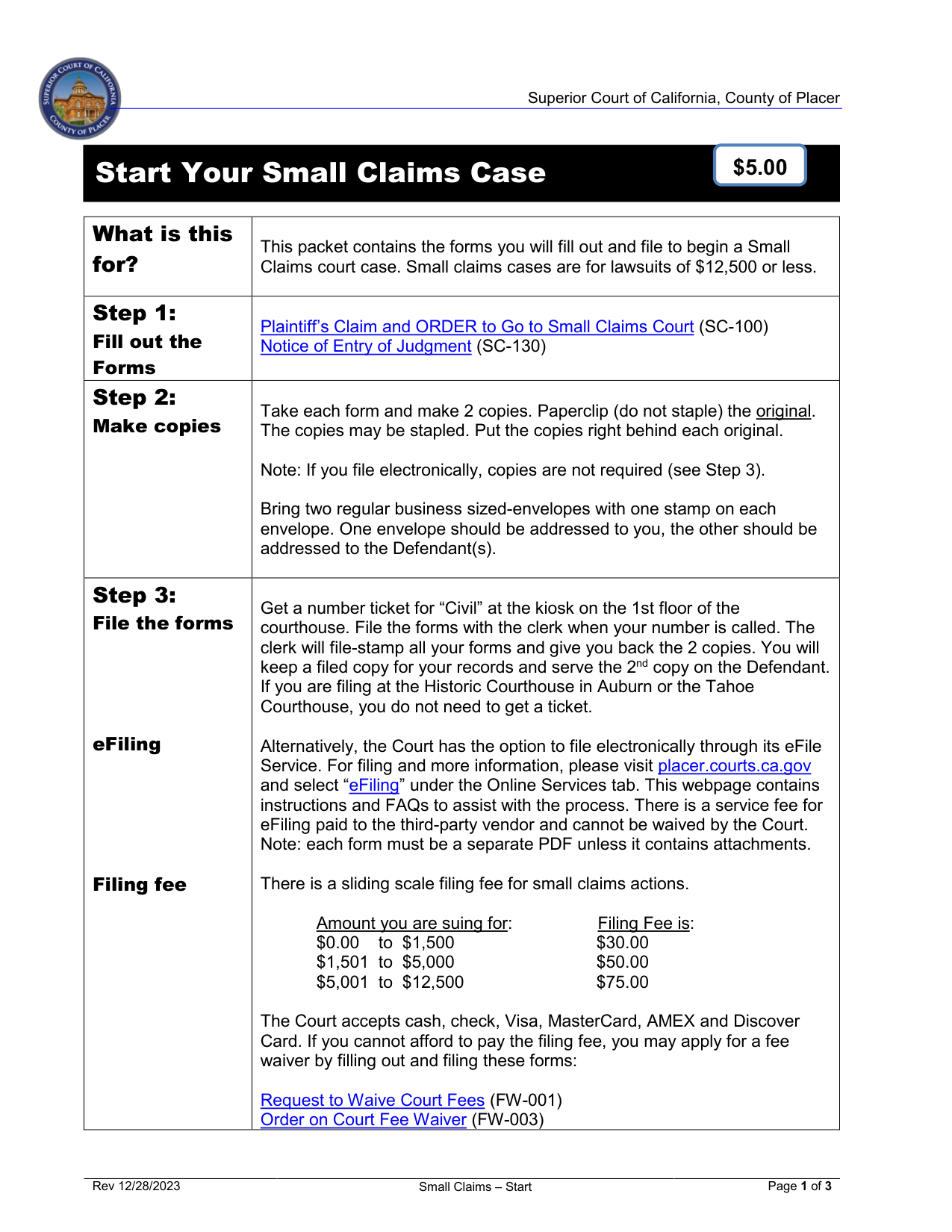
How to read Placer County Superior Court Start Your Small Claims Case packet sheet, part by part
What is this for?
This packet contains the forms to begin a Small Claims court case.
Small claims cases are for lawsuits of $12,500 or less. (checked November 14, 2026)
Plaintiff's Claim and ORDER to Go to Small Claims Court (SC-100) and Notice of Entry of Judgment (SC-130).
Step 2: Make copies
Take each form and make 2 copies.
Paperclip (do not staple) the original.
The copies may be stapled.
Put the copies right behind each original.
If you file electronically, copies are not required.
Bring two regular business sized-envelopes with one stamp on each envelope.
One envelope should be addressed to you, the other should be addressed to the Defendant(s).
Step 3: File the forms
Step 3: File the forms.
File the forms with the clerk when your number is called.
Get a number ticket for “Civil” at the kiosk on the 1st floor of the courthouse.
The clerk will file-stamp all your forms and give you back the 2 copies.
You will keep a filed copy for your records and serve the 2nd copy on the Defendant.
If you are filing at the Historic Courthouse in Auburn or the Tahoe Courthouse, you do not need to get a ticket.
eFiling
Alternatively, the Court has the option to file electronically through its eFile Service.
There is a service fee for eFiling paid to the third-party vendor and cannot be waived by the Court.
Note: each form must be a separate PDF unless it contains attachments.
Filing fee
There is a sliding scale filing fee for small claims actions.
Amount you are suing for $0.00 to $1,500: Filing Fee is $30.00. (checked November 14, 2026)
Amount you are suing for $1,501 to $5,000: Filing Fee is $50.00. (checked November 14, 2026)
Amount you are suing for $5,001 to $12,500: Filing Fee is $75.00. (checked November 14, 2026)
The Court accepts cash, check, Visa, MasterCard, AMEX and Discover Card.
If you cannot afford to pay the filing fee, you may apply for a fee waiver.
Request to Waive Court Fees (FW-001) and Order on Court Fee Waiver (FW-003).
Step 4: Serve the Defendant
You must have a copy of the Plaintiff's Claim and ORDER to Go to Small Claims Court (SC-100) handed to (“served” on) the Defendant(s).
Someone 18 or older must serve the forms for you.
You cannot serve the forms yourself.
If there is more than one Defendant, each must be served a separate copy.
If you are suing a corporation, you will need to serve the “Agent for Service” for that corporation.
To find out the contact information for the “Agent for Service”, search the California Secretary of State website at www.sos.ca.gov.
The person who serves the papers to the Defendant needs to completely and clearly fill out a Proof of Service (SC-104) form.
Step 5: File the Proof of Service
Step 5: Make 1 copy of the Proof of Service (SC-104) and take a number ticket for “Civil” at the kiosk on the 1st floor of the courthouse to file the original and copy.
Keep the filed copy for your records.
Next steps
Next steps: Go to your court hearing and present your case to the judicial officer.
The judicial officer will either make a decision (Judgment) that day or it will be mailed to you.
Can I Access My Court Case Electronically?
Important Information and FAQ: Can I Access My Court Case Electronically?
Court users can now receive access to their file/orders electronically by three different methods.
Online Portal: You can come to the courthouse and show ID to gain access.
eFiling: If you check the box on eFiling, you will receive your orders via email; you will also receive portal access if you pay for a filing (so you do not need to come into the courthouse to show ID).
eService: You may consent to receive notice and orders by email.
This can be done by submitting Judicial Council Form EFS-005-CV.
Where can I get the forms?
The blank forms listed in these instructions can be found online at www.courts.ca.gov/forms.
You can get the form packets through the court's Self-Help Center or buy them at the Court Clerk's counter.
Where can I get help or more information?
If you would like to mediate your dispute (have a neutral person help you and the other party come to agreement) instead of having a court hearing, contact Placer Dispute Resolution at: Placer Dispute Resolution 3785 Placer Corporate Dr. Suite 550, Rocklin, CA 95765 925 Northlake Blvd Suite B203, Tahoe City, CA 95730 admin@placerdisputeresolution.org Phone: (916) 234-0045 Website: www.placerdisputeresolution.org If you do not have an attorney, you can get help from the court's Self-Help Center.
Schedule a telephone or video appointment online at www.placer.courts.ca.gov and search for online appointments on the home page. Visit the “Self-Help Center” at www.courts.ca.gov Read: o Information for the Small Claims Plaintiff (SC-100-INFO) o What Is “Proof of Service”? (SC-104B) o How to Serve a Business or Public Entity (SC-104C) o What to Do After the Court Decides Your Small Claims Case (SC-200-INFO).
Sources
[1] Superior Court of California, County of Placer, Start Your Small Claims Case, Rev 12/28/2023.
