
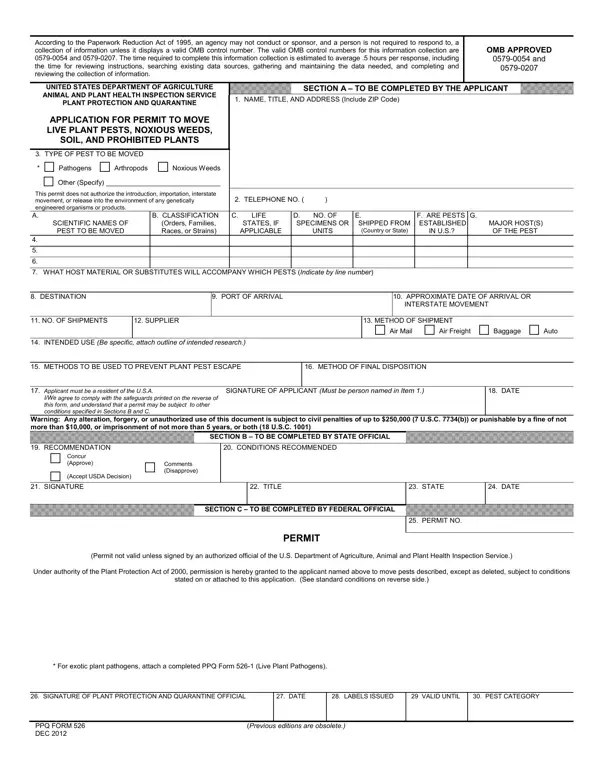
Dealing with PDF files online is definitely quite easy with our PDF tool. You can fill out usda 526 form plant here effortlessly. FormsPal team is focused on giving you the best possible experience with our editor by constantly adding new features and upgrades. With these improvements, working with our editor becomes better than ever before! Starting is effortless! All you need to do is adhere to the next basic steps directly below:
Step 1: Click on the orange "Get Form" button above. It'll open our editor so you could begin filling in your form.
Step 2: With this handy PDF tool, you are able to accomplish more than just complete blank fields. Edit away and make your docs look great with custom textual content added, or fine-tune the original content to excellence - all that comes with an ability to incorporate stunning graphics and sign it off.
In an effort to complete this PDF document, be sure you type in the necessary information in every single field:
1. To begin with, when filling out the usda 526 form plant, start in the form section that has the following blank fields:
2. Given that the last segment is completed, you'll want to insert the necessary specifics in Applicant must be a resident of, SIGNATURE OF APPLICANT Must be, DATE, IWe agree to comply with the, Warning Any alteration forgery or, RECOMMENDATION, CONDITIONS RECOMMENDED, SECTION B TO BE COMPLETED BY, Concur Approve, Accept USDA Decision, Comments Disapprove, SIGNATURE, TITLE, STATE, and DATE so you can proceed further.
3. In this part, check out SIGNATURE OF PLANT PROTECTION AND, DATE, LABELS ISSUED, VALID UNTIL, PEST CATEGORY, PPQ FORM DEC, and Previous editions are obsolete. All of these will need to be filled in with highest accuracy.
Concerning DATE and LABELS ISSUED, ensure that you double-check them in this section. Those two are certainly the most important ones in the form.
Step 3: Reread what you have entered into the form fields and then hit the "Done" button. Try a free trial subscription with us and gain immediate access to usda 526 form plant - download or edit from your FormsPal cabinet. FormsPal is focused on the personal privacy of our users; we make certain that all personal information handled by our editor is protected.
