
Ps Form 2565 PDF Details

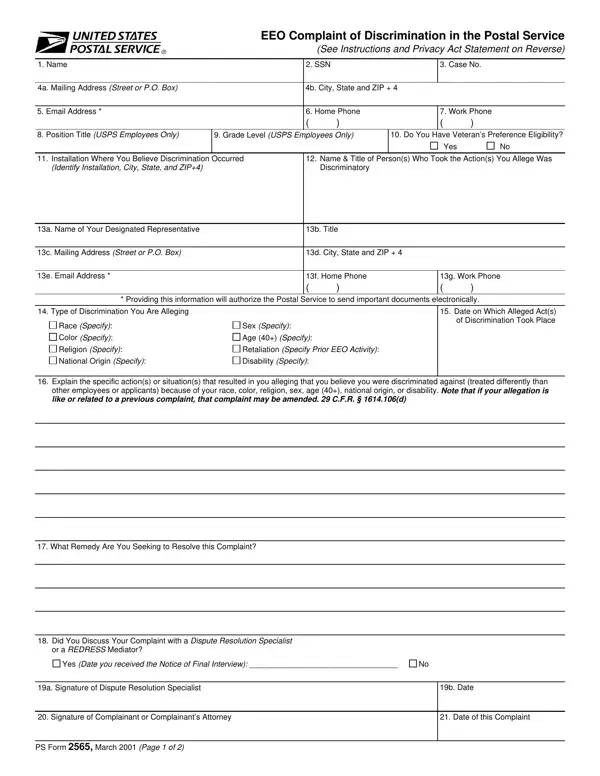
When individuals in the United States Postal Service (USPS) feel they have been subjected to discrimination, the PS Form 2565 serves as a crucial tool in seeking redress. This form, titled "EEO Complaint of Discrimination in the Postal Service," initiates the formal complaint process for employees or applicants who believe they have encountered discrimination based on race, color, religion, sex, age (40+), national origin, disability, or in retaliation for previous EEO activity. Detailing personal information, the specific nature of the alleged discrimination, and the remedy sought, the form sets the stage for a thorough investigation. Furthermore, it outlines the various stages of the complaint process, including initial contact with an EEO dispute resolution specialist, participation in alternate dispute resolution methods, and the potential escalation to formal hearings or civil court actions if resolution is not achieved internally. Additionally, the form provides instructions on extending filing deadlines under certain conditions, emphasizes the importance of maintaining updated contact information, and highlights the rights of complainants at every stage — from initial filing to decisions on appeals. The PS Form 2565 not only embodies the USPS’s commitment to equality and transparency but also functions as a gatekeeper for those seeking justice within one of the nation's largest federal employers.

QuestionAnswer
Form NamePs Form 2565
Form Length2 pages
Fillable?No
Fillable fields0
Avg. time to fill out30 sec
Other namesusps complaint form, form usps 2565, postal service form complaint, usps eeo online

How to Edit Ps Form 2565 Online for Free

Handling PDF documents online can be super easy with this PDF editor. Anyone can fill out 2565 form here and try out many other options we provide. The tool is constantly upgraded by our team, getting useful functions and turning out to be greater. With some basic steps, you'll be able to begin your PDF editing:

Step 1: Press the orange "Get Form" button above. It'll open up our pdf editor so you could begin filling in your form.

Step 2: Once you access the online editor, you will notice the form made ready to be filled out. Apart from filling out various fields, you may also do various other things with the PDF, specifically writing your own textual content, changing the initial textual content, adding images, affixing your signature to the document, and a lot more.

It will be easy to fill out the document with this detailed guide! Here's what you should do:

1. The 2565 form needs specific details to be typed in. Ensure that the next blank fields are finalized:

Filling out segment 1 of usps complaint form

2. Just after completing the previous section, go on to the subsequent step and complete the necessary particulars in these blanks - Explain the specific actions or, What Remedy Are You Seeking to, Did You Discuss Your Complaint, or a REDRESS Mediator, and Yes Date you received the Notice.

Writing section 2 in usps complaint form

3. This next section is considered rather simple, a Signature of Dispute Resolution, b Date, Signature of Complainant or, Date of this Complaint, and PS Form March Page of - these fields has to be filled out here.

usps complaint form completion process shown (part 3)

You can easily make a mistake while completing your Date of this Complaint, consequently make sure that you look again prior to when you send it in.

Step 3: Revise what you have inserted in the blank fields and then click on the "Done" button. Grab your 2565 form when you sign up for a 7-day free trial. Immediately gain access to the pdf inside your personal cabinet, with any modifications and adjustments automatically kept! Whenever you work with FormsPal, you can fill out documents without being concerned about personal information incidents or records being distributed. Our protected system makes sure that your personal data is kept safe.