
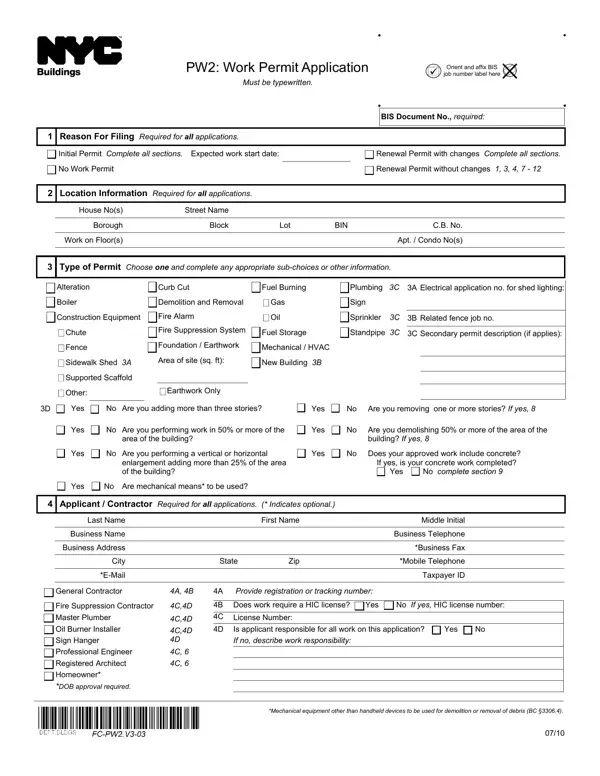
Pw2 Work Permit Application Form PDF Details

Navigating through the complexities of acquiring a work permit, the PW2: Work Permit Application emerges as a crucial document designed to formalize and kick-start various construction-related projects within specific jurisdictions. This form, which must be completed meticulously and typewritten, demands detailed information from applicants to ensure compliance with all necessary regulatory standards. At its core, the PW2 form serves multiple purposes, catering to initial permit applications as well as renewals, with or without changes to the original plan. Applicants are required to input foundational details such as the expected work start date, location specifics including house number, street name, and borough, alongside property identifiers like block and lot numbers. The form further delves into the type of permit sought—ranging from alterations, boiler installations, constructions, to more specialized permits like those for fire suppression systems or scaffolding—which necessitates a comprehensive understanding of the planned work's scope. Additionally, it asks for detailed applicant and contractor information, highlighting the necessity for a rigorous verification of qualifications and licensing, especially for tasks demanding specialized knowledge such as plumbing, electrical work, or demolition. Insurance requirements underscore the significance of liability coverage, while sections dedicated to construction superintendents, site safety coordinators, or managers emphasize the overarching priority of maintaining safety standards on-site. In this regard, the PW2 form embodies a meticulous approach to permitting, seeking to ensure that every aspect of construction work is accounted for, regulated, and executed within the bounds of safety and compliance, thereby safeguarding the interests of both the workforce and the broader public.

QuestionAnswer
Form NamePw2 Work Permit Application Form
Form Length3 pages
Fillable?No
Fillable fields0
Avg. time to fill out45 sec
Other namespw2, pw2 dob form, nyc dob pw2, work permit indicates get

How to Edit Pw2 Work Permit Application Form Online for Free

Any time you want to fill out work permit indicates form, it's not necessary to download and install any kind of programs - just give a try to our PDF editor. Our tool is constantly developing to grant the best user experience achievable, and that's because of our dedication to continual development and listening closely to feedback from users. All it requires is a couple of simple steps:

Step 1: Access the PDF form in our tool by clicking the "Get Form Button" above on this webpage.

Step 2: This tool helps you change almost all PDF files in many different ways. Improve it with personalized text, adjust what's originally in the PDF, and include a signature - all possible within minutes!

Be mindful while filling out this form. Ensure each blank is filled out accurately.

1. The work permit indicates form requires specific details to be typed in. Make certain the subsequent fields are filled out:

Ways to fill out work permit concrete stage 1

2. Once your current task is complete, take the next step – fill out all of these fields - Yes No Are you adding more than, Yes No Are you removing one or, Yes No Are you performing work in, Yes No Are you demolishing or, area of the building, building If yes, Yes No Are you performing a, Yes No Does your approved work, enlargement adding more than of, If yes is your concrete work, Yes No Are mechanical means to be, Applicant Contractor Required, Last Name, Business Name, and Business Address with their corresponding information. Make sure to double check that everything has been entered correctly before continuing!

work permit concrete conclusion process shown (portion 2)

3. The following section is related to Filing Representative Complete if, Last Name, Business Name, Business Address, City, EMail, State, First Name, Middle Initial, Zip, Business Telephone, Business Fax, Mobile Telephone, Registration Number, and Insurance PE RA only indicates - complete each of these empty form fields.

Part no. 3 in filling in work permit concrete

4. This next section requires some additional information. Ensure you complete all the necessary fields - day of, Date, Notary Signature, Demolition Subcontractor Required, Yes No, Is the applicantcontractor named, Last Name, Business Name, Address, City, EMail, State, First Name, Middle Initial, and Zip - to proceed further in your process!

Part # 4 for filling out work permit concrete

5. Now, this final subsection is what you should finish prior to finalizing the document. The blank fields here include the following: A Yes No, Are you requesting to exclude, Yes No, Does your approved work include, Concrete Subcontractor Required, Yes No, Is the applicantcontractor named, Last Name, Business Name, Address, City, EMail, State, First Name, and Middle Initial.

A Yes No, Does your approved work include, and Business Name inside work permit concrete

You can potentially make a mistake while completing your A Yes No, therefore make sure to look again before you decide to send it in.

Step 3: Look through everything you've entered into the blanks and hit the "Done" button. Join FormsPal today and instantly use work permit indicates form, prepared for downloading. All adjustments you make are kept , meaning you can change the pdf at a later point as required. FormsPal provides secure form tools devoid of personal information record-keeping or distributing. Feel safe knowing that your details are safe with us!