
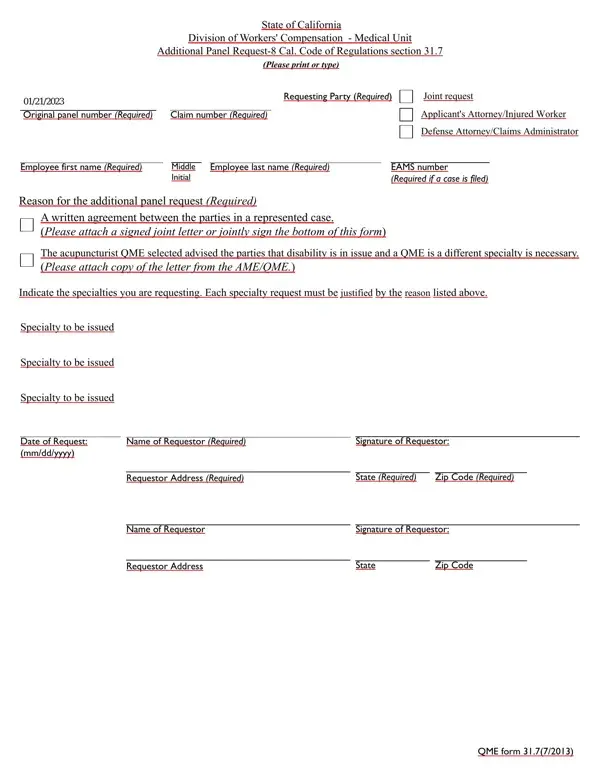
Qme Form 31 7 PDF Details

In the intricate landscape of workers' compensation in California, the QME 31 7 form plays a pivotal role in ensuring that disputes regarding an employee's medical condition and treatment are resolved with the input of qualified medical experts. Managed by the State of California Division of Workers' Compensation - Medical Unit, this form allows for the request of an additional panel of Qualified Medical Evaluators (QMEs) under specific regulations, particularly the 8 Cal. Code of Regulations section 31.7. This process necessitates clarity and precision, starting with the identification of the requesting party and extending through intricate details such as the original panel number, claim number, and the detailed rationale behind the request for an additional panel. Integral to this form is also the requirement for a detailed declaration of service, ensuring that all relevant parties are duly notified. Moreover, it tailors the medical expertise needed by allowing for the specification of the medical specialty requested, drawn from an extensive list that includes but is not limited to allergy & immunology, dermatology, internal medicine, and psychology, catering to the diverse range of medical issues that might arise in the context of workers' compensation claims. Understanding the QME 31 7 form is crucial for parties involved in disputes over medical conditions in workers' compensation cases, as it directly influences the timeliness and appropriateness of the evaluation process, potentially impacting the resolution of such disputes.

QuestionAnswer
Form NameQme Form 31 7
Form Length3 pages
Fillable?No
Fillable fields0
Avg. time to fill out45 sec
Other namesRequestor, 31 7 additional panel form, qme form 31 7, 2013

How to Edit Qme Form 31 7 Online for Free

Using PDF forms online can be simple with this PDF editor. Anyone can fill out additional panel request form here painlessly. FormsPal expert team is constantly endeavoring to enhance the tool and enable it to be much better for clients with its handy features. Take advantage of present-day modern opportunities, and discover a myriad of new experiences! To get started on your journey, take these easy steps:

Step 1: Firstly, access the pdf tool by pressing the "Get Form Button" in the top section of this webpage.

Step 2: After you start the online editor, you will see the document ready to be completed. Besides filling in different blanks, it's also possible to perform various other actions with the form, including writing any textual content, changing the initial textual content, adding illustrations or photos, putting your signature on the document, and much more.

As a way to finalize this form, be sure to type in the necessary information in each and every blank field:

1. Complete your additional panel request form with a number of necessary blanks. Consider all of the information you need and ensure there is nothing forgotten!

Writing segment 1 in California

2. Once the last segment is finished, you need to put in the essential details in Specialty to be issued, Specialty to be issued, Date of Request mmddyyyy, Name of Requestor Required, Signature of Requestor, Requestor Address Required, State Required, Zip Code Required, Name of Requestor, Signature of Requestor, Requestor Address, State, and Zip Code in order to move on further.

Name of Requestor Required, State, and Zip Code in California

3. The following portion focuses on I declare that I am a resident of, On I served this Additional Panel, addressed to the person or firm, depositing the sealed envelope, placing the sealed envelope for, placing the sealed envelope for, placing the sealed envelope for, and personally delivering the sealed - fill in all these empty form fields.

Writing section 3 of California

4. To move ahead, this fourth section requires filling out several empty form fields. These comprise of Method of Service, Method of Service, Method of Service, Method of Service, Person or firm served, Street Address, City, State, Zip Code, Person or firm served, Street Address, City, State, Zip Code, and Person or firm served, which you'll find essential to continuing with this particular document.

Writing segment 4 of California

5. Because you near the last parts of the document, you'll notice just a few more requirements that need to be satisfied. Specifically, Method of Service, Person or firm served, Street Address, City, State, Zip Code, I declare under penalty of perjury, Date, Type or print name, Signature, and California should be filled in.

Step no. 5 of completing California

Lots of people frequently get some points incorrect when completing Method of Service in this section. You should reread what you enter right here.

Step 3: Go through everything you have entered into the form fields and press the "Done" button. Find the additional panel request form when you subscribe to a 7-day free trial. Quickly use the form in your personal account, along with any edits and changes all saved! At FormsPal.com, we do everything we can to be sure that all of your details are stored secure.