
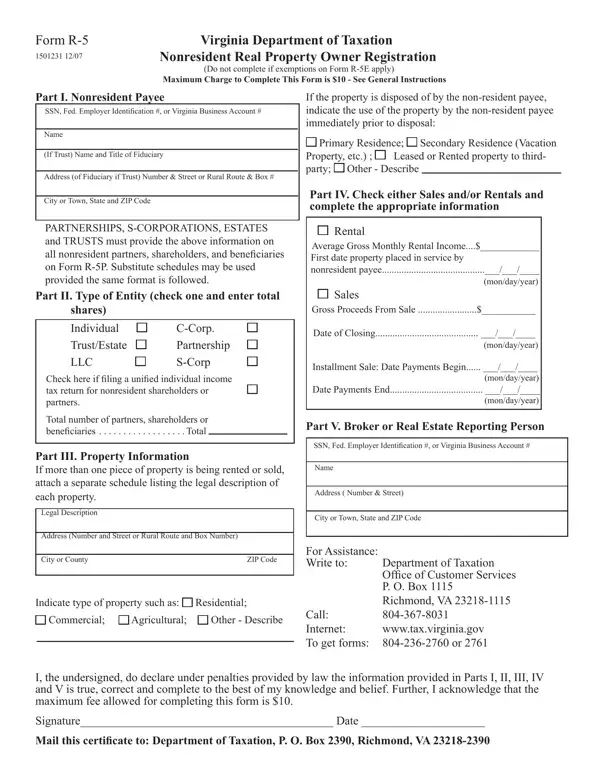
In the complex landscape of real estate transactions, nonresident property owners engaging in the sale or leasing of real estate in Virginia are subject to specific reporting and registration requirements mandated by the Virginia Department of Taxation. The Form R-5, officially known as the Nonresident Real Property Owner Registration, stands at the center of these obligations. Designed to streamline the tax compliance process, this form is compulsory for nonresident individuals, corporations, estates, trusts, partnerships, limited liability corporations, and S-corporations that derive income from Virginia-based real estate assets. The form meticulously gathers details about the property owner, including Social Security Number, Federal Employer Identification Number, or Virginia Business Account Number, alongside the legal description and income generated from the property. Furthermore, it delineates distinct instructions for rental property brokers and real estate agents managing sales, highlighting their responsibilities in ensuring their nonresident clients adhere to registration deadlines. Failure to comply attracts penalties, emphasizing the form's critical role in maintaining tax orderliness. By capturing a gamut of information ranging from property type and disposition to gross rental or sales proceeds, the R-5 form facilitates a smoother operation of the state's tax apparatus, ensuring nonresident real property owners contribute their fair share to Virginia's treasury.
| Question | Answer |
|---|---|
| Form Name | R-5 Form Virginia |
| Form Length | 2 pages |
| Fillable? | Yes |
| Fillable fields | 33 |
| Avg. time to fill out | 7 min 10 sec |
| Other names | Nonresident, form r 5, Virginia, R-5P |
R-5 Form Virginia isn’t the one you’re looking for?