Residential Data Input Form PDF Details

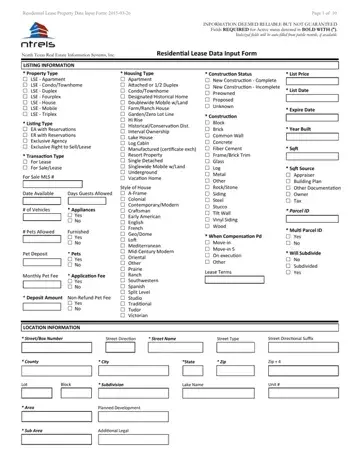
In the complex landscape of residential leasing, the Residential Data Input form serves as a vital tool for ensuring that listings on the North Texas Real Estate Information Systems, Inc. (NTREIS) are comprehensive and accurate. Updated on March 26, 2015, this extensive document spans ten pages, delineating a wide array of details pertinent to leasing properties. It is meticulously crafted to safeguard that all necessary information is not only gathered but also standardized across listings. Information that is considered crucial for a listing to be deemed "Active" is highlighted in bold with an asterisk, emphasizing its importance. Intriguingly, the form facilitates a smoother process by auto-filling italicized fields with public records whenever available, thus streamlining the input process. From basic listing information like property type, housing type, and list price to more detailed attributes concerning room details, kitchen features, and security amenities, the form covers a broad spectrum. It also touches on specifics such as lease requirements, handicap accessibility, pool attributes, parking features, and even monies required upfront, ensuring a holistic approach to property listing. By requiring details on everything from construction status to the inclusion of appliances, pet policies, and the nature of any special notes or common features associated with the property, the Residential Data Input form illustrates the depth of detail required in the modern real estate market, showcasing its role as an indispensable component of residential lease transactions.

QuestionAnswer
Form NameResidential Data Input Form
Form Length12 pages
Fillable?No
Fillable fields0
Avg. time to fill out3 min
Other namesresidential data input form, listing data form, mls input form, residential data form

How to Edit Residential Data Input Form Online for Free

Our PDF editor makes it simple to complete documents. You don't need to undertake much to manage residential input ntreis files. Merely consider these particular steps.

Step 1: Select the "Get Form Now" button to begin the process.

Step 2: As soon as you've entered the editing page residential data input, you should be able to find every one of the actions readily available for the document inside the upper menu.

Provide the necessary details in each one section to fill out the PDF residential data input

input residential empty spaces to fill out

The system will expect you to prepare the Pets Yes No, Monthly Pet Fee, Application Fee Yes No, Deposit Amount NonRefund Pet Fee, Yes No, LOCATION INFORMATION, Style of House AFrame Colonial, When Compensation Pd Movein, Lease Terms, Will Subdivide No Subdivided, StreetBox Number, Street Direction, Street Name, Street Type, and Street Directional Suffix box.

Finishing input residential part 2

It's important to put down certain data inside the field School District, Primary School, Elementary School, Middle School, ROOM DETAILS, Bedrooms, Intermediate School, Junior High School, High School, Senior High School, Full Baths, Half Baths, Stories, Living Areas, and Dining Areas.

stage 3 to finishing input residential

Please be sure to place the rights and responsibilities of the parties in the nd Master Bedroom, Lvl, Length, Width, Features Cedar Closet Coffee Bar, and Features Cedar Closet Coffee Bar section.

Filling in input residential stage 4

Finalize by checking the next areas and filling out the required details: Features Cedar Closet Coffee Bar.

input residential Features  Cedar Closet  Coffee Bar blanks to insert

Step 3: Select the Done button to make sure that your finalized document could be transferred to every gadget you use or sent to an email you indicate.

Step 4: You will need to generate as many copies of your form as you can to stay away from possible worries.

Please rate Residential Data Input Form

1 Votes
If you believe this page is infringing on your copyright, please familiarize yourself with and follow our DMCA notice and takedown process - click here to proceed .
