
Riversource 30482 Form PDF Details

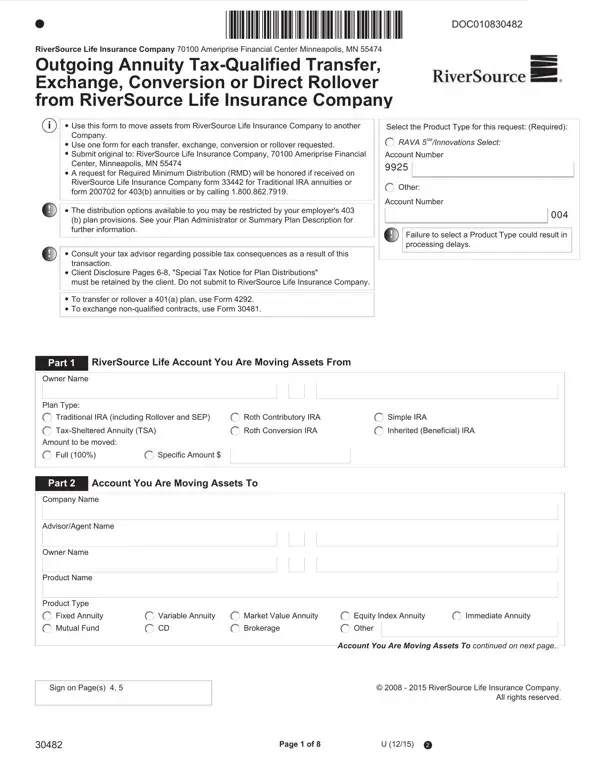
Navigating through the complexities of transferring annuity funds can often appear daunting for many clients; however, the RiverSource 30482 form serves as a comprehensive guide designed to simplify this process. Issued by the RiverSource Life Insurance Company, headquartered in Minneapolis, this form facilitates outgoing annuity transfers that are tax-qualified, including exchanges, conversions, or direct rollovers from RiverSource Life Insurance Company to another entity. A crucial aspect for clients to remember is the requirement to use a separate form for each transaction they wish to initiate. Additionally, the form provides clear instructions on submission, including the necessity to submit the original document to the specified address. It underscores the importance of consulting a tax advisor to understand the potential tax implications of the transfer, a step that cannot be overlooked given the complexity of tax laws and their impact on financial transactions. Furthermore, the form meticulously outlines various scenarios and specific forms for different types of transfers, urges clients to retain certain pages for their records, and elaborates on exceptions and particular conditions tied to employer plans. This introduction into the RiverSource 30482 form aims to demystify its purpose and encourage a thorough understanding and accurate completion to ensure a smooth transition of assets according to the client’s financial strategy.

QuestionAnswer
Form NameRiversource 30482 Form
Form Length8 pages
Fillable?No
Fillable fields0
Avg. time to fill out2 min
Other namesameriprise form 30482, 30482, 2013 or swimming daily sheet washington county trial, riversource annuities transfer out form

How to Edit Riversource 30482 Form Online for Free

Using the online tool for PDF editing by FormsPal, you can fill in or change riversource service form 30482 right here and now. Our editor is constantly evolving to give the very best user experience achievable, and that's due to our resolve for continual enhancement and listening closely to comments from users. Here's what you'll need to do to get started:

Step 1: Click the "Get Form" button at the top of this webpage to get into our PDF tool.

Step 2: As soon as you launch the online editor, you will find the document ready to be completed. Other than filling in various blanks, you could also perform other things with the PDF, including writing custom words, changing the original textual content, inserting illustrations or photos, affixing your signature to the form, and a lot more.

This document will need specific information to be typed in, hence be sure to take some time to enter what's required:

1. While completing the riversource service form 30482, be sure to include all of the necessary fields within its relevant form section. It will help to speed up the work, making it possible for your information to be processed efficiently and properly.

Filling in segment 1 of riversource forms

2. Immediately after the prior section is completed, go to enter the suitable details in these - Plan Type, Traditional IRA including Rollover, Roth Contributory IRA, Simple IRA, TaxSheltered Annuity TSA, Roth Conversion IRA, Inherited Beneficial IRA, Amount to be moved, Full, Specific Amount, Part, Account You Are Moving Assets To, Company Name, AdvisorAgent Name, and Owner Name.

Ways to fill out riversource forms step 2

3. The following step is focused on If product is an annuity Select One, New Contract, Existing Contract, Account Number, Plan Type, Traditional IRA including Rollover, Inherited Beneficial IRA, TaxSheltered Annuity TSA, Roth IRA, Simple IRA, Delivery Instructions, Make check payable to, Mail check to, Address, and City - type in each one of these blanks.

riversource forms writing process clarified (part 3)

Always be extremely attentive when filling out TaxSheltered Annuity TSA and Make check payable to, as this is where many people make some mistakes.

4. To go onward, the following step requires filling out a handful of blanks. These include Mailing Address Required, City, State, ZIP code, Part, Withholding Instructions, Direct Conversion from TSA to a, A direct conversion from a TSA to, Direct Conversion from a, and If taxes are withheld from this, which you'll find integral to continuing with this particular document.

Guidelines on how to fill in riversource forms part 4

5. To wrap up your document, this particular segment has some additional blank fields. Filling out federal income tax will be, Do not withhold federal tax, Withhold federal tax, Withhold, federal tax must be more than, State Withholding, If you do not indicate an election, Do not withhold state tax, Withhold default state tax, Withhold, state tax, Part, Acknowledgements and Signatures, By signing below I acknowledge and, and I am the owner of the listed will wrap up everything and you'll surely be done before you know it!

Tips on how to fill out riversource forms portion 5

Step 3: Right after you have reviewed the details provided, simply click "Done" to conclude your form. Right after creating afree trial account with us, you will be able to download riversource service form 30482 or send it via email without delay. The PDF file will also be readily available in your personal account page with your every edit. FormsPal offers protected form editing without personal information recording or sharing. Rest assured that your information is safe here!