
Sba Form 1993 PDF Details

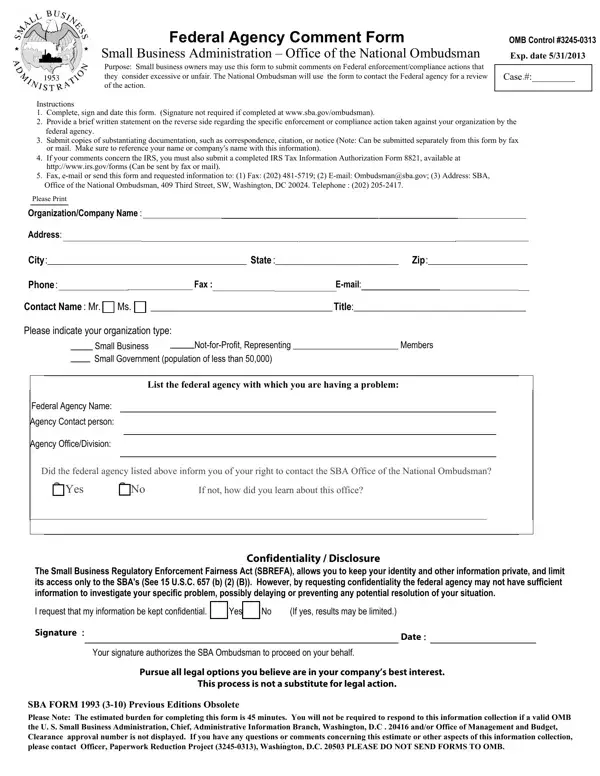
In today's complex regulatory environment, small business owners occasionally find themselves facing federal enforcement or compliance actions that may seem excessive or unfair. In response to this challenge, the Small Business Administration (SBA) provides a crucial resource through its SBA Form. Designed as a Federal Agency Comment Form under the auspices of the Office of the National Ombudsman, this document offers a structured method for entrepreneurs to voice their concerns directly to a federal agency. The purpose of the form is straightforward: it allows small business owners to submit comments on federal actions impacting their businesses, seeking a review that might lead to relief from actions deemed unjust. Key components of the process include the requirement to complete, sign, and date the form—though signatures are not necessary if submission occurs via the SBA's website. Additionally, the form mandates a brief written statement detailing the specific complaint against the federal agency in question, alongside the submission of any supporting documentation that bolsters the business owner's case. Confidentiality is a significant aspect of the submission, with businesses having the option to request anonymity to protect their privacy, though this might limit the investigation's scope. The Small Business Regulatory Enforcement Fairness Act (SBREFA) backs this confidentiality aspect, reinforcing the law's support for small businesses facing regulatory challenges. This form not only signifies the SBA's commitment to advocating for smaller enterprises but also equips business owners with a formal avenue to seek redress, making it an essential tool in the landscape of federal business regulation.

QuestionAnswer
Form NameSba Form 1993
Form Length2 pages
Fillable?No
Fillable fields0
Avg. time to fill out30 sec
Other namesform 1993 online, sba name signature, da form 1993 pdf, how to form 1993

How to Edit Sba Form 1993 Online for Free

Dealing with PDF forms online is certainly very simple with this PDF tool. You can fill in da form 1993 here with no trouble. We are aimed at providing you with the perfect experience with our tool by continuously introducing new features and upgrades. With these updates, working with our editor becomes easier than ever before! To get the process started, consider these easy steps:

Step 1: Press the "Get Form" button above. It'll open our pdf editor so you could begin filling out your form.

Step 2: After you launch the online editor, you will see the document made ready to be filled in. In addition to filling out different blank fields, you might also do other actions with the file, including writing your own textual content, editing the original text, adding images, placing your signature to the PDF, and much more.

It really is an easy task to finish the form adhering to our practical guide! Here's what you have to do:

1. Complete the da form 1993 with a selection of necessary blanks. Get all the important information and make sure there's nothing omitted!

Step # 1 of completing form sba fax

2. Once your current task is complete, take the next step – fill out all of these fields - List the federal agency with which, Federal Agency Name, Agency Contact person, Agency OfficeDivision, Did the federal agency listed, If not how did you learn about, Yes, The Small Business Regulatory, Confidentiality Disclosure, I request that my information be, Yes, If yes results may be limited, Signature, Date, and Your signature authorizes the SBA with their corresponding information. Make sure to double check that everything has been entered correctly before continuing!

If yes results may be limited, Federal Agency Name, and List the federal agency with which of form sba fax

When it comes to If yes results may be limited and Federal Agency Name, ensure that you don't make any mistakes in this current part. The two of these are certainly the key fields in this page.

3. The third stage is normally simple - fill in every one of the empty fields in Type or print your comments below in order to complete the current step.

Stage # 3 in filling in form sba fax

Step 3: Soon after proofreading the filled out blanks, click "Done" and you're all set! Sign up with us right now and immediately get access to da form 1993, ready for downloading. Every edit you make is handily saved , making it possible to customize the pdf at a later stage if required. FormsPal is devoted to the personal privacy of our users; we make sure all personal information entered into our editor continues to be protected.