Please rate Securus Form

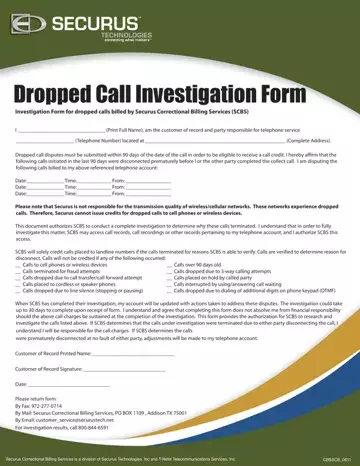
At the heart of the telecommunications challenges faced by individuals connected to correctional facilities lies the Securus Dropped Call Investigation Form, a document that becomes crucial when a call, billed by Securus Correctional Billing Services (SCBS), is prematurely disconnected. This form serves as a testament to the intricate process of disputing charges for calls that did not reach their intended duration, often a frustrating anomaly for friends and family of the incarcerated. Individuals are required to submit their claims within a specific 90-day window from the date of the dropped call, providing detailed information such as the date, time, and origin of the interrupted communication to initiate the investigation process. The form outlines specific conditions under which credits will not be issued, such as calls to wireless devices, attempts at fraud, or calls impacted by third-party services, emphasizing the company’s exemption from quality issues on cellular networks. By completing and submitting this form, customers authorize SCBS to delve into call records, recordings, and other relevant data in an effort to uncover the reasons behind the disconnection. The investigation's outcome might lead to account adjustments if it's determined that the premature disconnection was out of the customers' control, yet it also prepares individuals for the possibility of being held accountable for the charges if the calls do not meet the criteria for credit. This document not only facilitates a structured avenue for dispute resolution but also underscores the complexities of maintaining communication with loved ones in correctional settings, all while navigating the policies of telecommunication services specialized in this sensitive area.
| Question | Answer |
|---|---|
| Form Name | Securus Form |
| Form Length | 1 pages |
| Fillable? | No |
| Fillable fields | 0 |
| Avg. time to fill out | 15 sec |
| Other names | securus dispute form, securus dropped form, securus form, securustech |
Securus Form isn’t the one you’re looking for?
Please rate Securus Form
