
Form DOL-800 at a glance
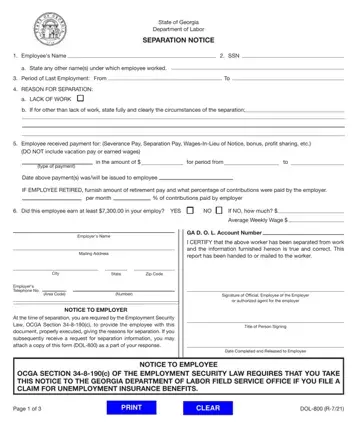
What it is: State of Georgia Department of Labor SEPARATION NOTICE, completed by the employer for each worker who leaves employment, regardless of the reason for the separation, under OCGA Section 34-8-190(c).
Who signs: Sign as an officer or employee of the employer or authorized agent for the employer.
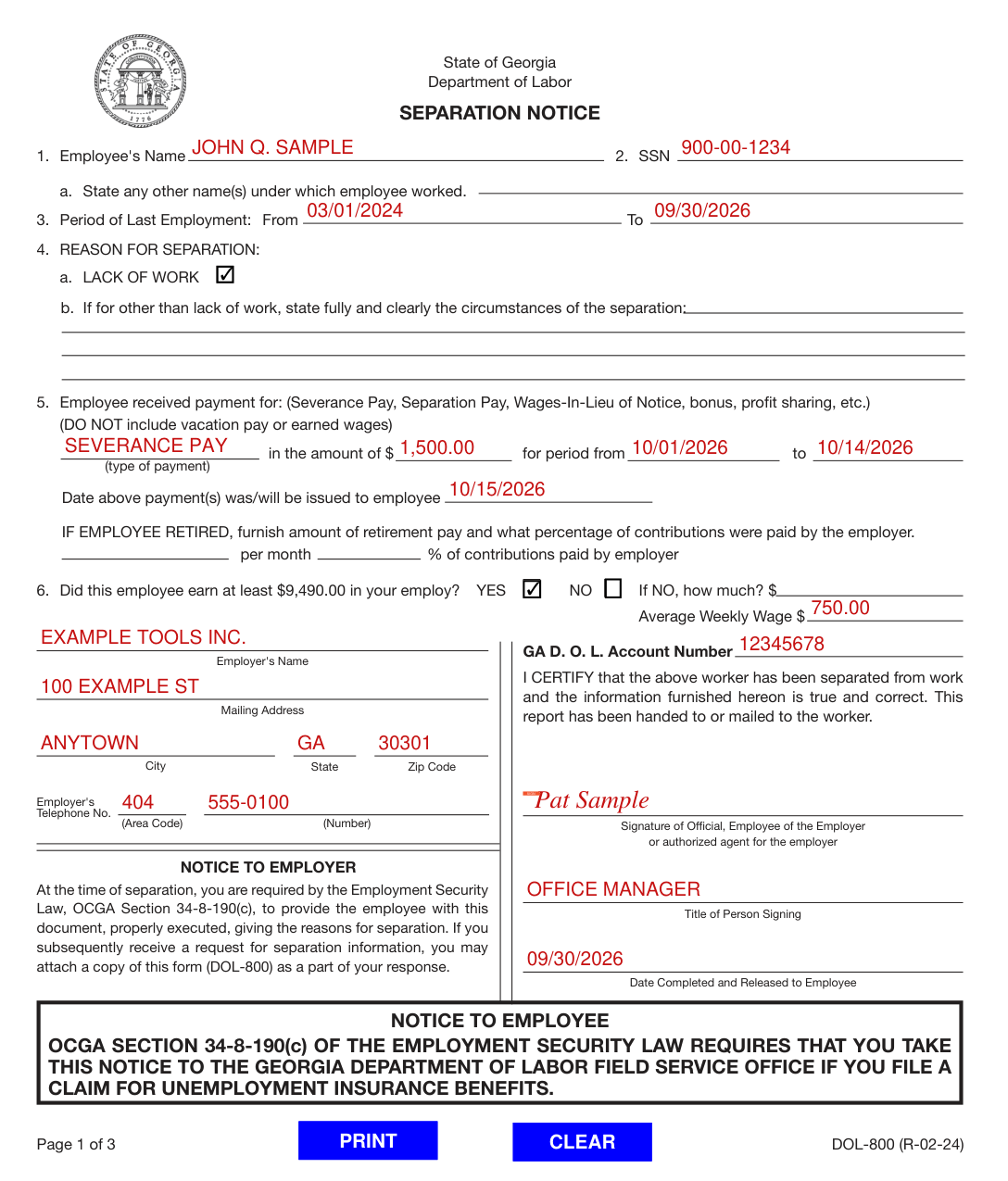
A filled-in Form DOL-800 example: a layoff for lack of work with severance pay
How to fill out Form DOL-800, box by box
1. Employee's Name, 2. SSN and 3. Period of Last Employment

In 1. Employee's Name, enter employee's name as it appears on your records.
If it is different from the name appearing on the employee's Social Security Card, report both names: in a., state any other name(s) under which employee worked.
In 2. SSN, enter the employee's Social Security Number. Verify for accuracy.
In 3. Period of Last Employment, enter the dates of employee's most recent work period, From and To.
4. REASON FOR SEPARATION

Under 4. REASON FOR SEPARATION, if the reason for separation is for LACK OF WORK, check box indicated.
If the reason for separation is OTHER THAN lack of work, give complete details about the separation in space provided: state fully and clearly the circumstances of the separation. If needed, add a separate sheet of paper.
5. Employee received payment for, and IF EMPLOYEE RETIRED

In 5. Employee received payment for, if any type payment (Severance Pay, Separation Pay, Wages-In-Lieu of Notice, bonus, profit sharing, etc.) was made, indicate the type of payment and the period for which payment was made beyond the last day. DO NOT include vacation pay or earned wages.
Enter the amount of the payment in the amount of $, and the period of the payment in for period from and to.
In Date above payment(s) was/will be issued to employee in box 5, give the date on which the payment was/will be issued to the employee.
IF EMPLOYEE RETIRED, furnish amount of retirement pay per month and what percentage of contributions were paid by the employer.
6. Did this employee earn: YES, NO, If NO how much, and Average Weekly Wage

Check the appropriate block YES or NO to indicate whether this employee earned at least $9,490.00 in your employ. If you check NO, enter amount earned in your employ (checked October 19, 2026).
In Average Weekly Wage $, give average weekly wage (without overtime) at the time of separation.
Employer's Name, Mailing Address and GA D.O.L. Account Number
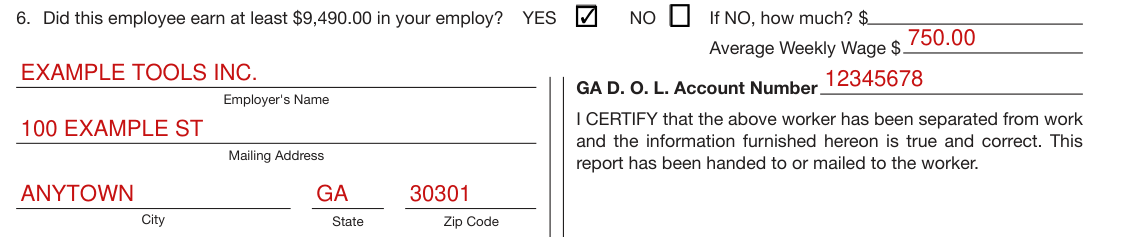
In Employer's Name, give full name of employer under which the business is operated.
In Mailing Address, give full mailing address of the employer where communications are to be sent regarding a potential claim, with City, State and Zip Code.
In GA D.O.L. Account Number, enter the employer's 8-digit state account number assigned by GDOL, your state DOL Unemployment Insurance Account Number as it appears on your Quarterly Tax and Wage Report.
Employer's Telephone No., SIGN and Title of Person Signing
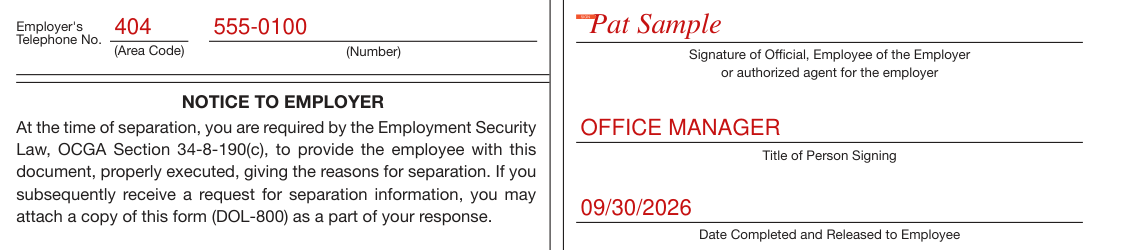
Enter the Employer's Telephone No. as (Area Code) and (Number).
By signing, you certify that the worker has been separated from work and the information furnished hereon is true and correct, and that this report has been handed to or mailed to the worker.
In Signature of Official, Employee of the Employer or authorized agent for the employer, sign; this person's title or position held with the employer must be shown in Title of Person Signing.
Under OCGA Section 34-8-256(b), any employing unit or any officer or agent of an employing unit or any other person who knowingly makes a false statement or representation or who knowingly fails to disclose a material fact in order to prevent or reduce the payment of benefits to any individual entitled thereto shall upon conviction be guilty of a misdemeanor and shall be punished by imprisonment not to exceed one year or fined not more than $1,000.00 or shall be subject to both such fine and imprisonment (checked October 19, 2026). Each such act shall constitute a separate offense.
Date Completed and Released to Employee

At the time of separation, you are required by the Employment Security Law, OCGA Section 34-8-190(c), to provide the employee with this document, properly executed, giving the reasons for separation. If you subsequently receive a request for separation information, you may attach a copy of this form (DOL-800) as a part of your response.
In Date Completed and Released to Employee, date the notice and deliver it to the separated employee in electronic or hard copy format.
More rules for Form DOL-800
Under OCGA Section 34-8-122(a), all letters, reports, communications, or any other matters, either oral or written, from the employer or employee to each other or to the department or any of its agents, representatives, or employees, which shall have been written, sent, delivered, or made in connection with the requirements of the administration of this chapter, shall be absolutely privileged and shall not be made the subject matter or basis for any action for slander or libel in any court of the State of Georgia.
Common questions about Form DOL-800
What is a DOL 800 form?
State of Georgia Department of Labor SEPARATION NOTICE, completed by the employer for each worker who leaves employment, regardless of the reason for the separation, under OCGA Section 34-8-190(c). OCGA Section 34-8-190(c) of the Employment Security Law requires that you take this notice to the Georgia Department of Labor Field Service Office if you file a claim for Unemployment Insurance Benefits.
Are you required to give a separation notice in Georgia?
In accordance with the Employment Security Law, OCGA Section 34-8-190(c) and Rules pursuant thereto, a Separation Notice must be completed for each worker who leaves your employment, regardless of the reason for the separation.
How can I apply for unemployment benefits in Georgia?
Unemployment Insurance (UI) benefits are available to workers who are unemployed and who meet the state UI eligibility laws. You may file a UI claim the first week that your employment stops or your work hours are reduced. Follow these steps to file your claim online: Go to dol.georgia.gov. Select Apply for Unemployment Benefits. Answer the questions completely.
Who signs it?
Sign as an officer or employee of the employer or authorized agent for the employer.
When is this form not the right one?
This notice shall be used where the employer-employee relationship is terminated and shall not be used when employer-filed claims (partial) or mass separation (DOL-402) notices are filed.
Sources
[1] Separation Notice DOL-800 (R-02-24), State of Georgia Department of Labor (the Official source link on this page).
