
South Carolina Form Pt 401 PDF Details

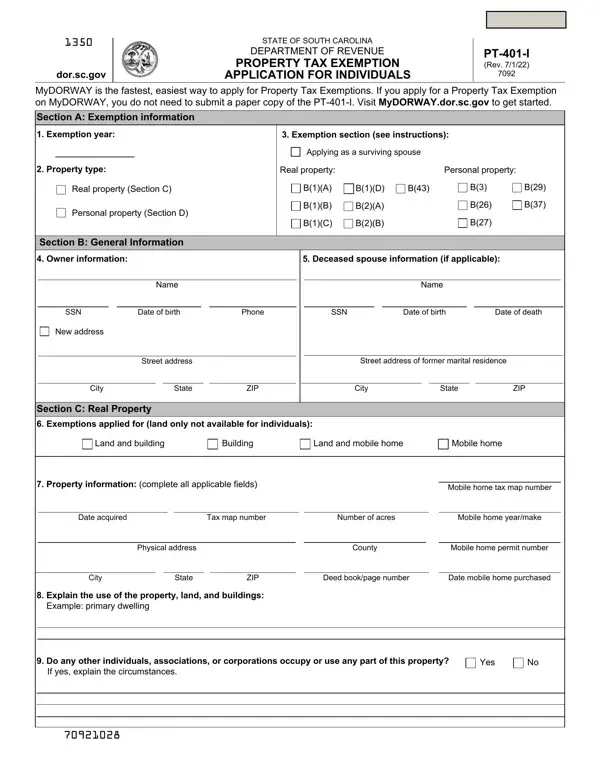
In the intricate landscape of South Carolina's tax regulation and compliance framework, the Tax Exemption Application, designated as PT-401, emerges as a critical document for various entities seeking relief from property taxation. This application, which underwent its latest revision on May 20, 2009, serves a pivotal role, necessitating meticulous completion by either the legal owner of the property or a designated agent to ensure its acceptance by the South Carolina Department of Revenue (SCDOR). Amidst a broad spectrum of exemption categories, the form delineates precise instructions correlating with types of exemptions, ranging from properties owned by educational institutions, charitable organizations, to those held by veterans or persons with disabilities, each reflecting a nuanced understanding of eligibility based on a myriad of criteria including ownership details, property acquisition dates, and specific uses outlined by the South Carolina Code Section 12-37-220. Additionally, the comprehensive nature of the form is evident through the requirement for substantive accompanying documentation, such as deeds, IRS determination letters, vehicle registration cards, and audited financial statements, underscoring the rigorous vetting process undertaken by the SCDOR. Furthermore, the PT-401 form extends its spectrum of exemptions to include properties utilized for economic development by public benefit corporations and accommodations designed for the elderly or handicapped by nonprofit housing corporations, thereby embracing a vast array of property use scenarios envisaged within the state's policy to facilitate tax relief for eligible entities. This meticulous articulation of requirements not only assists applicants in navigating the complexities of tax exemption claims but also ensures that the state's fiscal resources are allocated with a discernible measure of accountability and precision.

QuestionAnswer
Form NameSouth Carolina Form Pt 401
Form Length6 pages
Fillable?No
Fillable fields0
Avg. time to fill out1 min 30 sec
Other namesCFR, pt 401 form, pt 401 1 fillable, therefrom

How to Edit South Carolina Form Pt 401 Online for Free

Should you would like to fill out CFR, you won't have to download and install any software - simply try using our PDF editor. FormsPal team is aimed at providing you with the ideal experience with our tool by consistently adding new features and improvements. Our editor has become a lot more intuitive thanks to the latest updates! At this point, working with PDF files is a lot easier and faster than before. In case you are looking to get going, here is what it takes:

Step 1: Hit the "Get Form" button above. It will open up our pdf tool so that you can start filling in your form.

Step 2: With the help of this handy PDF file editor, you're able to do more than merely fill out blank form fields. Edit away and make your forms look great with customized textual content added in, or fine-tune the file's original input to perfection - all that comes along with an ability to incorporate any graphics and sign the file off.

It will be an easy task to finish the pdf with this helpful tutorial! Here's what you need to do:

1. To start with, when filling in the CFR, beging with the page that features the next blanks:

Best ways to fill out eleemosynary part 1

2. Once your current task is complete, take the next step – fill out all of these fields - Property information complete all, Mobile home tax map number, Date acquired, Tax map number, Number of acres, Mobile home yearmake, Physical address, County, Mobile home permit number, City, State, ZIP, Deed bookpage number, Date mobile home purchased, and Explain the use of the property with their corresponding information. Make sure to double check that everything has been entered correctly before continuing!

Date acquired, Mobile home permit number, and ZIP in eleemosynary

3. The following section will be focused on Do you receive any rent for this, Yes, If yes from whom, Do you lease or rent this property, Yes, If yes from whom, Section D Personal Property, Complete the chart below to apply, Vehicle Identification Number, Type, Make, Year, Registered Owner, List any vehicles to be removed, and Vehicle Identification Number - fill in every one of these blanks.

List any vehicles to be removed, Complete the chart below to apply, and Registered Owner in eleemosynary

Be extremely attentive while completing List any vehicles to be removed and Complete the chart below to apply, since this is the section where many people make some mistakes.

4. Completing Signature, Date, Important Reminders, If you leave the Exemption year, record and your effective date of, If you are requesting refunds for, o a change in status or o a change, and Send in your application using one is essential in this fourth form section - be certain to don't rush and fill in every blank area!

eleemosynary completion process clarified (portion 4)

Step 3: Before moving forward, ensure that blanks are filled in the right way. The moment you determine that it is fine, click “Done." After starting afree trial account with us, you'll be able to download CFR or email it at once. The file will also be at your disposal from your personal account with your each change. When you work with FormsPal, you're able to complete documents without having to get worried about personal information incidents or entries getting shared. Our protected software helps to ensure that your private data is kept safe.