
T1036 Form PDF Details

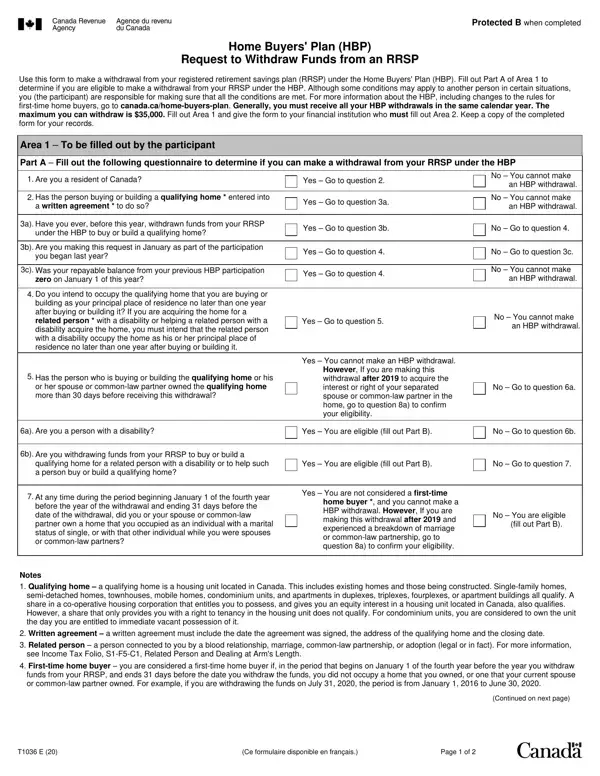
For many Canadians, owning a home is a significant milestone, intertwined with the dreams of establishing roots and creating a personal sanctuary. Recognizing the financial challenges that often accompany the purchase of a home, the Canadian government introduced the Home Buyers' Plan (HBP), a program allowing individuals to withdraw funds from their registered retirement savings plans (RRSPs) to buy or build a qualifying home. The T1036 form serves as a crucial document for those wishing to leverage their RRSP savings for this purpose. Through this form, individuals determine their eligibility to withdraw funds under the HBP, adhering to specific conditions such as residency in Canada and the intent to occupy the purchased or constructed home as a principal residence within one year. The form also outlines the maximum withdrawal amount, currently capped at $35,000, and requires information about the qualifying home. Moreover, the T1036 form addresses situations unique to persons with disabilities and individuals experiencing significant life changes, such as marriage breakdowns, ensuring a broad spectrum of applicants can access their RRSP funds to support their home-buying aspirations. Keeping a copy of the completed form is essential for personal records, highlighting its role not only as a procedural step but also as a record of an important financial decision.

QuestionAnswer
Form NameT1036 Form
Form Length2 pages
Fillable?No
Fillable fields0
Avg. time to fill out30 sec
Other namest1036, t1036 form, t1036e, cra t1036

How to Edit T1036 Form Online for Free

Any time you need to fill out t1036, you don't need to download any kind of applications - simply make use of our PDF tool. The editor is consistently upgraded by our team, receiving handy features and growing to be better. Getting underway is simple! Everything you should do is stick to the following basic steps below:

Step 1: Open the form inside our tool by clicking the "Get Form Button" in the top section of this page.

Step 2: Once you start the tool, you will find the form prepared to be completed. Apart from filling in different blank fields, you might also do several other actions with the PDF, specifically writing your own text, changing the initial text, adding illustrations or photos, signing the PDF, and much more.

As a way to finalize this PDF document, make certain you provide the right details in each area:

1. To begin with, while filling out the t1036, start out with the area containing following fields:

Step # 1 in submitting t1036 formulaire

2. Once your current task is complete, take the next step – fill out all of these fields - However If you are making this, a Are you a person with a, Yes You are eligible fill out, No Go to question b, b Are you withdrawing funds from, qualifying home for a related, Yes You are eligible fill out, No Go to question, At any time during the period, before the year of the withdrawal, Yes You are not considered a, home buyer and you cannot make a, No You are eligible, fill out Part B, and Notes Qualifying home a with their corresponding information. Make sure to double check that everything has been entered correctly before continuing!

before the year of the withdrawal, At any time during the period, and Notes  Qualifying home  a of t1036 formulaire

3. This 3rd part is fairly easy, Part A continued, a Are you making this withdrawal, Yes Go to question b, b Have you been living separate, commonlaw partner because of a, c Do you have a new spouse or, Yes Go to question c, No You cannot make an HBP, No You cannot make, an HBP withdrawal, Yes You cannot make an HBP, No Go to question d, d Do you own and occupy a home as, residence, and Yes Go to question e - these empty fields will have to be filled in here.

Stage no. 3 for filling in t1036 formulaire

4. The subsequent part needs your details in the following areas: If you answered yes to question b, Persons name, Relationship to you, Social insurance number, Part C Certification, Amount of requested withdrawal, I certify that the information, Participants signature, Date withdrawal required cid Year, Account number of the RRSP from, Date, cid Year Month Day, Area To be filled out by the, Issuers name, and Issuers address. Just remember to type in all required information to go further.

Step number 4 of filling out t1036 formulaire

Be very attentive when filling in Date withdrawal required cid Year and If you answered yes to question b, because this is the section where a lot of people make mistakes.

Step 3: Soon after taking one more look at your fields you have filled out, click "Done" and you're good to go! Grab the t1036 as soon as you register online for a 7-day free trial. Easily view the form within your FormsPal cabinet, along with any edits and adjustments being conveniently saved! FormsPal ensures your data confidentiality with a secure method that never saves or shares any type of personal data provided. You can relax knowing your files are kept safe any time you use our editor!