
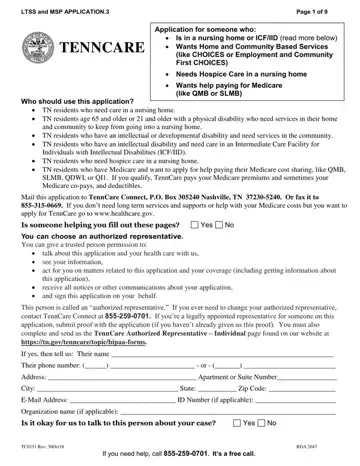
The TennCare Renewal Packet form is an essential document for Tennessee residents navigating their healthcare and supportive service needs, especially for those encountering circumstances that necessitate specialized care or financial assistance with Medicare costs. Designed to cater to a varied group including individuals residing in nursing homes or those with intellectual or developmental disabilities requiring community services, the form comprehensively covers applications for those aged 65 and above, or 21 and older with a physical disability, seeking in-home and community-based services to avoid institutional care. Additionally, it serves residents in need of hospice care within nursing homes and offers a pathway for individuals with Medicare to apply for aids such as QMB, SLMB, QDWI, or QI1, whereby TennCare assists with Medicare premiums, co-pays, and deductibles. Crucially, the packet details the process for assigning an authorized representative to aid in completing the application, underscoring the form’s function not just as a bureaucratic requirement but as a pivotal tool in securing necessary healthcare support services. This inclusivity and support echo the state’s commitment to accessible healthcare, guiding residents through the complexity of eligibility and application processes to ensure that those in need can receive the right care and financial assistance.
| Question | Answer |
|---|---|
| Form Name | Tenncare Renewal Packet 2017 |
| Form Length | 9 pages |
| Fillable? | No |
| Fillable fields | 0 |
| Avg. time to fill out | 2 min 15 sec |
| Other names | tenncare gove forms questionnaire to keep coverage, tenncare form tc0131, questionnaire to keep coverage tenncare, tenncare renewal packet 2021 |
