
Tr52 Form PDF Details

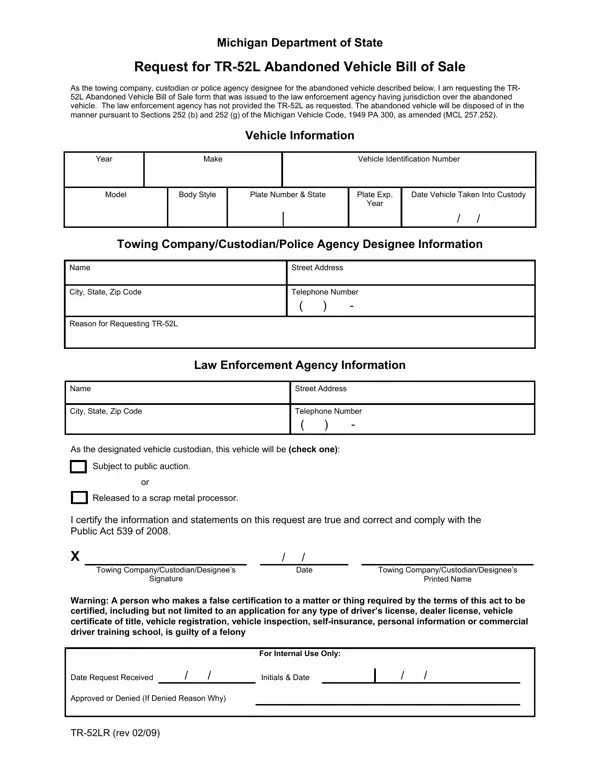
In the state of Michigan, managing abandoned vehicles involves a precise legal process, ensuring that these vehicles are lawfully disposed of or repurposed. The Michigan Department of State provides a specific form, the TR-52L Abandoned Vehicle Bill of Sale, as a crucial document in this process. This form is requested by towing companies, custodians, or police agency designees when an abandoned vehicle has not been claimed, and the law enforcement agency overseeing the area where the vehicle was found hasn’t provided the necessary paperwork for its disposal or sale. It outlines the vehicle details, the custody details, and the reasoning behind the request, adhering to Sections 252 (b) and 252 (g) of the Michigan Vehicle Code. This procedure ensures that the handling of the abandoned vehicle complies with Public Act 539 of 2008, under the threat of felony charges for false certification. Additionally, the policy mandates that a vehicle must be declared abandoned in the Law Enforcement Information Network (LEIN) and that requests for the TR-52L can only be made after 25 days from the required notice period. With this system in place, Michigan aims to efficiently handle abandoned vehicles through either public auctions or scrapping, thus avoiding potential legal issues while clearing up space and maintaining public areas.

QuestionAnswer
Form NameTr52 Form
Form Length2 pages
Fillable?No
Fillable fields0
Avg. time to fill out30 sec
Other namestr52 form, tr52 michigan, michigan abandoned vehicle custodian, 252a

How to Edit Tr52 Form Online for Free

1949 can be filled in online without any problem. Simply use FormsPal PDF tool to complete the job in a timely fashion. FormsPal team is dedicated to providing you with the ideal experience with our tool by constantly introducing new capabilities and improvements. With these improvements, using our tool becomes easier than ever! All it requires is a few basic steps:

Step 1: Access the form inside our tool by hitting the "Get Form Button" in the top part of this page.

Step 2: Using our handy PDF editor, you can accomplish more than merely fill in blank fields. Try all the functions and make your forms seem perfect with customized textual content incorporated, or tweak the file's original input to excellence - all that comes with the capability to insert just about any graphics and sign the PDF off.

Completing this PDF needs attention to detail. Ensure each and every blank is done properly.

1. To start off, once filling out the 1949, begin with the page with the following blank fields:

Filling out section 1 in TR-52L

2. The third stage is to complete the following blank fields: A I certify the information and, Released to a scrap metal processor, Date, Towing CompanyCustodianDesignees, Signature, Towing CompanyCustodianDesignees, Printed Name, Warning A person who makes a false, For Internal Use Only, Date Request Received Approved or, TRLR rev, and Initials Date.

Filling in section 2 in TR-52L

You can certainly make errors while completing your For Internal Use Only, thus be sure to look again before you'll finalize the form.

Step 3: Right after looking through your fields, press "Done" and you're good to go! Try a 7-day free trial subscription at FormsPal and gain direct access to 1949 - available in your FormsPal cabinet. FormsPal guarantees risk-free document completion devoid of personal data record-keeping or distributing. Rest assured that your information is safe here!