
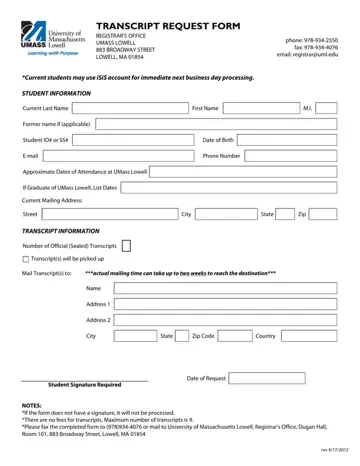
In today's digital age, the process of obtaining academic transcripts has been streamlined, yet it retains certain formal requirements to ensure privacy and authenticity. The University of Massachusetts Lowell embodies this modern approach with their Transcript Request Form, a document that serves as a gateway for students and alumni to access their academic records. Located within the purview of the Registrar's Office, this form caters to both current students, who benefit from the expedited process through their iSiS account for next business day processing, and former students. Essential personal information, such as current and former names, student identification or social security numbers, date of birth, contact details, and approximate dates of attendance, form the cornerstone of this request process. The form accommodates requests for official sealed transcripts with specifics on the number of copies and the mailing addresses, pointing out that the actual delivery could extend up to two weeks. Significantly, it emphasizes the necessity of the student's signature to validate the request, highlighting the institution's commitment to maintaining the integrity of the academic record. Furthermore, the form notes the absence of fees for this service, with a cap on the maximum number of transcripts set at nine per request. Directions for submitting the completed form—either via fax to 978-934-4076 or mail to the Registrar's Office in Dugan Hall on Broadway Street—are clearly outlined, making it a comprehensive resource for those looking to navigate their academic journey post-UMass Lowell. This form, revised as of September 17, 2012, stands as a testament to UMass Lowell's effort to blend traditional educational values with the convenience of modern administration.
| Question | Answer |
|---|---|
| Form Name | Umass Transcript Request Form |
| Form Length | 1 pages |
| Fillable? | No |
| Fillable fields | 0 |
| Avg. time to fill out | 15 sec |
| Other names | transcriptreque st_tcm18 3516 umass lowell transcript request form |
