
Va Form 10 7959F 2 PDF Details

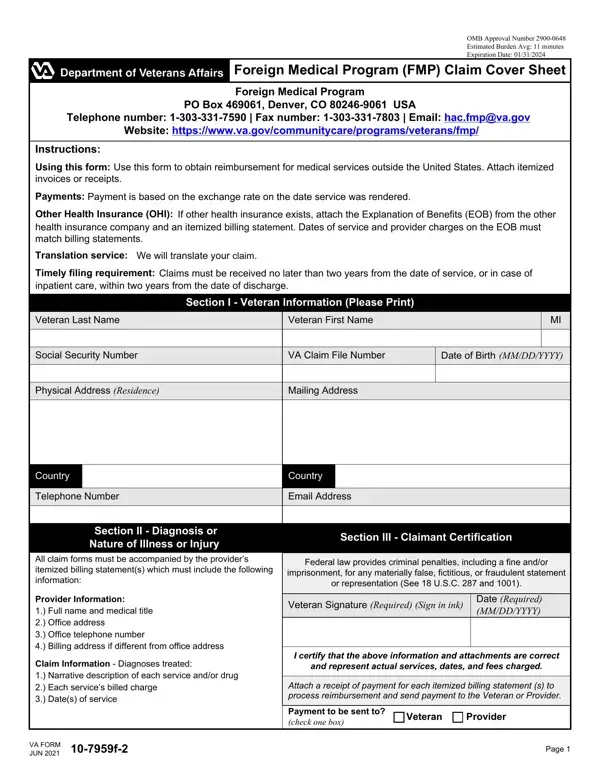
Access to healthcare services for veterans residing or traveling outside the United States is facilitated by the VA Foreign Medical Program (FMP) through a streamlined process embodied in the VA Form 10-7959F-2. The form serves as a crucial conduit for veterans seeking reimbursement for medical services received in foreign countries, ensuring that the financial burden of healthcare does not impede the well-being of individuals who have served their country. Detailed instructions within the form guide veterans through the submission process, which mandates the inclusion of itemized invoices or receipts to substantiate their claim. This process is not only designed to safeguard the financial interests of veterans but also underscores a commitment to transparency and accountability by requiring a certification that the information provided is accurate and true, under the potential penalty of law for any fraudulent claims. The form outlines specific provisions for payment, dictated by exchange rates at the time services were rendered, and addresses contingencies for those with other health insurance (OHI), mandating the attachment of an Explanation of Benefits (EOB). Furthermore, the form accommodates the need for translation services, ensuring no veteran is disadvantaged due to language barriers. The filing deadline, set at two years from the date of service or discharge in the case of inpatient care, emphasizes the importance of timely submission while recognizing the challenges that may accompany the collection of necessary documentation. Undergirded by federal law and regulations, including the authority of Title 38, U.S.C. 1724, and governed by privacy and paperwork reduction acts, the VA Form 10-7959F-2 exemplifies a structured yet flexible approach to administering benefits to veterans abroad, signifying the extended reach of the Department of Veterans Affairs’ commitment to its constituents, regardless of their geographic location.

QuestionAnswer
Form NameVa Form 10 7959F 2
Form Length2 pages
Fillable?No
Fillable fields0
Avg. time to fill out30 sec
Other namesva fmp, form claim, va form fillable 10 7959f 2, claim cover

How to Edit Va Form 10 7959F 2 Online for Free

In case you intend to fill out va form claim cover sheet, you don't need to download and install any kind of programs - simply give a try to our PDF editor. To make our editor better and simpler to work with, we continuously design new features, taking into account suggestions from our users. By taking a couple of easy steps, you can start your PDF editing:

Step 1: Click on the "Get Form" button above. It's going to open up our pdf editor so you can begin completing your form.

Step 2: As soon as you start the editor, you'll see the document all set to be filled in. Aside from filling out different blanks, you may as well perform many other actions with the file, namely putting on custom text, editing the initial textual content, inserting graphics, putting your signature on the PDF, and much more.

When it comes to blank fields of this specific PDF, here is what you should consider:

1. Begin completing your va form claim cover sheet with a group of necessary blank fields. Note all the necessary information and ensure not a single thing forgotten!

Part # 1 in filling in va fmp claim form

2. Just after this part is completed, go to type in the applicable details in all these - Claim Information Diagnoses, Attach a receipt of payment for, Payment to be sent to check one box, Veteran, Provider, VA FORM JUN f, and Page.

Filling in segment 2 in va fmp claim form

When it comes to VA FORM JUN f and Payment to be sent to check one box, make sure that you double-check them here. Both of these could be the most important ones in this form.

Step 3: Once you've looked over the details you given, click "Done" to finalize your form at FormsPal. Grab the va form claim cover sheet once you join for a free trial. Readily access the pdf form from your personal cabinet, with any modifications and adjustments being conveniently synced! We do not share any information you type in while working with forms at our website.