
Va Form 22 1919 PDF Details

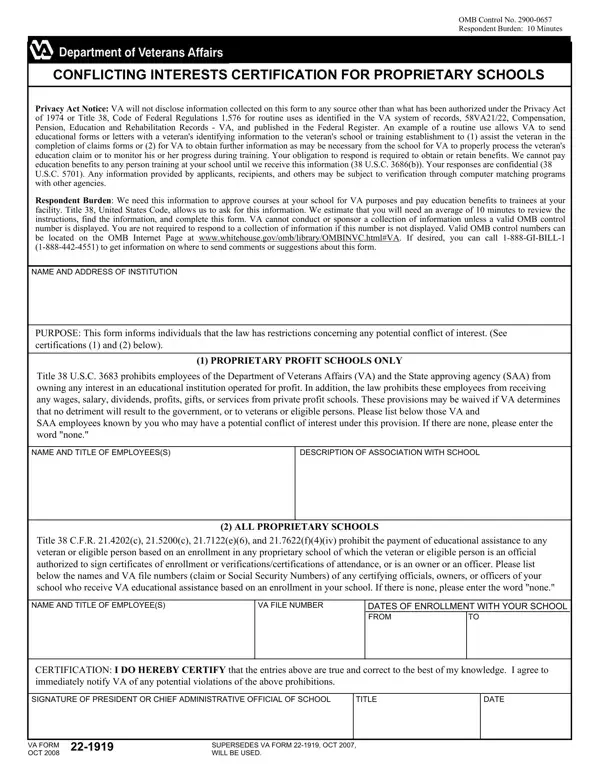
In the realm of educational benefits provided by the Department of Veterans Affairs (VA), the VA 22 form serves as a crucial element for proprietary schools seeking approval for their courses and the disbursement of educational benefits to veterans and eligible persons. This form, officially titled “CONFLICTING INTERESTS CERTIFICATION FOR PROPRIETARY SCHOOLS,” is accompanied by an OMB Control Number, 2900-0657, demonstrating its legitimacy and the requirement for its completion as imposed by federal regulations. With a respondent burden estimated at 10 minutes, the form meticulously guides institutions through the process, ensuring they comply with the privacy considerations under the Privacy Act of 1974 and the relevant sections of Title 38, United States Code. It delves into critical areas concerning potential conflicts of interest, specifically targeting individuals who might have financial interests in, or connections to, the proprietary institution, including VA and State approving agency (SAA) employees. Proprietary profit schools and all proprietary schools are addressed with distinct provisions aimed at preventing any misuse of educational benefits or conflicts of interest that could potentially harm veterans or the integrity of the VA's educational programs. The commitment to transparency and adherence to legal frameworks is encapsulated in the certification section, obligating school officials to affirm the accuracy of the information provided and their commitment to uphold these standards. This form not only operationalizes statutory requirements but also embodies the VA’s dedication to safeguarding the interests of veterans and ensuring the ethical administration of its educational benefits programs.

QuestionAnswer
Form NameVa Form 22 1919
Form Length1 pages
Fillable?No
Fillable fields0
Avg. time to fill out15 sec
Other namesva form 22 1919 nov 2017, form 22 1919, form 22 1919 proprietary schools, va form 22 1919 pdf

How to Edit Va Form 22 1919 Online for Free

Working with PDF documents online is a breeze using our PDF tool. You can fill in va 221919 here painlessly. To maintain our editor on the forefront of practicality, we strive to integrate user-oriented capabilities and enhancements regularly. We are at all times looking for suggestions - help us with revampimg how we work with PDF files. All it requires is a few basic steps:

Step 1: Open the PDF doc in our tool by clicking on the "Get Form Button" at the top of this page.

Step 2: With our online PDF editing tool, it is possible to accomplish more than just complete blank form fields. Try each of the functions and make your documents appear professional with customized text incorporated, or fine-tune the file's original content to perfection - all supported by an ability to add almost any graphics and sign the PDF off.

Completing this document calls for focus on details. Make certain every single blank field is filled in correctly.

1. When submitting the va 221919, make sure to incorporate all necessary blanks in the corresponding form section. It will help to speed up the work, allowing your details to be processed fast and properly.

form 22 1919 proprietary schools conclusion process clarified (portion 1)

2. Once your current task is complete, take the next step – fill out all of these fields - NAME AND TITLE OF EMPLOYEES, VA FILE NUMBER, DATES OF ENROLLMENT WITH YOUR, CERTIFICATION I DO HEREBY CERTIFY, SIGNATURE OF PRESIDENT OR CHIEF, TITLE, DATE, VA FORM OCT, and SUPERSEDES VA FORM OCT WILL BE with their corresponding information. Make sure to double check that everything has been entered correctly before continuing!

Tips on how to fill in form 22 1919 proprietary schools stage 2

It is easy to make errors while filling out the DATE, therefore make sure you take another look prior to deciding to submit it.

Step 3: Right after going through your form fields you have filled out, press "Done" and you are done and dusted! Find the va 221919 the instant you subscribe to a 7-day free trial. Conveniently access the form from your personal cabinet, with any edits and changes being all saved! FormsPal guarantees your data privacy with a protected method that never saves or distributes any kind of sensitive information involved in the process. Rest assured knowing your documents are kept safe whenever you use our service!