
Vec B 31 Form PDF Details

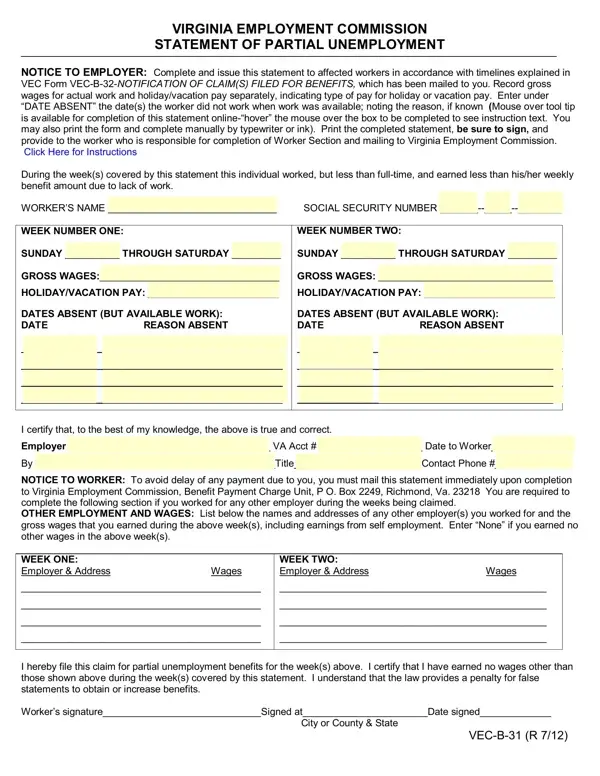
In the landscape of employment benefits and employer responsibilities, forms like the Vec B 31 play a pivotal role, ensuring clear communication and adherence to regulations regarding partial unemployment claims. It serves as a vital document for workers who have found themselves employed under less than full-time conditions due to a decrease in work, enabling them to report earnings and claim potential benefits accurately. The complexity of the form lies not just in its purpose but also in the meticulous details it requires - segregating gross wages from holiday/vacation pay, documenting dates of absence even when work was available, and noting the reasons thereof. Employers are tasked with issuing this statement following specific timelines detailed in a complementary form, the VEC Form VEC-B-32-NOTIFICATION OF CLAIM(S) FILED FOR BENEFITS, ensuring both the employer and the employee fulfill their respective parts in reporting and claiming partial unemployment benefits. This crucial document further underscores the importance of transparency between employees and employers and the meticulous record-keeping necessary for compliance with the Virginia Employment Commission's guidelines, acting as a safeguard for both parties and helping maintain a fair working relationship even in times of reduced employment.

QuestionAnswer
Form NameVec B 31 Form
Form Length1 pages
Fillable?No
Fillable fields0
Avg. time to fill out15 sec
Other namesvirginia employment commission form vec b 31, virginia partial unemployment form, vec b31, from vec b 31

How to Edit Vec B 31 Form Online for Free

By using the online PDF tool by FormsPal, you can fill out or modify from vec b 31 here and now. In order to make our tool better and less complicated to work with, we consistently develop new features, taking into consideration suggestions coming from our users. It merely requires a few simple steps:

Step 1: Open the PDF doc inside our editor by hitting the "Get Form Button" above on this page.

Step 2: With this state-of-the-art PDF editing tool, it is easy to do more than just fill in blank form fields. Express yourself and make your forms appear professional with customized textual content added in, or fine-tune the original input to perfection - all that comes with an ability to incorporate any pictures and sign the file off.

When it comes to blank fields of this specific form, here is what you should do:

1. When filling in the from vec b 31, ensure to complete all essential fields within its corresponding area. It will help to hasten the work, allowing your information to be handled swiftly and correctly.

How you can complete vec b 31 form step 1

2. Once your current task is complete, take the next step – fill out all of these fields - I certify that to the best of my, WEEK TWO Employer Address Wages, City or County State, and VECB R with their corresponding information. Make sure to double check that everything has been entered correctly before continuing!

I certify that to the best of my, City or County  State, and WEEK TWO Employer  Address Wages in vec b 31 form

Many people frequently get some points incorrect when filling in I certify that to the best of my in this section. Ensure you re-examine what you enter right here.

Step 3: Always make sure that your details are accurate and then click "Done" to progress further. Go for a 7-day free trial option at FormsPal and get direct access to from vec b 31 - accessible inside your FormsPal account page. We don't share or sell the information that you provide while filling out forms at our site.