
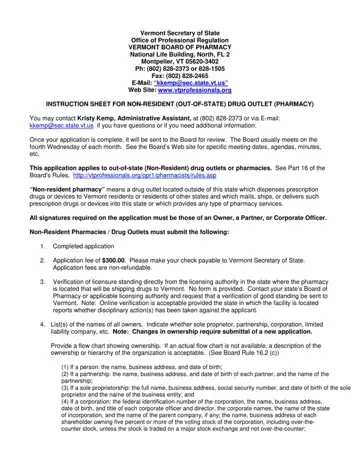
The Vermont Non Resident Pharmacy form, as administrated by the Vermont Secretary of State's Office of Professional Regulation, represents a crucial process for out-of-state (non-resident) drug outlets or pharmacies aiming to extend their services to Vermont residents. These entities, positioned beyond Vermont's borders, require adherence to specific regulatory demands to dispense prescription drugs or devices within the state. The meticulous instructions highlight the necessity for a completed application, a non-refundable application fee, verification of licensure in good standing from the pharmacy's home state, and detailed ownership information. Additionally, the form mandates affirmations of legal compliance and the absence of convictions or indictments related to drug or pharmacy laws by the applicant's managerial staff. It also calls for a recent inspection report and for internet non-resident pharmacies, a Verified Internet Pharmacy Practice Sites (VIPPS) certification or its equivalent may be required to ensure compliance with standards. This careful scrutiny underscores Vermont's commitment to safeguarding its residents through rigorous oversight of non-resident pharmacies, reflective of broader health and safety priorities. Disciplinary action disclosures and mandatory statutory compliances for child support, tax, and unemployment compensation further exemplify the comprehensive nature of the application process, aimed at promoting responsible and lawful pharmacy practice across state lines.
| Question | Answer |
|---|---|
| Form Name | Vermont Non Resident Pharmacy Form |
| Form Length | 8 pages |
| Fillable? | No |
| Fillable fields | 0 |
| Avg. time to fill out | 2 min |
| Other names | vermont pharmacy technician online application, vermont board of pharmacy forms, vtprofessionals org, vermont board of pharmacy |
