Please rate Npma33 Form

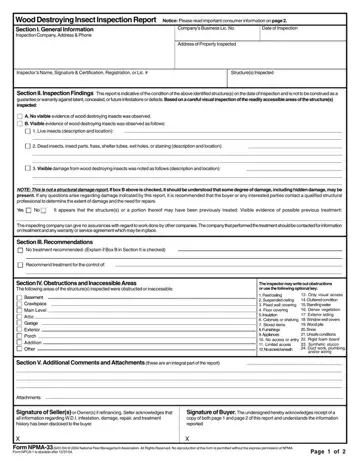
The NPMA-33 form is a critical document in the real estate transaction process, serving as a Wood Destroying Insect Inspection Report. This form provides invaluable insights into the condition of a property with respect to potential or existing damage caused by wood-destroying insects such as termites, carpenter ants, carpenter bees, and reinfesting woodboring beetles. Compiled following a rigorous visual inspection of readily accessible areas of a property, this report documents the presence or absence of visible evidence of wood-destroying insects, including live or dead insects, their by-products, and any observable damage they've caused. Importantly, the NPMA-33 form clarifies that it does not serve as a guarantee against latent issues nor a comprehensive assessment of structural integrity. It draws attention to whether the structure might have undergone previous treatments for infestations, emphasizing the inspection's limitations due to inaccessible areas or obstructions and underscores the absence of a warranty unless explicitly attached or required by state law. Furthermore, it provides guidelines for treatment recommendations, especially in compliance with FHA and VA loans, and highlights the importance of homeowner vigilance in mitigating conditions conducive to pest infestation. This document, therefore, plays a pivotal role not only in informing the current state of the property but also in guiding both preventative measures and any necessary remedial actions post-inspection.
| Question | Answer |
|---|---|
| Form Name | Npma33 Form |
| Form Length | 2 pages |
| Fillable? | No |
| Fillable fields | 0 |
| Avg. time to fill out | 30 sec |
| Other names | npma 33 form 2019, blank termite form npma 33, form npma 33, npma 33 form 2020 pdf |
Npma33 Form isn’t the one you’re looking for?
Please rate Npma33 Form
