
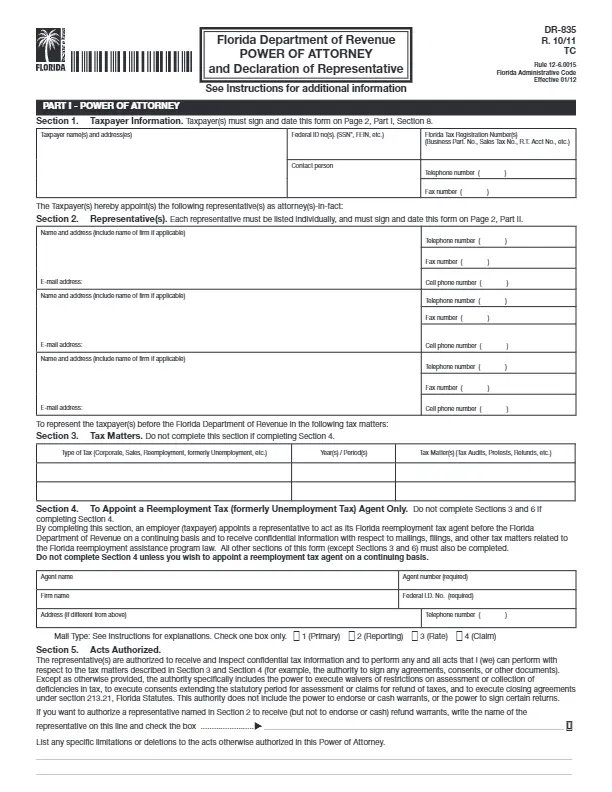
A Florida tax power of attorney form is a document that lets you appoint another person, such as an accountant, to manage your tax matters with the state. The state calls it Form DR-835, and you can build it with our tools, fill in the fields on screen, and save it as a PDF.
Last Updated: October 2026. This guide is reviewed and updated regularly to reflect current law. If you notice an error or outdated information, please contact us.
If an individual in Florida wants to delegate dealing with taxes to someone else, they should create and sign a Florida tax power of attorney (or POA) form. It will appoint another person to be responsible for the taxes. The tax POA in Florida is also referred to as the DR-835 form.
A person who creates such a fillable power of attorney form in the US is referred to as “principal.” By this form, a specially hired agent or accountant may access the principal’s data and conduct various actions. Usually, a tax POA form includes specific information, including:
A tax POA in Florida allows a person to choose more than one representative to deal with taxes. Sometimes POA forms should be notarized. However, in this state, the principal’s and the attorney’s signatures are sufficient. In Florida, the laws that describe powers of attorney, in general, are prescribed in Chapter 709 of the Florida Statutes.
Browse all the Florida POA documents you can fill out in our Florida guide.
Here are the key facts at a glance, since the state calls this power of attorney Florida Form DR-835 and it has 75 fillable fields, takes about 15 minutes to fill out, and comes as an Adobe PDF.
| Document Name | Florida Tax Power of Attorney Form |
| State Form Name | Florida Form DR-835 |
| Relevant Link | Florida Department of Revenue |
| Where to File? | If for a reemployment tax matter and the taxpayer has completed Section 4: To the Florida Department of Revenue, P.O. Box 6510, Tallahassee FL 32314-6510 |
| Avg. Time to Fill Out | 15 minutes |
| # of Fillable Fields | 75 |
| Available Formats | Adobe PDF |
Collect these details before you start. With everything at hand, the Florida power of attorney paperwork goes quickly, and you do not need to stop to look up a number or an address.
Check that every entry you make matches your IDs before you start filling in the fields, because small mismatches are easy to miss later.
Fill it in one part at a time and double-check each entry as you go, since a template in this state is brief and straightforward. The steps below go in order, and each screenshot shows the matching part of the Florida paperwork.
Start by finding the document and saving it to your computer. Our software builds it for you, so you can fill it in on screen.
The first section of the tax POA in Florida reveals information about the principal signing the form. Here, you have to include the name and exact address on the left-hand side and the federal ID number on the other side. This can be, for example, the Social Security Number (SSN) or the Federal Employer Identification Number (FEIN).
In the relevant blank field, add an individual who may act as your “contact person.” This section should also reveal the Florida Tax Registration Number (or numbers) of the principal and the valid telephone number. If you, as the principal, have fax, write its number as well.

As said above, the tax POA in Florida allows more than one attorney (or a representative) in the document. For all of them, you should insert the names and addresses along with the contact details: email address, fax, and phone number(s).

Below the attorney’s details, you will see the section for the tax matters you want to delegate, or Section 3. The principal should specify the type of tax, the period, and the exact issues.
Please note that completing Section 4 below this one leads to the non-completion of Section 3. Section 4 is required if you are hiring an agent to deal with your taxes continuously.
In Section 4, you should add the agent’s name, name of the entity where they work, federal ID number, and address. Also, write the agent number and a telephone number. Choose the degree of communication between you and the agent.

In Section 5 of the form, you may limit the powers of your attorney, if needed. Write this information in the relevant blank lines.

Section 6 lets you choose people that will receive notifications regarding the tax matters. If you have already filled out Section 4, skip Section 6.

When you create a new tax POA form in Florida, the documents you signed before will not be canceled automatically. If you, as the principal, wish to annul them, fill out this section.

The principal’s signature and the date of signing make a tax POA form valid in Florida. Apart from signing and inserting the date, the principal must include their name and title (if applicable).

With this document, you have chosen a representative (or representatives). Once you have signed the form, they should append their signatures, too. Before signing, they should read a short text, accept it, and choose one option. Besides the signature and the signing date, a representative must insert their Jurisdiction (State) and Enrollment Card Number (if there is any).

Keep your tax ID numbers and the representative’s contact details open in another window while you work through the steps, which saves you from stopping halfway.
Once every part is complete, read everything through one more time, because a few simple habits keep your paperwork organized and easy to find later, whether you save it on your computer or keep a paper copy.
Compare each entry with your records before you print it, and then look at the signature lines one last time.
After the paperwork is complete, you and your representative work together on your tax matters, and these habits help you manage that partnership and keep your records in good order for the long run.
Form DR-835 is the state name for the Florida tax power of attorney. It is the paperwork you fill in to appoint someone to manage your tax matters, and you can build it with our tools and save it as a PDF.
The Florida paperwork has 75 fillable fields and takes about 15 minutes to fill out, so have your numbers and the representative’s contact details ready so you can finish in one sitting.
Yes, you can build it with our tools and save it as a PDF, and then fill in the PDF with the FormsPal PDF editor, or print it and write by hand.
Make a copy for your records, give each representative a copy, and then check the Where to File row in the details table above.
General information, not legal or tax advice.
