
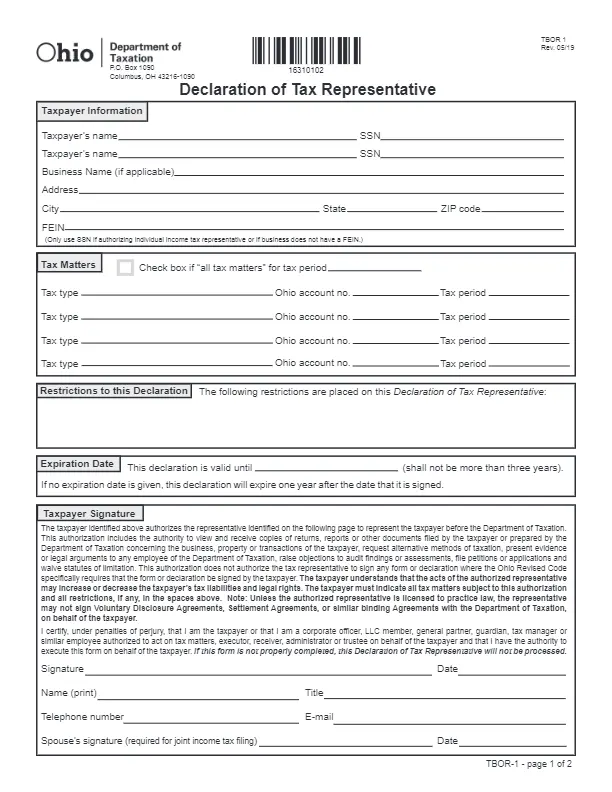
An Ohio tax power of attorney form is a document that lets you name another person to handle your state tax matters for you. You can build the template with FormsPal, fill in the fields on screen, and download it as a PDF.
Last Updated: October 2026. This guide is reviewed and updated regularly to reflect current law. If you notice an error or outdated information, please contact us.
If a taxpayer decides to transfer their authority on tax-related matters to another person, the two parties should sign a Tax Power of Attorney form. The Ohio Department of Taxation administrates the state tax system and is responsible for issuing all kinds of tax-related forms and declarations. All tax-related legal forms apply either to business structures or individuals.
In plain terms, a power of attorney lets a person you trust speak for you on tax matters, so you do not have to handle every step yourself.
You can refer to the Department’s official website for a complete list of every existing tax type and its requirements.
Browse all the Ohio power of attorney forms you can create in our Ohio guide.
Suppose a taxpayer cannot comply with their tax obligations before the Department of Taxation in person or suddenly becomes incapacitated. In that case, they should use the Department of Taxation Declaration of Tax Representative (Form TBOR-1).
Using this form, one can appoint an agent to represent them and act on their behalf in all cases regarding taxation. The principal defines the scope of powers that he or she would like to grant to an agent.
Thus, by using the Ohio Tax Power of Attorney form, the principal authorizes an appointed agent to represent him or her before the state Department of Taxation. All tax declarations and related documents contain confidential information that cannot be released without the taxpayer’s official consent.
Decide which state tax matters you want your agent to handle, and find the Ohio account number for each one before you start.
Upon verification, the power of attorney form will give the agent access to the taxpayer’s data on business deals, private property, or other financial transactions. The document enables the agent will be able to do the following on the principal’s behalf:
However, there are certain exceptions to the agent’s authority. According to the Ohio Revised Code, a tax representative can only sign forms specifically requiring the taxpayer’s authorization.
Please note that the appointee may not be able to sign Voluntary Disclosure Agreements, Settlement Agreements, or any other binding documents with the Department of Taxation on behalf of the taxpayer unless the legal representative has a license to practice law.
Keep these details close while you fill in the template. Before you send anything, compare the state form name and the filing address with the information on the Ohio Department of Taxation website.
| Document Name | Ohio Tax Power of Attorney Form |
| State Form Name | Ohio Form TBOR-1 |
| Relevant Link | Ohio Department of Taxation |
| Where to File? | Per email/fax or mail to: Ohio Department of Taxation P.O. Box 1090, Columbus, OH 43216-1090 |
| Avg. Time to Fill Out | 17 minutes |
| # of Fillable Fields | 102 |
| Available Formats | Adobe PDF |
Gather these details first. With everything on your desk, the power of attorney form goes quickly, and you avoid stopping halfway to look up a number, a name, or an address.
Check that every name you type matches the name on the matching ID or financial account record before you move on.
Start with the latest version of the form. You can find it online or use FormsPal to build and download a template. The document has several parts, so work through the steps below in order.


Look over the finished form one more time before you send it. A few simple habits keep your paperwork in order and make it easy to find again later when you need it.
Compare each entry with your records before you print and sign the form.
These short answers cover the questions people ask most often about the Ohio tax power of attorney form. Each answer is brief, and the checklist and the steps above give more detail on any part of the process.
Yes. Build the template with FormsPal and download it as a PDF. Then fill in the PDF with the FormsPal PDF editor, or print it and write by hand.
Have the taxpayer’s name and legal address, the FEIN or Social Security Number, and the agent’s contact details ready. The checklist above gathers everything in one place.
Make a copy for your records and give a copy to your agent. Then send the form as shown in the last step of the guide.
General information, not legal or tax advice.
