
Updated:
A photography copyright release form is written permission to use specific photos. The photographer signs it and names the person or business receiving permission. Clients, businesses and bloggers use the form, especially before printing or posting the photos.
On this page you can create the release online or download the PDF template, follow a guide to each field, and see what to do before and after the photographer signs.

Build Your Document
Answer a few simple questions to make your document in minutes
Save and Print
Save progress and finish on any device, download and print anytime
Sign and Use
Your valid, lawyer-approved document is ready
A photography copyright release form is an agreement in which a photographer gives another person permission to copy, share and use specific photos. It covers only the photos it lists and only the uses both sides agree on.
The form names both sides. The releasor is the owner of the copyright in the photos who grants the permission, usually the photographer. The owner is not always the photographer: for a work made for hire the employer is considered the author, and owning a print or another copy of a photo is distinct from owning its copyright (17 U.S.C. § 201(b); 17 U.S.C. § 202). The releasee is the person or business that receives it.
People search for the same document under several names: photo copyright release form, copyright release for photos, image copyright release form and picture copyright release form. Each of them means a permission from the photographer to a named user.
A release is different from a full copyright transfer. In a nonexclusive release, the copyright owner keeps ownership of the photos and gives the releasee permission to use them, not the photos themselves.
This page explains the release itself. For copyright registration and fair use, the U.S. Copyright Office publishes its own guidance.
A photo copyright release, a copyright transfer and a model release are different documents: the photographer signs a release or a transfer, and the person shown in the photo signs a model release.
| Document | Who signs it | What the other side receives |
|---|---|---|
| Photo copyright release | The copyright owner, usually the photographer | Permission to use the listed photos in the agreed ways; the photographer keeps ownership |
| Copyright transfer | The copyright owner | Ownership of the copyright in the photos; valid only in a writing signed by the owner of the rights conveyed, unless it happens by operation of law (17 U.S.C. § 204(a)) |
| Exclusive license | The copyright owner | The sole right to the licensed uses; it counts as a transfer of copyright ownership (17 U.S.C. § 101) |
| Model release | The person shown in the photo | Permission to use that person's image or likeness |
Under 17 U.S.C. § 101, a transfer of copyright ownership includes an exclusive license but not a nonexclusive license. A release that leaves the owner free to let others use the same photos is nonexclusive; a release that grants exclusive rights is a transfer, and 17 U.S.C. § 204(a) makes a transfer other than by operation of law valid only in a writing signed by the owner of the rights conveyed. Check which kind your release grants before signing.
A portrait can involve both sides: the photographer gives permission to use the picture, and the person in it gives permission to use their image. For releases from the people in a picture and other kinds of photo permission, see the photo release form page.
Use a copyright release for photos when someone other than the photographer wants to print, publish or share specific photos and the photographer agrees to it in writing.
A photo release comes up in everyday situations:
Each case has its own purposes, so name the photos and how they will be used in plain words.
You need no copyright release for photos you took and still own the copyright to. That is not the case for a photo you took as an employee within the scope of your job, which is a work made for hire owned by the employer (17 U.S.C. § 101; 17 U.S.C. § 201(b)), or for a photo whose copyright you have transferred to someone else. A recognizable person in your photo may also need to sign a model release.
If a photo already carries a Creative Commons license, read its terms first: Creative Commons licenses let a creator allow some uses in advance, often with credit to the author.
A photo copyright release form names the photographer and the releasee, lists the photos, describes the permitted uses, and ends with the photographer's contact details and signature.
The FormsPal template covers the date, both names, the photographer's contact details and the signature, and it refers to the attached photographic images. Put the photo list, the permitted uses and any limits on that attachment.
| Document Name | Photography Copyright Release Form |
| Other Names | Copyright Release, Copyright Release for Photographers, Image Copyright Release Form, Picture Copyright Release Form |
| Avg. Time to Fill Out | 5 minutes |
| # of Fillable Fields | 9 |
| Available Formats | Adobe PDF |
These five steps follow the FormsPal Photography Copyright Release template, a one-page form with nine fillable fields. Fill in the date and names first, then the photographer's contact details, and finish with the signature line. If you want a different kind of release, FormsPal also has a general release of liability form.
The screenshots under each step show the FormsPal Photography Copyright Release template filled with sample entries in blue, so you can see where each answer goes. The names, addresses, dates and amounts are examples only.
Date, Photographer and Releasee
Enter the date on the Date line at the top. In the first paragraph, write the Photographer's name in the first blank and the Releasee's name in the second.
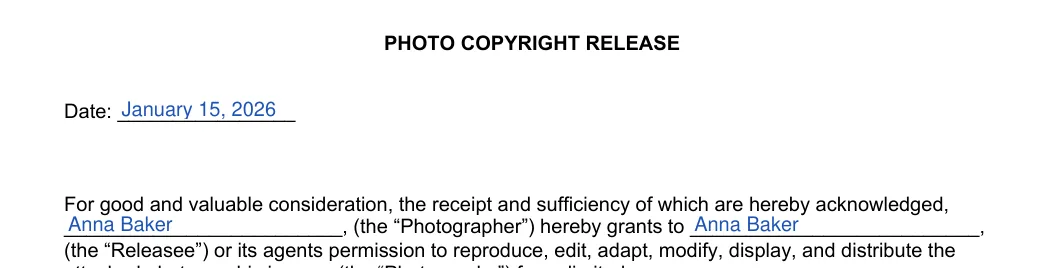
Photographer: Name
In the Photographer block at the bottom, write the same name on the Name line. Spell it the same way as in the first paragraph.

Photographer: Address
Write the street address on the first Address line and the city, state and ZIP on the second.

Photographer: Phone
Write a phone number on the Phone line. Choose a number where the Releasee can reach you.

Fax / E-mail and Signature
Write a fax number or an e-mail address on the Fax / E-mail line. Then sign on the Signature line, the last line on the page.


Sign the photography copyright release only after both sides agree on the photos, the uses and any payment, then give each side a copy and use the photos as agreed.
Check Whether the Photo Is Free to Use
Look for a Creative Commons license or other terms of use next to the photo. If those terms already allow your use, follow them, including any credit they ask for.
Contact the Photographer
Ask the photographer for permission and describe where and how you plan to use the photos. Some photographers allow free use; others set a price or conditions.
Agree on Payment
The photographer may ask for payment up front, as royalties later, or on other terms you agree on. Write the agreed payment on the attached list so both sides read the same terms.
Get the Signature
The copyright owner signs the completed release on the Signature line. That is usually the photographer, but it is the employer for a work made for hire (17 U.S.C. § 201(b)), or whoever the copyright was transferred to. Make a copy for each side before you use the photos.

Use the Photos as Agreed
Use the photos only in the ways the release and the attached list describe. For a new use, ask the photographer for a new release.
The FormsPal template takes about 5 minutes. It has nine fillable fields, from the date and both names to the contact details and signature.
Yes, the PDF has fillable fields. Open it in the FormsPal PDF editor to type in each entry, then print it for signing.
The template refers to the attached photographic images, so attach a list or a contact sheet of the photos. File names and a short description of each photo make the list easy to follow.
The template's wording names a photographer and photographic images. For a drawing, a painting or a digital design, check that this wording fits the work before you use it.
The template has no end date line. If the permission should end on a certain date, write that date on the attached list next to the permitted uses.
The Signature line is the last line of the Photographer block at the bottom of the form. The Date line is at the top.
Keep a signed copy with your photo records and give the other person a copy as well. A scan stored next to the original photos makes it easy to find later.
General information, not legal or tax advice.
